EasyManua.ls Logo

meilan FINDER - User Manual

meilan FINDER
16 pages
Print Icon
To Next Page IconTo Next Page
Loading...
FINDER
GPS Navigation Bike Computer
Quick User Guide
APP Download
Question and Answer IconNeed help?

Do you have a question about the meilan FINDER and is the answer not in the manual?

Summary

How to Install Your Bike Computer

GPS Signal Status

Connecting to the MEILAN App

Navigating with Komoot

Getting Started and Initial Setup

Language Setting

Setting the initial language preference for the device interface.

Button Functions Overview

Understanding Device Icons and Abbreviations

Main Menu Navigation

Wireless Connection Protocols

Uploading Your Riding Data

Charging the Device

Product Specifications

Safety Statements and Warranty Information

Accessing Support Resources

Overview

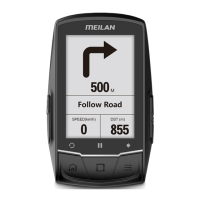
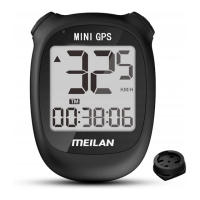
The MEILAN FINDER is a GPS Navigation Bike Computer designed to assist cyclists with navigation, track riding data, and connect with various sensors.

Function Description

The FINDER serves as a comprehensive bike computer, offering GPS-based navigation, real-time display of riding data, and connectivity with external sensors. Its primary functions include:

  • GPS Navigation: Connects with the KOMOOT APP for turn-by-turn navigation, displaying directions and distance to the next turn.
  • Riding Data Tracking: Records and displays essential cycling metrics such as speed, distance, time, altitude, ascent, grade, VAM, and heading.
  • Sensor Connectivity: Supports Bluetooth BLE4.0 and ANT+ dual-mode wireless protocols, allowing connection to speed sensors, cadence sensors, heart rate belts, and power meters.
  • Data Upload: Riding data can be uploaded to the MEILAN APP via Bluetooth or transferred to a computer via USB for web upload.
  • Settings and Customization: Users can customize language, time zone, metric/imperial system, rider weight, and initial total mileage. The display content can also be adjusted to show different data pages.

Important Technical Specifications

  • Battery Type: Rechargeable lithium battery.
  • Working Hours: Approximately 25 hours on a full charge.
  • Wireless Transmission Mode: Bluetooth BLE4.0 / ANT+.
  • Operation Frequency: 2.4 GHz.
  • Ambient Temperature: -10°C to +40°C.
  • Waterproof Grade: IPX5, suitable for light to moderate rain.
  • Internal Storage: The device has internal storage for riding data, with approximately 3.42 MB available out of a total of 3.44 MB for user data.
  • Model: M1.
  • Input: DC 5V, 0.5A.
  • Capacity: 1200mAh.
  • Compliance: CE, FC, REACH RoHS.
  • Rim Size Reference: A comprehensive table is provided for various wheel sizes and their corresponding circumference values (L(mm)), ranging from 12x1.75 (935mm) to 29x2.3 (2326mm). This is crucial for accurate speed sensor calibration.

Usage Features

  • Installation: The device can be easily installed on a bicycle handlebar using the provided bike mount or F-mount, screw, and rubber band.
  • APP Connection: The MEILAN APP (available on Google Play, Apple Store, Yingyongbao, or www.meilancycling.com) facilitates initial setup, sensor management, and detailed sports data viewing. Bluetooth and location services must be enabled on the phone for connection.
  • Navigation Setup: For navigation, the KOMOOT APP needs to be downloaded and an account registered. A unique S/N number from the FINDER package is required to activate Komoot's navigation service. The FINDER connects to Komoot via Bluetooth.
  • GPS Working Status: The GPS icon flashes when searching for a signal and disappears when a strong signal is acquired. High buildings or radio transmitting equipment can affect GPS positioning.
  • Initial Setup: Upon first use, users need to set the language, time zone, metric/imperial system, rider weight, and ODO (total mileage).
  • Sensor Pairing: Sensors (speed, cadence, heart rate, power) are paired through the device's menu. Sensors typically enter power-saving mode and need to be activated by a short ride or pedaling. If a speed sensor is connected, the rim circumference value must be input for accuracy.
  • Recording and Saving Data: A short press of the record button starts recording, and another short press pauses it. A long press saves the current ride data. The device automatically judges pauses and resumes.
  • Display Customization: The riding data can be displayed across up to four pages, and users can zoom in/out or select the next page.
  • Backlight Adjustment: Backlight brightness can be adjusted in the status page.
  • Button Functions:
    • Power Switch Key: Short press to enter working status.
    • Increase/Up Button: Short press to increase value or move up.
    • Decrease/Down Button: Short press to decrease value or move down.
    • Segment/Exit/Main Menu Button: Short press for LAP (segment) in riding state (only when recording), exit main menu. Long press to enter main operation menu in riding state.
    • Record/OK/Pause Button: Short press to start/pause recording, or confirm selections in menus. Long press to end recording and save/discard data.
    • Next/On-screen Instructions Button: Short press to select next item or follow on-screen instructions.

Maintenance Features

  • Battery Charging: The device is charged via a Mirco USB DC 5V/0.5A cable.
  • Battery Care: It is recommended to charge the device at least once every six months if not used continuously to prevent battery degradation.
  • Data Management: Users can delete recorded data files from the device when connected to a computer. However, caution is advised as deleted built-in files and data cannot be recovered and may cause product failure.
  • Water Resistance: The IPX5 rating means it's suitable for light to moderate rain, but should not be used in heavy rain or immersed in water.
  • Warranty: The product comes with a one-year warranty for non-human damage from the date of sale. Accessories are not covered. For repairs, users should contact MEILAN global distributors or MEILAN directly, ensuring internal storage information is kept as data may be lost during repair.
  • Safety: Riders are cautioned against paying too much attention to the screen while riding at high speeds, as this can increase the risk of injury. The data provided is for reference only.
  • Firmware Updates: The MEILAN APP is constantly updated, and users may need to adapt to different operating interfaces. Firmware information (e.g., V1.0.1) is available in the device settings.

meilan FINDER Specifications

General IconGeneral
Brandmeilan
ModelFINDER
CategoryBicycle Accessories
LanguageEnglish

Related product manuals