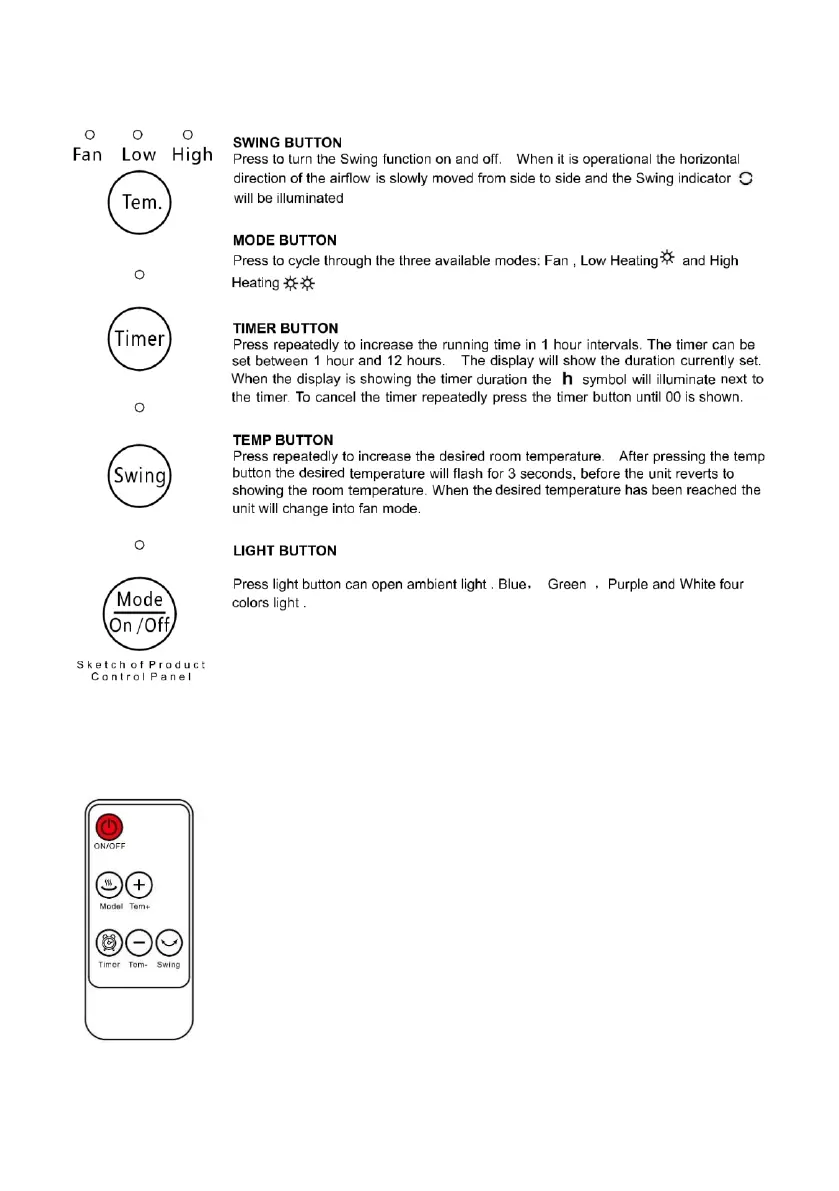
CONTROL PANEL AND SETTINGS
REMOTE CONTROL
ON / OFF BUTTON
Press the ON / OFF button to switch the appliance on and off
MODE BUTTON
Press the MODE key to scroll through the three available modes: fan, low
temperature heating and high temperature heating
TEMP + and TEMP - KEY
Press repeatedly to increase (+) or decrease (-) the desired room
temperature. After pressing the TEMP button, the desired temperature will
flash for 3 seconds, before the appliance shows the room temperature again.
When the desired temperature has been reached, the appliance will switch to
fan mode.
TIMER BUTTON
Press repeatedly to increase the operating time in 1 hour intervals. The timer can be set between 1
hour and 12 hours. The display will show the set time. When the display shows the duration of the


 To Next Page