51
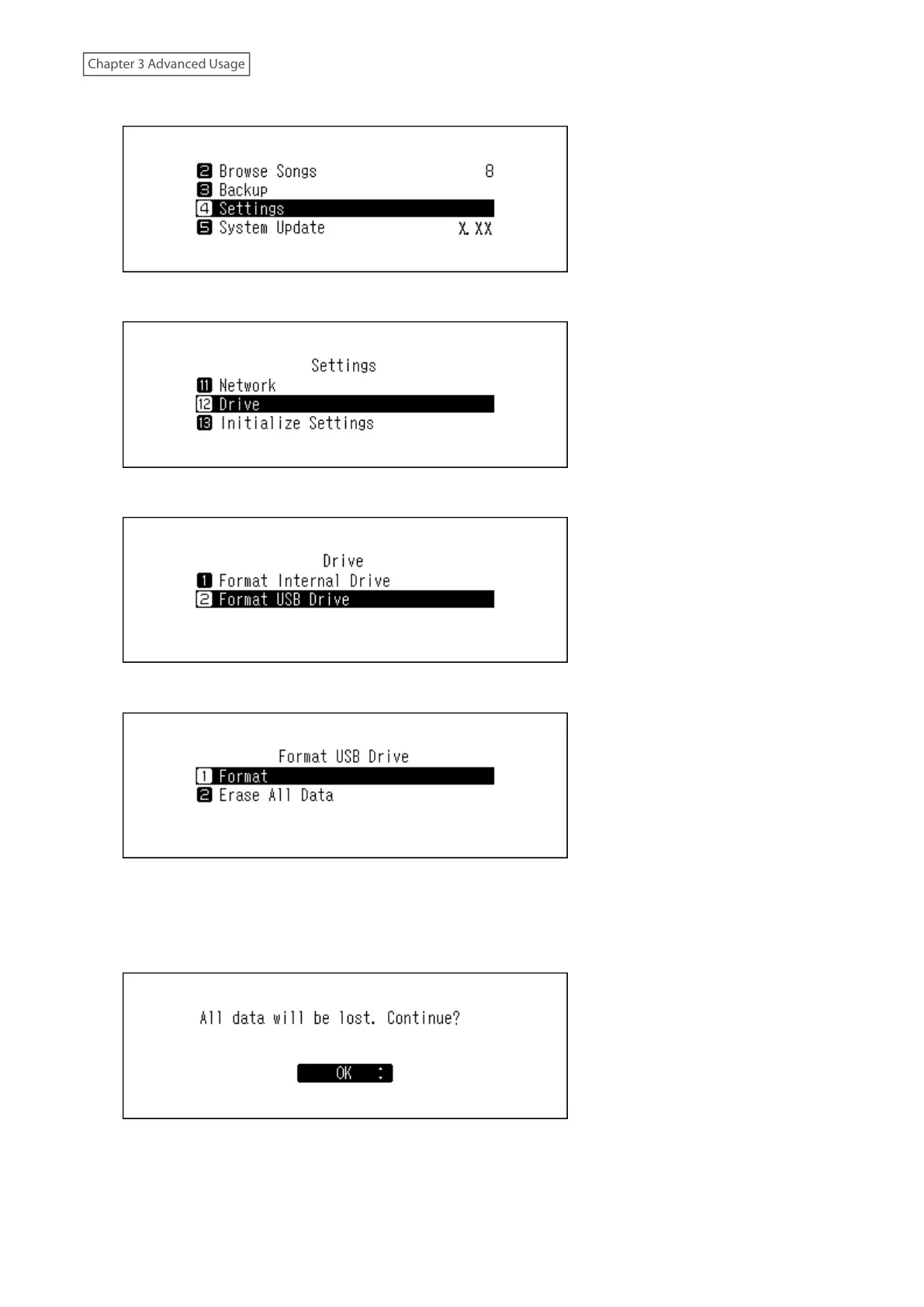
2 Press the Up/Down buttons and select “Settings”, then press the Menu/Enter button.
3 Press the Up/Down buttons and select “Drive”, then press the Menu/Enter button.
4 Press the Up/Down buttons and select “Format USB Drive”, then press the Menu/Enter button.
5 Press the Up/Down buttons and select “Format”, then press the Menu/Enter button.
Note: If multiple USB drives are connected to the Digital Music Library and an error message is displayed when
formatting a drive, disconnect the drives other than the drive you want to format, and try again.
6 Make sure that all files on the drive can be erased before proceeding. To continue formatting, press the Up/
Down buttons and select “OK”, then press the Menu/Enter button.
Note: The screenshot above shows the N1 EX. On the N10/N100, “All USB drive data will be lost. Continue?” will
be displayed.



 To Next Page