EN
If the model of your appliance does
not have the accessories described
above, they can also be bought
separately from the Technical
Assistance Service.
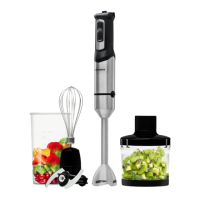
Description
A – Speed control regulator
B – Buttons
B1 –ON/OFF
B2 –Turbo
C – Motor Body
D – Release buttons
E – Stick-blender accessory
F – Measuring cup
G – Whisk
G1 – Adapter whisk
H –Chopper cup
H1 – Chopper lid
H2 – Blades chopper set
Make sure that all products’
packaging has been removed.
Before using the product for the
rst time, clean the parts that will
come into contact with food in the
manner described in the cleaning
section.
Prepare the appliance according
to the function you wish to use.
–
–
–
Instructions for use
Before use
Unroll the cable completely before
plugging it in.
Connect the appliance
to the mains.
The pilot light comes on.
Turn the appliance on, by using the
on/o button.
Select the desired speed.
Work with the food you want
to process.
–
–
–
–
–
–
Use
The speed of the appliance can
be regulated by using the speed
regulator control (A). This function
is very useful, as it makes it
possible to adapt the speed of the
appliance to the type of work that
needs to be done.
–
Electronic speed control
The appliance has a Turbo
function. By activating the Turbo
function (B2) all the power of the
motor becomes available, thus
obtaining a ner nish in the nal
texture of the product.
–
Turbo function


 To Next Page
 Loading...