EN
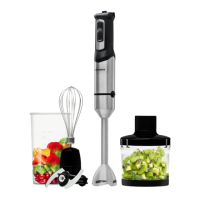
Chopping accessory (H)
Whisk accessory (G)
Stop the appliance by releasing
the pressure on the on/o button.
Unplug the appliance from the
mains.
Clean the appliance.
not properly tted and connected
together).
Stop the appliance when the food
reaches the desired texture.
Detach the unit from the lid by
pressing the release buttons.
Open the lid and remove the
blades set.
Note 1: Do not exceed half of the
chopper cup when working with
solid foods.
Note 2: In the case of working with
liquid foods, do not exceed 300 ml.
This accessory is used to whip
cream, beat egg whites…
Insert the whisk into the adapter.
Join this unit to the motor unit by
pressing until you hear click (Fig.4).
Put the food into a large
receptacle and switch the
appliance on. For best results, turn
the whisk clockwise.
Press the release buttons to free
the adapter and remove the whisk
accessory from the adapter. (Fig.5).
Note 1: Do not work at high speeds
even with the turbo function with
this accessory attached, as this
would cause defects in the whisk
(spinning its wires).
This accessory is used for making
sauces, soups, mayonnaise,
milkshakes, baby food…
Attach the stick to motor body by
pressing until you hear a click (Fig.1).
Put the food to be prepared in
the measuring cup and switch the
appliance on.
Detach the stick to motor body by
pressing the release buttons
(Fig. 2).
This accessory is used to chop
vegetables or meat…
Put the blades set and the food
to be prepared in the chopping
container. Then, put the lid rmly.
Fit the motor unit to the lid by
pressing until you hear a click
(Fig.3).
Switch the appliance on (be
careful: do not switch the
appliance on if the whole unit is
–
–
–
–
–
–
–
–
–
–
–
–
–
–
–
–
–
–
–
Accessories
Once you have nished using
the apliance
Stick blender accessory (E)


 To Next Page
 Loading...