5
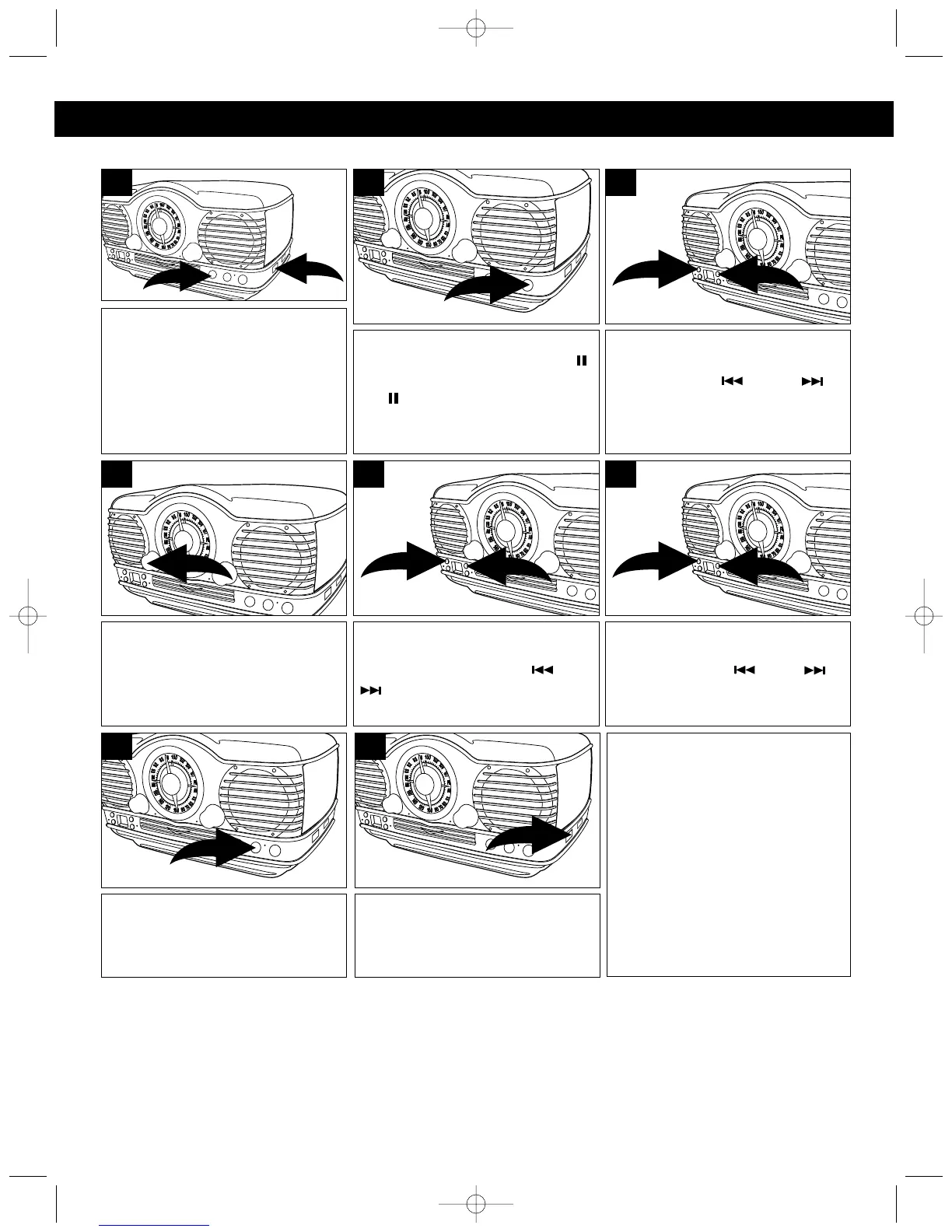
TO INSERT AND PLAY A CD (STANDARD CD, CD-R AND CD-RW CAN BE USED)
Slide the FUNCTION switch ❶ to
the CD position and press the CD
Open/Close button ❷. Place a CD
on the center spindle, with the
printed label side facing up. Press
the CD Open/Close button ❷ again
to close the CD compartment door.
1
2
1
To start from a specific track,
locate the track using the
SKIP/Search ❶ or ❷
button; the unit will automatically
play the track.
2
1
3
To play a disc from the beginning,
press the PLAY/PAUSE (/)
button. Press the PLAY/PAUSE
(/) button again to pause
playback; the Play/Pause
indicator will blink.
2
NOTES:
• If a disc is inserted incorrectly, dirty, damaged or not present at all, it will not play.
• As each track is played, the track number is shown in the display.
Adjust the VOLUME control as
desired.
4
When the disc is through playing,
it will stop rotating. Press the
STOP (■) button to stop the disc
before it is finished.
7
When you have finished listening,
slide the FUNCTION switch to the
OFF position.
8
To search forward or backward
through the tracks, press and hold
the SKIP/Search ❶ or ❷
button, a chattering noise will be
heard.
2
1
6
To skip forward or backward
through the tracks on the disc,
press the SKIP/Search ❶ or
❷ button.
2
1
5
FAQS:
Do I need an adapter to play 3”
singles?
No, simply insert the 3” single into the
groove.
What type of CDs can I play?
CD, CD-Rs and CD-RWs can be used.
COMPACT DISC (CD) OPERATION
MTT3200 O/M.QXD 2/28/03 9:22 AM Page 5


 To Next Page