EasyManua.ls Logo

Memory-map Adventurer 2800 - Adventurer 2800 Interface Features; Overlay and Settings Menu; Menu Navigation; Info Button

Memory-map Adventurer 2800
12 pages
Print Icon
To Next Page IconTo Next Page
To Previous Page IconTo Previous Page
Loading...
2
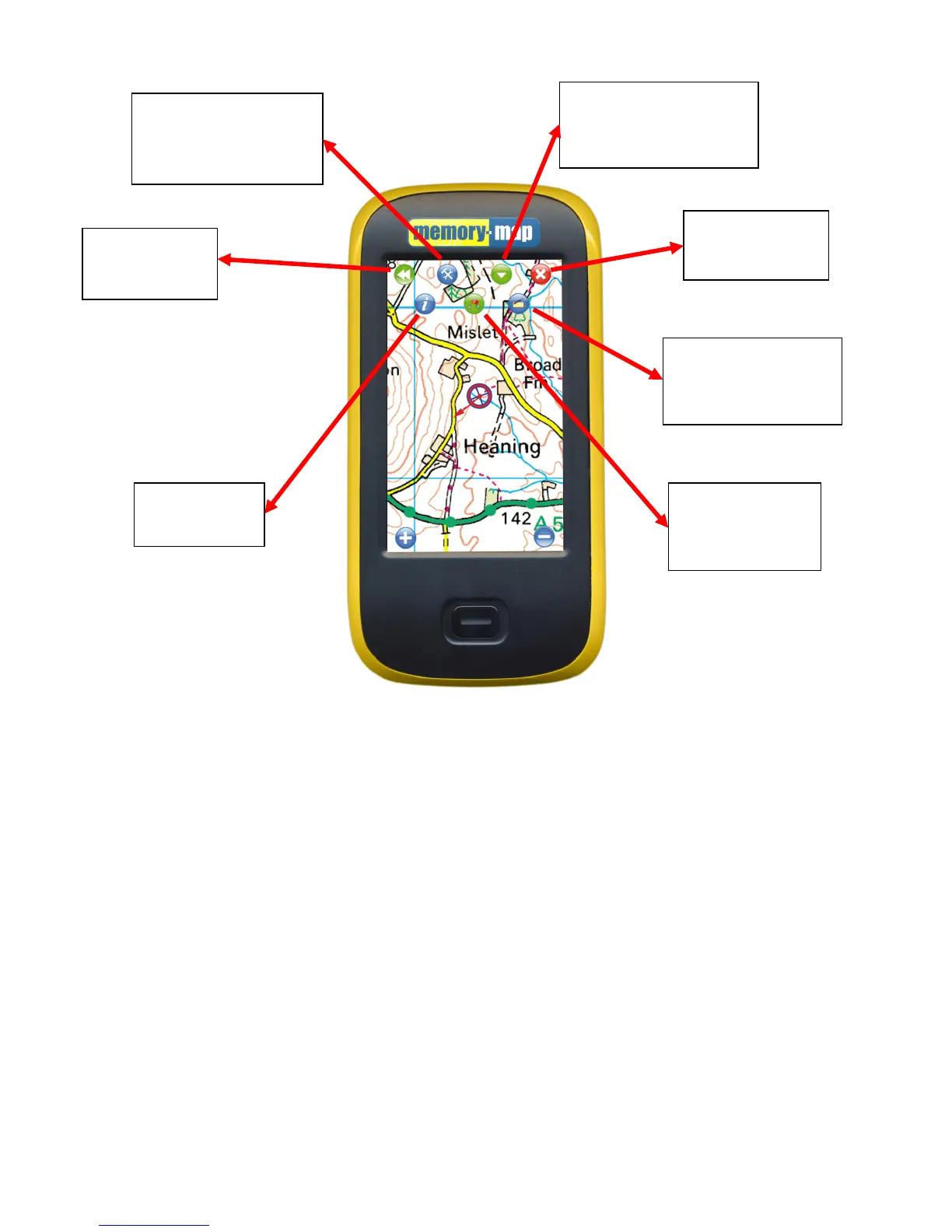
Menu
Returns you to the
original icon menu
Overlay and Settings Menu
Allows you to manage the
overlays on your device and
change advanced settings
Quick Map Change
Allows you to quickly jump to a
different scale map at your
current location
Exit Memory-Map
Saves all your overlays
and exits the program
Info button
Displays the status
of the GPS
Position read-out
When selected displays
positional coordinates
wherever you tap the screen
Drop Mark
When selected places a
mark wherever you tap
on the screen

Other manuals for Memory-map Adventurer 2800

Related product manuals