33
32
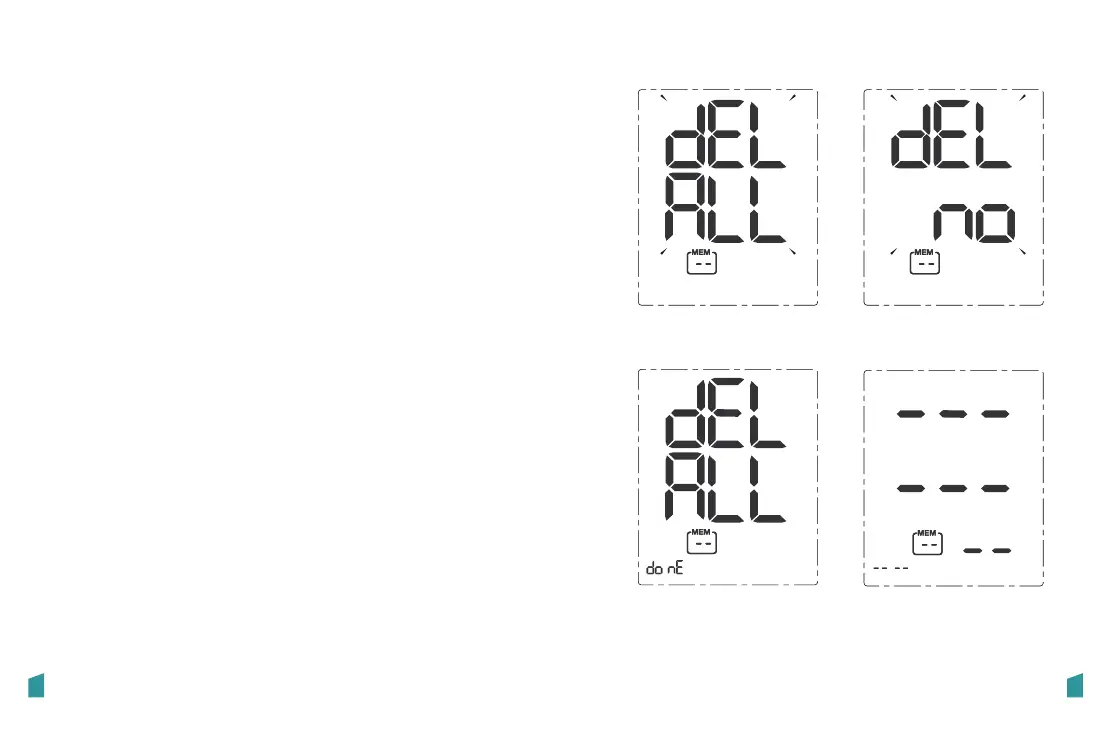
No recordDele�on is done
“DEL ALL” blinks “DEL no” blinks
1. Enter the memory recall mode as described in section
[Recall the Records].
2. Press and hold “BLUETOOTH” and “RECORD” button for
5 seconds, and the display will show a blinking “dEL ALL”
along with the user ID.
3. Use the “BLUETOOTH” or “RECORD” button to toggle
between “dEL ALL” and “dEL no”, Press “START/STOP” to
confirm the selection.
If “dEL ALL” is selected, the unit will display “dEL ALL do
nE” + User ID and delete all the record of the current user.
Several seconds later, it will display “---”.
If “dEL no” is selected, it will stop the deletion.
B: To delete all measurements:


 To Next Page