31
30
3. If you data is not synced to App, will show
in data page, indicating the record is not
uploaded to App.
4. You could press ‘Bluetooth’ button when the
blood pressure monitor is off to sync data that are
not uploaded.
Delete the records
1. Enter the memory recall mode as described in section
[Recall the Records]. Press “Record” or “Bluetooth” button to
get the measurement you would like to erase.
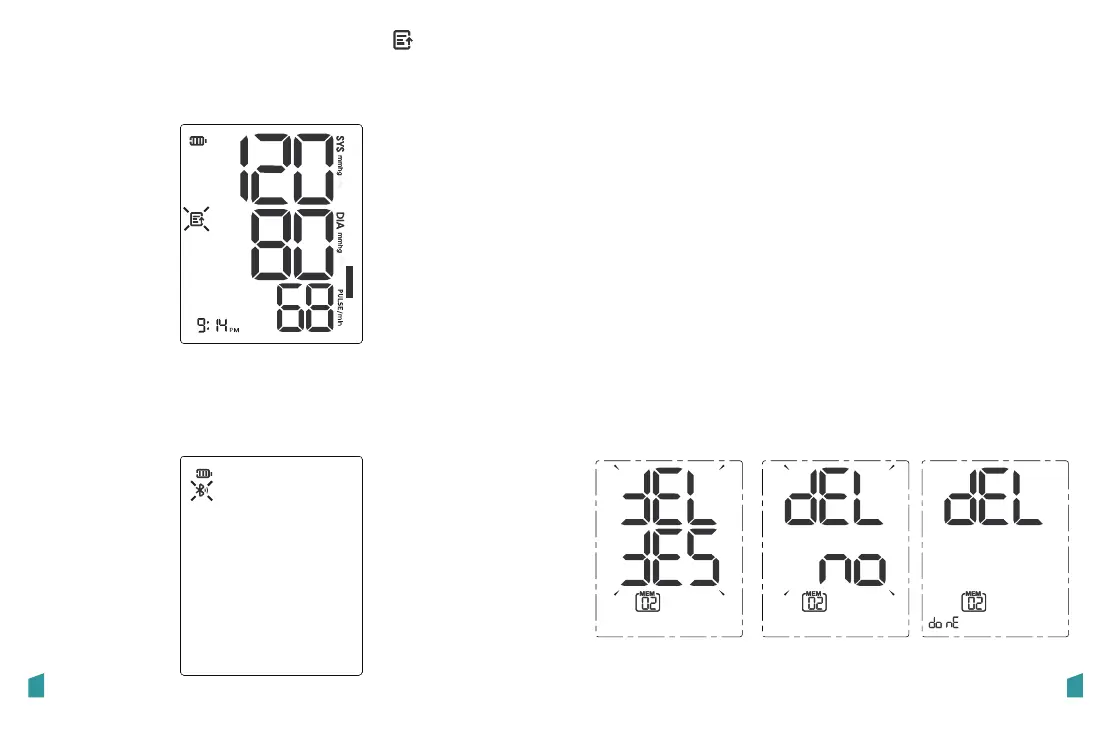
2. Press and hold “Record” button for 3 seconds, and the
display will show a blinking “dEL yES” along with the memory
number of the reading.
3. Use the “Record” or “Bluetooth” button to toggle between
“dEL yES” and “dEL no”, Press “START/STOP” to confirm the
selection.
If “dEL yES” is selected, the unit will delete the record and
display “dEL do nE” along with the memory number of the
reading. After then it will return to last memory record and
All the records are pushed forward one digit (e.g., 03 becomes
02, and so on)
If “dEL no” is selected, it will stop the deletion.
If you did not get the correct measurement, you can
delete results by following steps below.
Deletion is done“DEL YES” blinks “DEL no” blinks
A: To delete a single measurement:


 To Next Page
 Loading...