10
Device Set Up
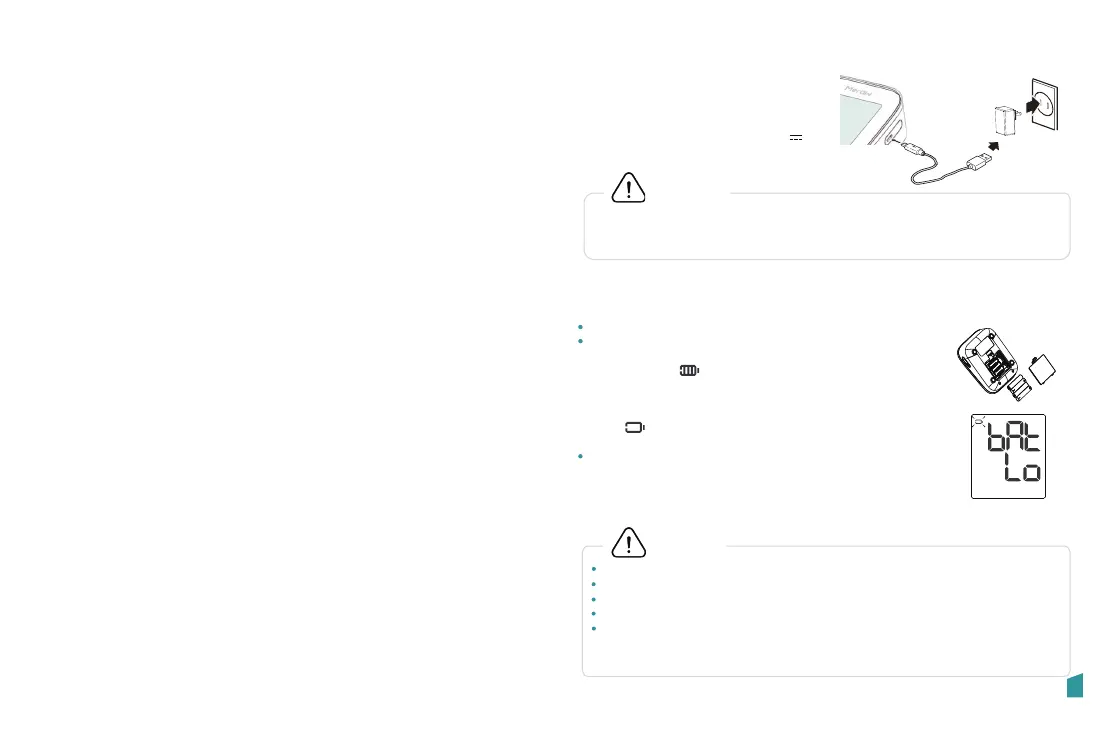
Power supply
Installing Batteries
Setting date and time
02
In order to get the best effect and protect your monitor, please use the
right batteries and special power adapter which complies with local safety
standard.
Installing Batteries
CAUTION
CAUTION
Power Supply
1. Battery powered mode:
6V DC 4× AAA batteries
2. AC adapter powered mode: 5V 1A
Do not use new and used batteries together.
Do not use different types of batteries together.
Do not dispose the batteries in fire. Batteries may explode or leak.
Remove batteries if the device is not likely to be used for some time.
Worn batteries are harmful to the environment. Do not dispose with
daily garbage.Remove the old batteries from the device following your local
recycling guidelines.
1.Slide off the battery cover.
2.Install or replace 4× AAA size batteries as indicated in
the battery compartment. The display will light up and
show the icon . Press “START/ STOP” button to
turn off, otherwise it will power off automatically after
10 seconds.
Any time the battery is low, it will display the icon“ bAt
Lo” & . It will power off automatically after 5
seconds.
3.Close the battery cover.
Replace the batteries if:
• The low battery symbol appears on the display.
• When any button is pressed and nothing is
displayed on the screen.
AC adapter
USB cable
Low Battery


 To Next Page
 Loading...