1211
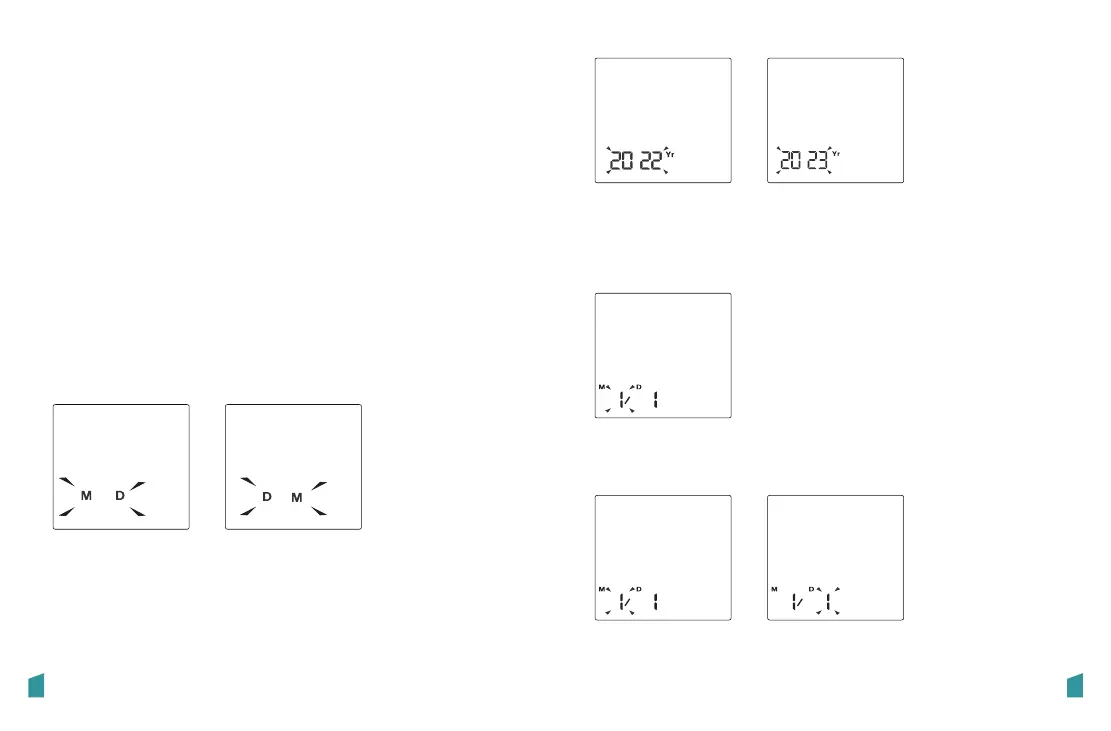
Setting Date and Time
It is important to set the clock before using your blood
pressure monitor, so that a time stamp can be assigned to
each record that is stored in the memory.
(year: 2022—2050 Time format: 12H/24H)
1. When the monitor is off, press and hold the “START/ STOP ”
button to display the date format. Press the “Bluetooth” or
“Record” button to switch the date format between
[month/day] and [day/month].
2. Press the “START/ STOP ” button to confirm the date format,
then the year will flash. Press the “Bluetooth” or “Record”
button to change the year.
3.When you get the right year, press the “START / STOP” button
to confirm the year. The screen will then show a blinking
number representing the [MONTH].
4.Repeat steps 2 and 3 to set the [MONTH] and [DAY].
Once connected to smartphone App via Bluetooth, date and
time will be syned to BPM automatically.
Auto Setting
Manual Setting


 To Next Page
 Loading...