Setup and Operation
Setup
The setup function is accessible while in any of the scan tool’s menus or while in the
data scanning mode. Pressing the SETUP key causes the scanner to suspend its
current mode of operation and enter a special setup menu. The setup menu contains
items that allow you to tailor various functions of the scan tool.
These functions are as follows:
English/Metric
Mode
Causes data related to pressure, temperature and velocity to be
displayed in English or Metric units.
GPH Scaling
Affects the display of GM MEFI 1 & 2 fuel flow readings. Use
Scale Factory #1 for most engine’s. Use Scale Factor #2 when
working on older MerCruiser engines.
MAP Scaling
Use 2 ATM setting only when working on supercharged engines.
Save Settings
Causes adjustments made to English/Metric Units, GPH Scaling,
Screen Contrast, and Fuel Injector time settings to be stored in the
scanner’s non-volatile memory. These settings are permanently
retained and will automatically be recalled each time the tool is
turned ON. The settings remain in effect until changed.
Screen Adjust
Allows the scanner’s display contrast to be adjusted. Please note
that the display’s readability is affected by both ambient lighting
conditions and temperature. Use the screen adjustment feature as
necessary to produce a suitable amount of contrast for your
viewing purposes.
Press the NO key to exit the Setup mode.
Operation
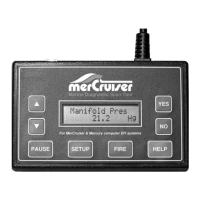
The s and t keys are used to access all menu choices throughout the operation of
the scan tool.
The YES key is used to select or activate the currently displayed menu item.
The HELP key provides information on current menu choices or items.
After the scan tool displays its initial opening messages, use the s and t keys to
access one of the following operating modes, then press the YES key to select it.
Marine EFI
Merc D-Tronic
Thunderbolt V
Mercury Outboard
Injector Test
Support Information
Page 5


 To Next Page