The 1st Mate system is a marine safety and security device designed to enhance boating safety and provide theft deterrence. It consists of a hub, wearable fobs for the captain and passengers, and a mobile application.
Function Description:
The 1st Mate system primarily functions as a man overboard (MOB) detection and engine stop system. If the captain, wearing a fob, falls overboard, the engine(s) will immediately stop. For both captain and passenger MOB events, the system marks the location on the app's GPS screen, sounds an audible horn from the mobile device app and the vessel's hub, and sends alerts and recovery coordinates to emergency contacts and connected passengers. The system also includes an optional theft-deterrent system (TDS) that can lock the engine(s) and limit RPM to idle speed, preventing unauthorized use. The hub communicates wirelessly with the fobs using a dedicated marine wireless protocol. A NMEA network is not required for operation, but the system can integrate with NMEA and Mercury SmartCraft networks if available.
Important Technical Specifications:
Hub:
- Operating Temperature Range: -10 to 70 °C (14 to 158 °F)
- Storage Temperature Range: -40 to 85 °C (-40 to 185 °F)
- Operating Humidity Range: 0-100%
- Voltage Source: 13.8 V Nominal
- Power Consumption: 10 mA in sleep (0.138 mW), 150 mA in active mode (2 W)
- Frequencies:
- WiMEA: 915 MHz FCC (US/CAN), 868 MHz RED (EU), 915 MHz ACMA (AU)
- Bluetooth: 2.4 GHz
- NFC: 13.56 MHz
- RF Signal:
- WiMEA: 10 dBm max.
- Bluetooth: 5 dBm max.
- WiFi: 20 dBm max.
- NFC: 100 mW max.
- Wireless Peripherals: WiMEA, Bluetooth, WiFi, NFC
- Hardware Peripherals: NMEA2000, SmartCraft
- Certifications and Compliance:
- Radio: US: FCC Part 15c EU: R&TTE, EN 300 328, Maritime/CE
- EMC: US: CISPR 16-1 EU: EN 301 489-01 (V1.9.2), Class A
- Compliant materials: RoHS (2002/95/EC)
- Compliant: ABYC A-33, ABYC A33 & E–11 Compliant (US Emergency engine/propulsion cut-off devices standard)
Antenna:
- Frequency Range: 824-960 MHz
- Polarization: Linear
- Gain: 2.0 dBi (Zentih)
- V.S.W.R.: < 2.0
- Impedance: 50Ω
- Cable: RG174, 2 Meters
- Connector: RP-SMA
- Mounting Method: Magnet / 3M-tape
- Operating Temperature: -40 to 85 °C (-40 to 185 °F)
- Vibration: 10-55 Hz with 1.5 mm amplitude 2 hours
- Environmentally Friendly: ROHS Compliant
Fob:
- Flammability: IEC 60950 1&22, CE-UL94
- Immersion: IEC 60945 IP68, Maritime/CE - 3 m (10 ft.) water resistant
- Battery: CR2430 lithium battery
Usage Features:
Hub:
- Mounting: Mounted in the vessel's console or an interior compartment, protected from elements.
- Indicator Lights: Five indicator lights (TDS, Fob, NMEA, SmartCraft, Wireless) provide visual status. A flashing red light indicates a fault.
- TDS: Green when unlocked, blue when locked (if security system enabled).
- Fob: Green when fobs are paired, solid red and horn beep during MOB.
- NMEA/SmartCraft: Green if connected to respective networks.
- Wireless: Green when enabled, flashing green when waiting to pair.
- NFC Chip and RFID Sensor: Used to unlock the theft-deterrent system (TDS) if a fob or app is unavailable, and for anti-theft authentication and system override.
- Reset Button: Located on the front of the hub, used to reset the system after a MOB event or to stop all engines (hold for 3 seconds).
Fobs (Captain's and Passenger):
- Wearable Devices: Small wireless devices worn on a wristband or carabiner clip.
- Lights: MOB and ON lights indicate connection status.
- Captain's Fob: Includes an On/Off/Reset button to turn the system on/off or reset after an overboard event. Immediately stops engine(s) if submerged. Notifies connected passengers and provides recovery coordinates.
- Passenger Fob: Supports up to seven fobs. Marks position, notifies captain and other connected passengers, and provides recovery coordinates during a MOB event.
- Battery Installation: Uses a CR2430 battery, inserted with the positive side facing the cover. An O-ring ensures a seal.
Mobile Application (1st Mate App):
- Account Registration: Required for initial setup.
- Vessel Setup: Allows entering vessel name/picture, selecting boat type, engine manufacturer/type, horsepower rating, and number of engines.
- Device Pairing: Guides pairing of the hub and fobs.
- System Test: Tests wireless connection and E-Stop functionality.
- Optional Distress Messaging: Enables/disables distress messages to emergency contacts during a MOB event. Contacts can be manually entered or imported.
- Optional Theft-Deterrent System (TDS): Allows setting a PIN or Face ID to lock/unlock engines. Limits engine RPM to idle when enabled.
- Connecting/Disconnecting: Captain's fob power button connects/disconnects the system. App shows Fob Status Icon (green semi-circle for captain only, full green circle for captain and passengers).
- Fob Settings: Adjust FOB LED Brightness via the app.
- Man Overboard (MOB) Monitoring:
- Engine(s) stop if captain's fob is submerged.
- Audible horn from app and hub.
- Location marked on GPS screen.
- Alerts sent to emergency contacts and connected passenger fobs.
- Coordinates sent via text message to emergency contacts.
- MOB events can be canceled via the app (Cancel button, Cancel Man Overboard) or by pressing the power button on the Captain's fob or the On/Off/Reset button on the hub.
- MOB with Gear in Neutral can be enabled/disabled in Vessel Settings.
- App Menu:
- Vessel Users: Add users for vessel control and access.
- Manage Devices: Add, update, delete fobs.
- Emergency Contacts: Manage contacts for distress messaging.
- Invite Passengers: Share the app with passengers for MOB notifications.
- History Log: Logs TDS, battery, MOB events, and system faults.
- Active Notifications: View active notifications, warnings, and faults.
- My Account: Manage account information, TDS PIN/Face ID, log out.
- My Invites: Manage invitations.
- Vessel Settings: Manage MOB with Gear in Neutral, test wireless connection, test E-Stop.
- Purchase: Order accessories.
- Help Center: Send feedback, access support, app diagnostics.
- App Settings: Push notifications ON/OFF.
- About: App information, privacy policy, terms of use.
- Product Tour.
Maintenance Features:
- Fob Battery Replacement: Instructions provided for replacing the CR2430 battery.
- Antenna Relocation: In some cases, reorienting or relocating the antenna may be necessary to improve performance. Refer to installation instructions for details.
- Device Updates: The app prompts for and manages available device updates.
- System Diagnostics: Available through the Help Center in the app.
- Low Battery Warning: Fob light indicates low battery (3 consecutive red blinks, repeating). Hub horn tables include a mode for low battery (2 consecutive short beeps at 30-second intervals).

 Need help?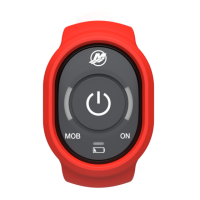

 To Next Page
 General