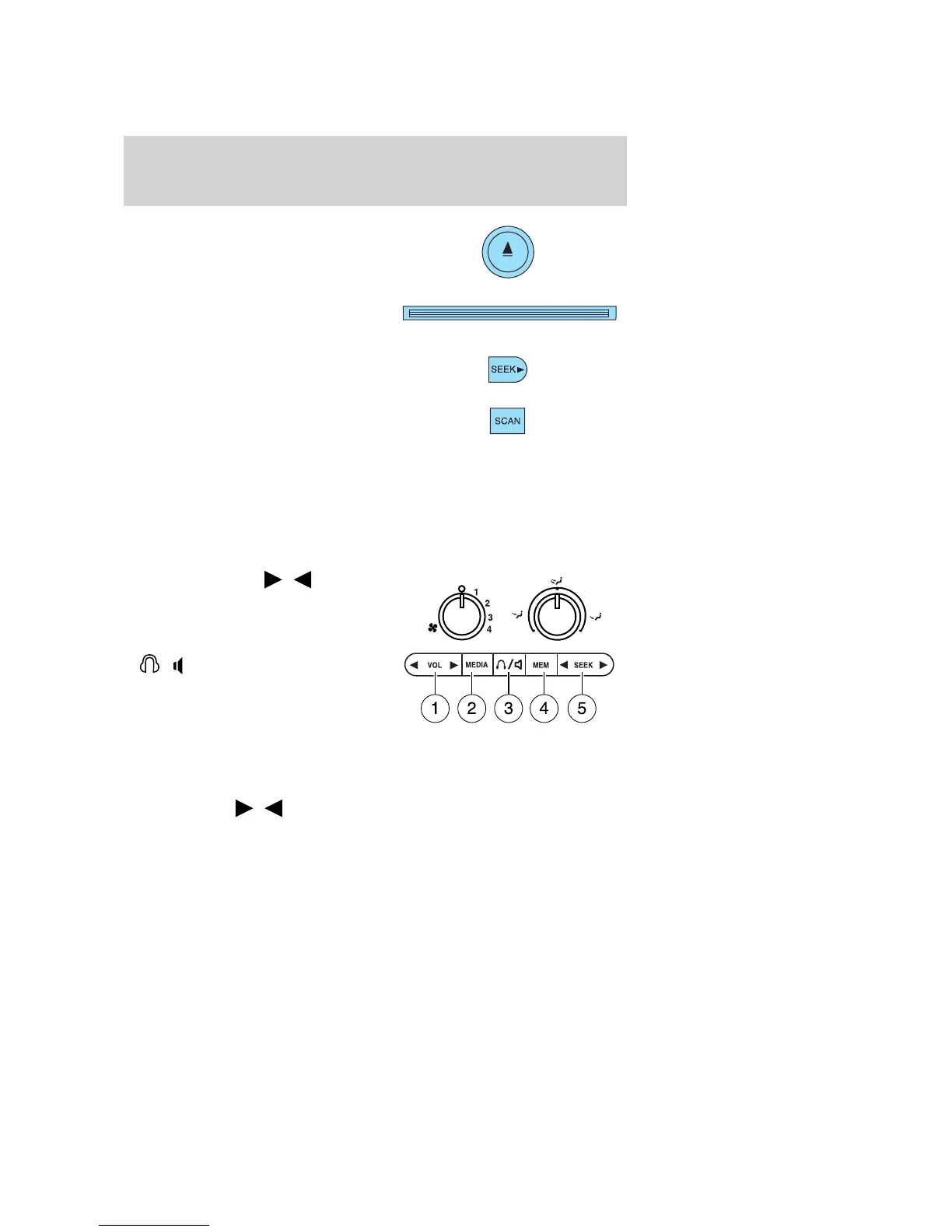
19. CD eject: Press to eject a CD.
20. CD slot: Insert a CD label side
up.
21. Seek:Press to access the
previous strong station or track.
22. Scan: Press for a brief sampling
of radio stations or CD tracks. Press
again to stop.
AUXILIARY AUDIO CONTROLS (IF EQUIPPED)
Your vehicle may be equipped with auxiliary audio controls. This feature
allows the front and middle seat passengers to listen to different media
sources (radio, cassette, CD or DVD) simultaneously. (However, the front
and middle-seat passengers cannot listen to two different radio stations
at the same time.)
1. Volume: Press to
/
increase/decrease volume control.
2. Media: Press to select from
different playing medias.
3.
/ : Press to activate dual
play mode and enable the rear seat
passengers to hear audio through
the headphones. Press again to
deactivate.
4. MEM: Press consecutively to scroll through the preset stations,
change tape side (if equipped), or to change discs on multiple disc
radios (if equipped).
5. SEEK: Press
/ to access the next/previous strong radio station,
cassette selection or CD track.
When the rear seat controls are activated, rear seat passengers can use
the controls to change the playing media for all passengers (Single Play
mode). In this mode, all speakers will play audio from the same media
source for all passengers to hear.
2005 Monterey (mty)
Owners Guide (post-2002-fmt)
USA_English (fus)
Entertainment Systems
26



 To Next Page
 Loading...