EasyManua.ls Logo

Mercury 350.001UK - User Manual

Mercury 350.001UK
3 pages
Print Icon
To Next Page IconTo Next Page
Loading...
www.avsl.com 350.001UK User Manual
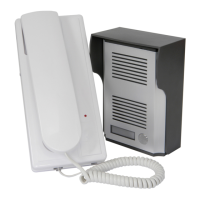
2.4GHz Wireless Door Phone
Order ref: 350.001UK
User Manual
This wireless door phone system allows you to talk to your visitors before opening the door. No wires are required
between the external and internal units, making this system very easy to install, and a range of up to 150m makes this
useful for security and helpful for the elderly or less mobile.
Features:
Easy to install; no wiring required
Battery operated IP44 rated external unit with
low power consumption
Battery back-up feature on internal unit
Wireless range up to 150m (clear sight)
Adjustable ringer volume
In the box:
IP44 rated external call unit
Internal handset & cradle
Internal handset PSU
Fixing kit
User guide
Installation:
External Call Unit
1. Fasten the rain shade on the wall 1.4~1.7m above the ground.
2. Remove the screw from the bottom of the external unit and remove the bottom plate.
3. Remove the silver cover and install 4 x AA batteries (not supplied) paying attention to the polarity indicators within
the battery compartment.
4. Remove the name card cover and complete the card as required ie. name, room number, etc.
Question and Answer IconNeed help?

Do you have a question about the Mercury 350.001UK and is the answer not in the manual?

Summary

Installation Guide

External Call Unit Setup

Steps for mounting the rain shade, attaching the external unit, and installing batteries for the door phone.

Internal Handset Setup

Instructions for mounting the handset cradle, installing batteries, and connecting the power supply.

System Operation

System Alerts and Specifications

System Alerts

Information on understanding device status indicators and error notifications.

Technical Specifications

Details on frequency, range, IP rating, power requirements, and unit dimensions.

Safety Warnings and Compliance

General Warnings

Important safety precautions regarding electrical hazards, damage, and warranty.

Disposal and Declaration

Guidance on proper disposal of electronic waste and EU conformity declaration.

Overview

This document describes the 2.4GHz Wireless Door Phone, a system designed to enhance security and convenience by allowing users to communicate with visitors before opening their door. The system is particularly beneficial for the elderly or less mobile due to its ease of use and wireless operation.

Function Description

The core function of this device is to provide a wireless intercom system between an external call unit and an internal handset. When a visitor presses the call button on the external unit, the internal handset chimes, alerting the user to the presence of a visitor. The user can then pick up the handset to engage in a two-way conversation with the visitor. This allows for identification and communication without the need to physically open the door, thereby improving security. The wireless nature of the system eliminates the need for complex wiring between the two units, simplifying installation significantly. With a clear line of sight, the system boasts a wireless range of up to 150 meters, making it suitable for various property layouts.

Usage Features

The system is designed for straightforward operation and offers several features to enhance user experience.

Ease of Installation: One of the primary advantages of this door phone is its easy installation, as no wiring is required between the external and internal units. This makes it accessible for users who may not have extensive technical knowledge or wish to avoid the complexities and costs associated with wired systems.

External Call Unit Features:

  • Battery Operated: The external call unit is powered by 4 x AA batteries (not supplied), contributing to its wireless nature and ease of placement.
  • IP44 Rated: With an IP44 rating, the external unit is protected against solid objects larger than 1mm and splashes of water from any direction, making it suitable for outdoor use and capable of withstanding typical weather conditions.
  • Low Power Consumption: The external unit is designed for low power consumption, extending battery life and reducing the frequency of battery replacements.
  • Name Card Slot: A dedicated slot for a name card allows users to personalize the external unit with their name, room number, or other relevant information, making it clear to visitors whose door they are at.
  • Rain Shade: The external unit comes with a rain shade that should be fastened to the wall at an optimal height of 1.4 to 1.7 meters above the ground. This shade provides additional protection against the elements, further enhancing the unit's durability and reliability in outdoor environments.

Internal Handset Features:

  • Battery Back-up: The internal handset features a battery back-up system, powered by 4 x AA batteries (not supplied). This ensures that the system remains operational for several hours during a mains power failure, providing continuous security and communication capabilities. It's important to note that the handset is not capable of recharging batteries, and only dry cells should be used for this feature.
  • Adjustable Ringer Volume: Users can adjust the ringer volume of the internal handset to suit their preferences and ensure they can hear incoming calls, regardless of their location within the house.
  • Visual Call Indicator: When the call button on the external unit is pressed, the handset's LED will change from blinking to a steady state, providing a clear visual indication of an incoming call. If the call is left unanswered, the units will beep after one minute, and the system will return to standby mode.
  • Standby Mode: In standby mode, the handset LED blinks every 3 seconds, indicating that the system is active and ready to receive calls. If the call button has been pressed and not answered, the LED will blink rapidly for 10 minutes before returning to the normal standby blink pattern.
  • Power Supply: The internal handset is powered by a 12VDC 500mA power supply unit (PSU), which should be plugged into a power outlet. Upon switching on, the handset will beep, signaling that it is ready for use.
  • Cradle Design: The handset comes with a cradle that can be attached to the wall, providing a convenient and organized place to store the handset when not in use. The power supply jack inserts into a socket on the rear of the handset, and the handset then hooks onto the cradle.

Maintenance Features

The device incorporates several features and alerts to assist with maintenance and ensure continuous operation.

Battery Management:

  • Low Battery Indicator: A steady red LED on the handset at all times serves as a clear indicator that the batteries in the internal handset need to be replaced. This proactive alert helps users maintain the system's functionality.
  • External Unit Battery Replacement: The external unit's batteries are easily accessible by removing a screw from the bottom plate, allowing for straightforward replacement when needed. Users should pay attention to the polarity indicators within the battery compartment during installation.

System Alerts:

  • Out of Range/Dead Handset Alert: If the external unit detects that the internal handset is out of range or completely dead, it will beep four times when the call button is pressed. This alert helps users diagnose connectivity issues or dead handset batteries.

General Maintenance Guidelines:

  • Environmental Protection: To ensure longevity and proper functioning, the device should never be immersed in water, exposed to damp conditions, or subjected to excessive force. The IP44 rating of the external unit provides a degree of protection, but extreme conditions should still be avoided.
  • Damage Prevention: Users are advised not to use the device if they find it damaged in any way. This prevents potential safety hazards and ensures optimal performance.
  • No User Repair: It is explicitly stated that users should not attempt to repair or take apart the device under any circumstances. Doing so will invalidate the warranty, and any repairs should be handled by qualified professionals. This ensures the integrity and safety of the device.

By adhering to these usage and maintenance guidelines, users can ensure the reliable and long-lasting performance of their 2.4GHz Wireless Door Phone system.

Mercury 350.001UK Specifications

General IconGeneral
Audio Frequency Response300Hz - 3.4kHz
Wiring2-wire
Operating Voltage12V DC
Housing MaterialPlastic
Number of Buttons1
CompatibilityCompatible with Mercury