VESSELVIEW MOBILE MODULE
Page 2 / 5 © 2019 Mercury Marine 90-8M0168272 eng DECEMBER 2019
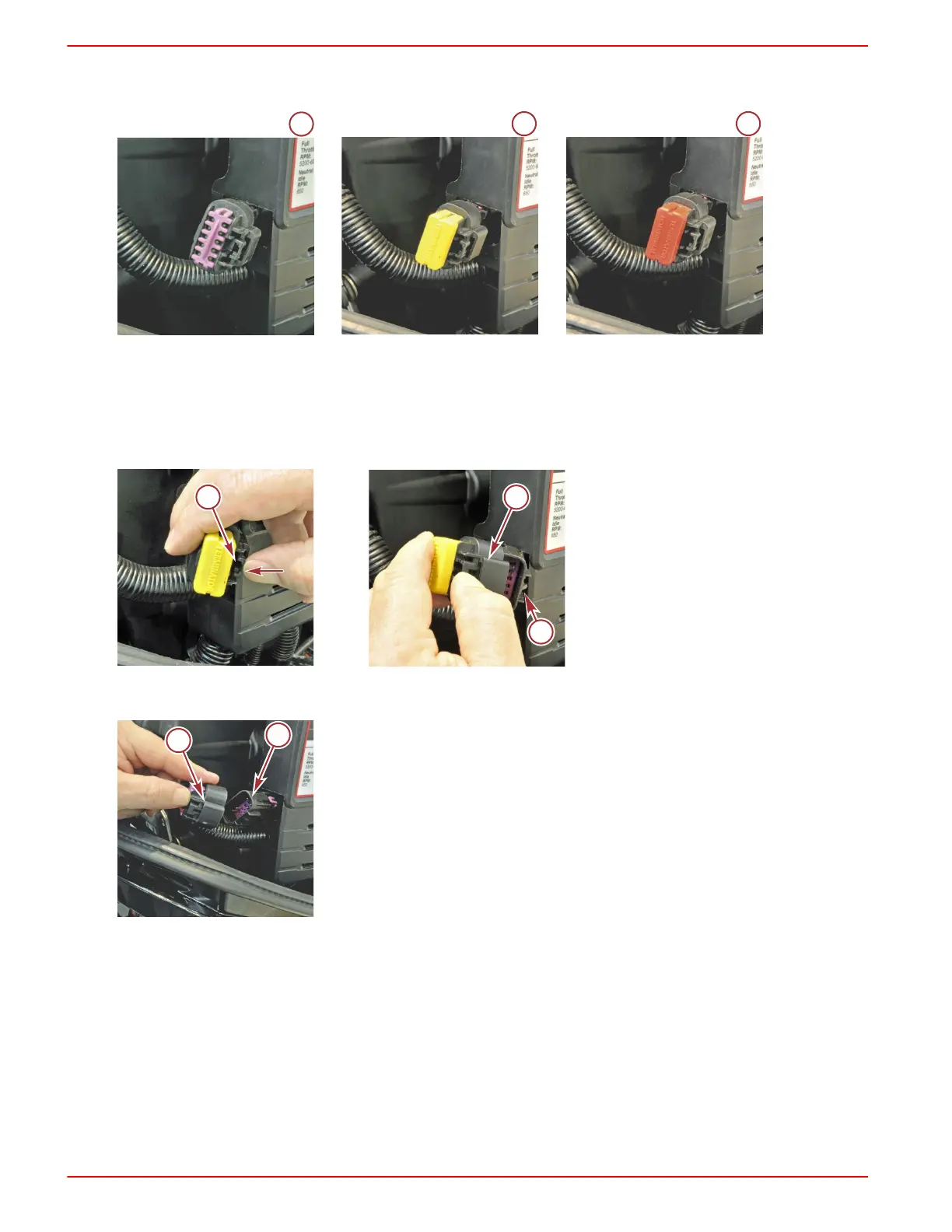
IMPORTANT: 859318T1 must be purchased separately if the engine is not equipped with a yellow or red terminator
resistor.
1 - Weather cap
2 - Yellow terminator
3 - Red terminator
2. Locate and remove the terminator or weather cap by pressing the retaining latch and pulling it from the engine harness
10‑pin connector. If removing a terminator, retain the terminator for use with the VesselView Mobile harness.
Yellow terminator shown
a - Terminator retaining latch
b - Terminator
c - Engine harness 10‑pin connector
3. After the terminator or weather cap is removed from the engine harness, plug the VesselView Mobile harness 10‑pin
connector into the engine harness 10‑pin connector.
a - VesselView Mobile harness 10‑pin connector
b - Engine harness 10‑pin connector



 To Next Page
 Loading...