Her türlü değişiklik hakkı saklıdır.
KLV-09/Yayın Tarihi : 09.03.2023/Revizyon No: 00 /Revizyon Tarihi:
Sayfa :
Güncel dokümanlar için www.merihasansor.com adresini ziyaret ediniz!
Belirtilmeyen tüm ölçü birimleri milimetredir.(mm)
DDC70/DDC80
4.2. Key Combination
Her türlü değişiklik hakkı saklıdır.
KLV-09/Yayın Tarihi : 09.03.2023/Revizyon No: 00 /Revizyon Tarihi:
08
WI-FI
POWER
1
2
3
9
4
6
7
8
5
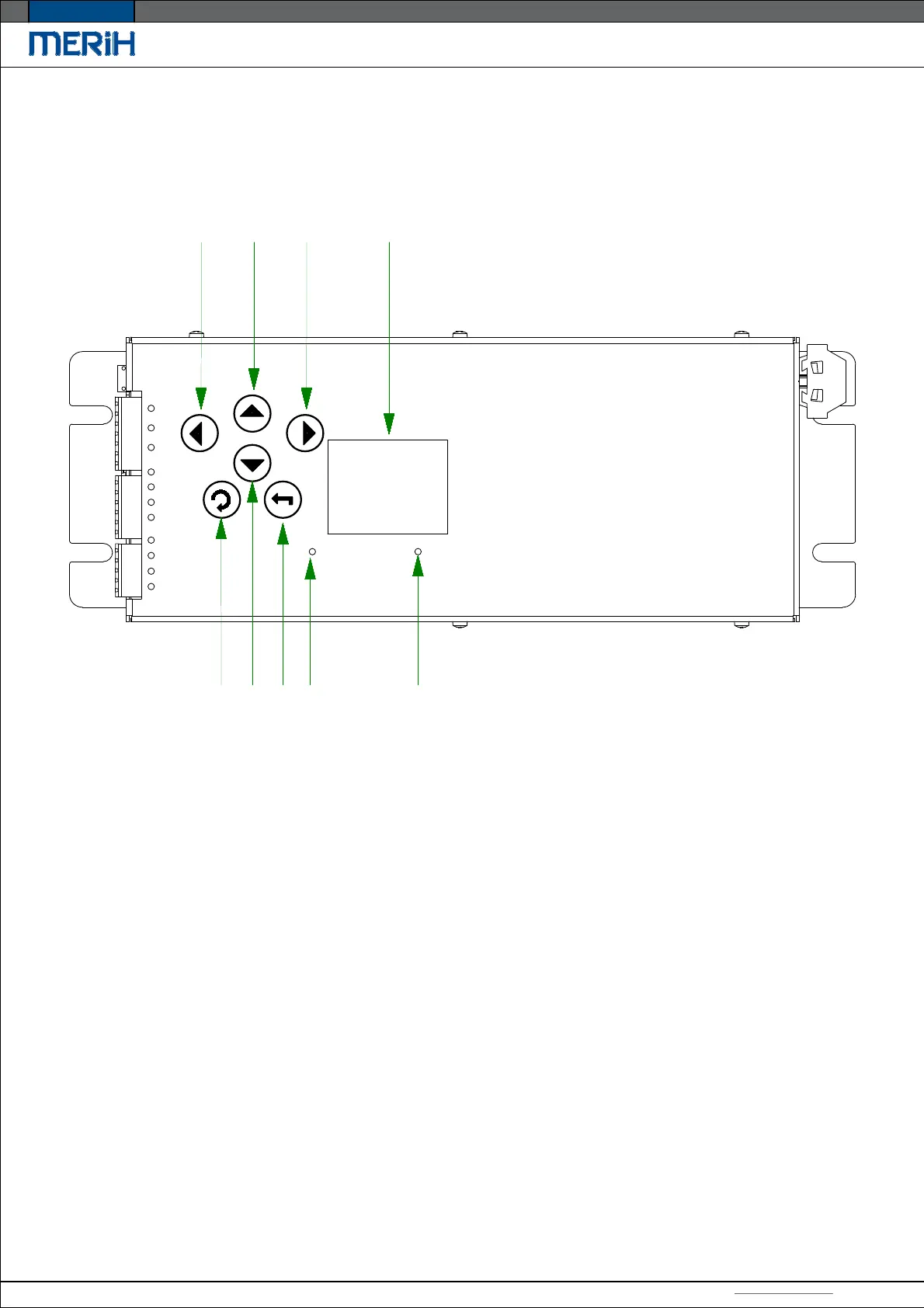
1-It is used to decrease values in menu lines entered.
2-It moves the selection up in the menu lines entered.
3-It is used to increase the selection in the menu lines entered.
4-It is used to go back one process in the menu line entered.
5-It moves the selection down in the menu line entered.
6-It is used to go forward one process and for confirmation
in the menu line entered. It is used to access the menu section.
7-The light turns on when the wifi is turned on.
8-The light turns on when the card is open.
9-It shows the connection scheme.


 To Next Page
 Loading...