EasyManua.ls Logo

Merik 893MAX-LMK - User Manual

Merik 893MAX-LMK
4 pages
Print Icon
To Next Page IconTo Next Page
Loading...
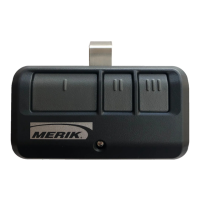
3-BUTTON REMOTE CONTROL
MODEL 893MAX-LMK
To prevent possible SERIOUS INJURY or
DEATH from a moving gate or garage door:
ALWAYS keep remote controls out of reach
of children. NEVER permit children to
operate or play with remote controls.
Activate gate or door ONLY when it can be
seen clearly, is properly adjusted and there
are no obstructions to door travel.
ALWAYS keep gate or garage door in sight
until completely closed. NEVER permit
anyone to cross path of moving gate or
door.
Locate the Program button on
the remote control.
Locate the Learn
button on the garage
door opener.
NOTE: Your garage door
opener may look different.
OR OR
Learn
LED
Learn
LED
Learn
LED
Green
or
Red/Orange
Purple
Yellow
Program Button
2
3
Press and release the remote control button
you want to use...
4
To exit programming mode, press
any remote control button except
the button that was just programmed.
Install the visor clip.
6
The garage door opener
will activate.
To test, press the programmed button on
the remote control...
1
Press and release the
Learn button on the
garage door opener.
Within 30 seconds...
The Learn LED will light.
Check to see if the garage
door opener light bulb
blinks.
If not, wait for the remote
control LED to light solid
then slowly press and
release the remote
control button again.
Repeat until the
light bulb blinks.
DO NOT press the
button after the light
bulb blinks.
5
To enter programming mode, press the Program button
until the LED on the front of the remote control turns on.
Visor Clip
LED
PREPARE
PROGRAMMING THE REMOTE CONTROL
Compatible with 315 MHz or 390 MHz garage door openers
manufactured after January 1, 1993. Make sure the garage door
opener has a working light bulb because it is a programming
indicator.
For use with gate operators, commercial door operators, or other
products that are 315 MHz or 390 MHz and have a Learn button.
Refer to your product manual for the location of the Learn button.
LED
Question and Answer IconNeed help?

Do you have a question about the Merik 893MAX-LMK and is the answer not in the manual?

Summary

Prepare for Remote Control Programming

Locate Garage Door Opener Learn Button

Find the Learn button on the garage door opener, noting its appearance may vary.

Locate Remote Control Program Button

Identify the Program button on the remote control for programming initiation.

Programming the Remote Control

Enter Programming Mode

Press the Program button on the remote until its LED indicator turns on.

Activate Garage Door Opener

Press and release the Learn button on the garage door opener; its LED will light.

Program Remote Button

Press remote button, observe opener light; repeat if necessary until light blinks.

Exit Programming Mode

Press any unprogrammed button to exit the programming sequence.

Test Programmed Remote

Press the programmed button to activate the garage door opener and confirm functionality.

Install Visor Clip

Attach the included visor clip to the remote control for convenient mounting.

General Safety Warnings

How to Use the Remote Control

Battery Replacement and Care

Replace Low Battery

Replace battery when LED stops flashing. Use only 3V CR2032 coin cells.

Battery Safety Precautions

Keep batteries from children; notify doctor if swallowed. Do not recharge or heat.

Warranty Information

One Year Limited Warranty

Covers defects in materials and workmanship for one year from purchase date.

Replacement Parts

Lists available replacement parts such as batteries and visor clips.

Merik 893MAX-LMK Specifications

General IconGeneral
BrandMerik
Model893MAX-LMK
CategoryRemote Control
LanguageEnglish