BEFORE
YOU BEGIN
14
INTRODUCTION
IMPORTANT
PRECAUTIONS
ASSEMBLY
BEFORE
YOU BEGIN
BIKE
OPERATION
LIMITED
WARRANTY
TROUBLESHOOTING
& MAINTENANCE
CONDITIONING
GUIDELINES
ASSEMBLY
BIKE
OPERATION
BEFORE
YOU BEGIN
ASSEMBLY
15
INTRODUCTION
IMPORTANT
PRECAUTIONS
BIKE
OPERATION
CONDITIONING
GUIDELINES
TROUBLESHOOTING
& MAINTENANCE
LIMITED
WARRANTY
BIKE
OPERATION
ASSEMBLY
Note: There is a thin protective sheet of clear plastic on the overlay of the console and should be removed.
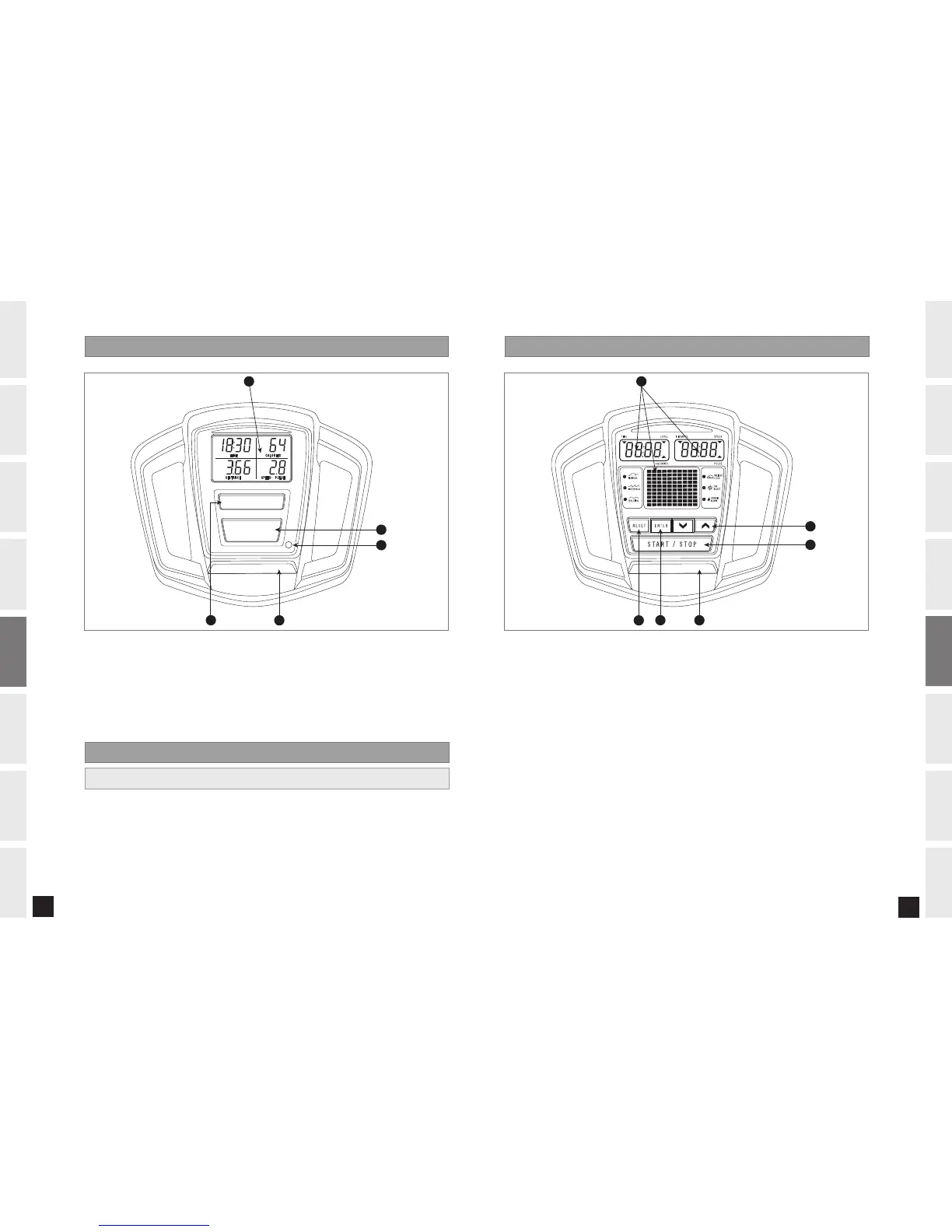
A) MONITOR DISPLAY: Speed, Time, Pulse, Distance.
B) START/STOP: Press to start/pause/end your workout.
C) RESET: Press to reset the bike.
D) BOOK RACK: Holds reading material
E) THUMB PULSE: Used to monitor you heart rate
Note: Thumb pulse may be inaccurate when used in low-light environments.
710B C O NSOLE DISPLAY
B
E
C
D
S T A R T / S T O P
R E S E T
A
710B C O NSOLE OPERAT I O N
1) Turn on Bike by pressing any key.
2) Press START button and begin exercising. The time will count up from 0:00.
3) The resistance level can be adjusted during the workout by using the RESISTANCE KNOB.
QUICK START
720B CONSOLE DISP L AY
Note: There is a thin protective sheet of clear plastic on the overlay of the console and should be removed.
A) MONITOR DISPLAYS: Speed, Time, Pulse, Distance, Level, Calories and Program Profiles.
B) START/STOP: Press to start/pause/end your workout.
C) ENTER: Used to set your program.
D) RESET: Press to reset.
E) UP/DOWN ARROW KEYS: Used to adjust resistance and select programs.
F) BOOK RACK: Holds reading material
710B_720B_Rev.1.7.indd 14-15 8/28/06 3:32:32 PM


 To Next Page
 Loading...