EasyManua.ls Logo

Merlin Flash 4000 - User Manual

Merlin Flash 4000
2 pages
Print Icon
To Next Page IconTo Next Page
Loading...
1
Thank you for purchasing this Merlin Product. Please read the
instruction manual carefully before using the product.
The documentation provided will allow you to fully enjoy all the
features this unit has to offer.
Please save this manual for future reference.
Product Parts and Functions
1) USB 1 Charging Output
2) USB 2 Charging Output
3) Type-C Port Charging Input
4) Micro USB Port Charging Input
5) LED Indicator Level and Status Indicator
6) ON/OFF Button
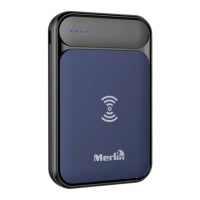
7) Wireless Charging Charging Output
How to Use
Charging the Power Bank
- The power bank can be charged through any of the input ports
(Type-C and Micro USB)
- Use the included cable or your smartphone charger (for
Android Only) to charge the power bank
- The power bank can be charged from a computer or any 5V
USB adaptor (refer to Picture A)
Charging your Smartphone
- You may charge up to two devices using the USB ports
- Simply use the corresponding cable for your smartphone,
connect the USB pin to the power bank’s USB port and the
other end to your smartphone then switch the power bank ON
Wireless Charging
- Lay the power bank flat with wireless surface facing up. Turn
ON the power bank and place your smartphone on top
properly. Please take note that it only works with
smartphones that is capable of wireless charging.
Note: The LED (#5) will be able to tell you how much charge is left
when being used OR how much charge has been completed when
being charged. There are 4 LEDS corresponding to (100%, 75%, 50%,
and 25%)
FAQ
Q) Why is my Smartphone not charging?
A) For wireless charging, please make sure that your smartphone
supports wireless charging and place it properly on the
correct surface.
B) For wired connection, try to use another charging cable
and/or port on the power bank to find out the problem and
make sure that the power bank is ON
Q) My Smartphone is charging but at a slow rate.
A) If your device is not charging properly and the display on the
LED shows a low charge, this might be a sign that the power
level is very low and your power bank needs to be charged.
Maintenance
1. Retain these instructions for future use.
2. Clean the product with a damp cloth and mild soap.
3. Do not expose this product to rain or moisture.
4. Be careful not to turn or twist the cables used in this product
too much as it can lead to malfunction and failure.
5. This product is not designed to be submerged in water and
will malfunction if this occurs.
6. This product has no user serviceable items inside. Do not
open this product as the user risk injury and would void the
warranty.
7. Keep unit away from strong magnetic fields to avoid
interference with the product.
Flash 4000
Question and Answer IconNeed help?

Do you have a question about the Merlin Flash 4000 and is the answer not in the manual?

Summary

How to Use

Charging the Power Bank

Instructions for charging the power bank via input ports (Type-C and Micro USB).

Charging your Smartphone

Guide on charging devices using the USB output ports with appropriate cables.

Wireless Charging

Steps for placing a smartphone on the power bank for wireless charging.

Product Parts and Functions

FAQ

Smartphone Not Charging

Troubleshooting steps for when the smartphone does not charge.

Slow Charging Rate

Explains potential causes and solutions for slow charging.

Maintenance

Limited Warranty

Product Registration

Benefits of Registration

Details on availing discounts, exclusive information, and updates.

Contact Information

Provides website, Facebook page, and phone number for inquiries.

Summary

How to Use

Charging the Power Bank

Instructions for charging the power bank via input ports (Type-C and Micro USB).

Charging your Smartphone

Guide on charging devices using the USB output ports with appropriate cables.

Wireless Charging

Steps for placing a smartphone on the power bank for wireless charging.

Product Parts and Functions

FAQ

Smartphone Not Charging

Troubleshooting steps for when the smartphone does not charge.

Slow Charging Rate

Explains potential causes and solutions for slow charging.

Maintenance

Limited Warranty

Product Registration

Benefits of Registration

Details on availing discounts, exclusive information, and updates.

Contact Information

Provides website, Facebook page, and phone number for inquiries.

Overview

This document describes the Merlin Flash 4000, a portable power bank designed for charging smartphones and other devices, including wireless charging capabilities.

Function Description

The Merlin Flash 4000 serves as a versatile power bank, offering multiple methods for charging devices. It features two USB output ports for wired charging, a Type-C input port, and a Micro USB input port for charging the power bank itself. Additionally, it incorporates a wireless charging surface, allowing compatible smartphones to be charged simply by placing them on the device. An LED indicator provides real-time feedback on the power bank's charge level and status.

Important Technical Specifications

While specific technical specifications like battery capacity (mAh) are not explicitly stated in the provided manual, the device is designed to charge smartphones and other devices. The LED indicator, with its four segments (100%, 75%, 50%, and 25%), suggests a substantial battery capacity. The input ports (Type-C and Micro USB) are compatible with standard 5V USB adaptors, and the output ports (USB 1 and USB 2) are designed to charge devices efficiently. The wireless charging feature is compatible with smartphones that support wireless charging.

Usage Features

Charging the Power Bank: The Flash 4000 can be charged using either the Type-C or Micro USB input ports. Users can utilize the included cable, their smartphone charger (for Android devices only), or connect it to a computer or any 5V USB adaptor. The LED indicator will show the charging progress.

Charging your Smartphone (Wired): The power bank allows for simultaneous charging of up to two devices via its USB output ports. To charge a device, simply connect the appropriate cable from the power bank's USB port to the smartphone, then switch the power bank ON using the ON/OFF button.

Wireless Charging: For wireless charging, the power bank should be placed flat with its wireless surface facing up. After turning the power bank ON, a compatible smartphone can be placed on top of the wireless surface. It's crucial to ensure the smartphone is placed properly for effective charging. This feature is exclusively for smartphones capable of wireless charging.

LED Indicator: The LED indicator (#5) serves a dual purpose: it shows the remaining charge when the power bank is in use and indicates the charging progress when the power bank itself is being charged. The four LED segments correspond to 100%, 75%, 50%, and 25% charge levels.

Troubleshooting:

  • Smartphone not charging: For wireless charging, verify smartphone compatibility and proper placement. For wired charging, try a different cable or port, and ensure the power bank is ON.
  • Slow charging rate: If charging is slow and the LED indicates a low charge, the power bank likely needs to be recharged.

Maintenance Features

To ensure the longevity and optimal performance of the Merlin Flash 4000, the following maintenance guidelines should be observed:

  • Storage: Retain the instruction manual for future reference.
  • Cleaning: The product can be cleaned with a damp cloth and mild soap.
  • Environmental Protection: Avoid exposing the product to rain or moisture. It is not designed to be submerged in water.
  • Cable Handling: Exercise care when handling cables to prevent twisting or turning them excessively, which could lead to malfunction.
  • Internal Components: The device contains no user-serviceable parts. Opening the product is not recommended as it may cause injury and will void the warranty.
  • Magnetic Fields: Keep the unit away from strong magnetic fields to prevent interference.

Warranty Information

The Merlin Flash 4000 is covered by a limited one-year warranty. If a manufacturing defect is identified within 15 days of purchase, a replacement will be provided. Beyond this period, the product will be inspected for repair options, with repairs being free of charge if within the one-year warranty. Repairs outside the warranty period will incur charges. For international clients, defective products can be sent via post at their own cost, and the repaired/replaced product will be returned at Merlin's cost if the warranty is active.

Important Warranty Exclusions: The warranty does not cover normal wear and tear, accidents, transit damage, misuse, abuse, or neglect. Disassembling the unit will void the warranty.

Merlin Flash 4000 Specifications

General IconGeneral
BrandMerlin
ModelFlash 4000
CategoryAccessories
LanguageEnglish