4. Widgets
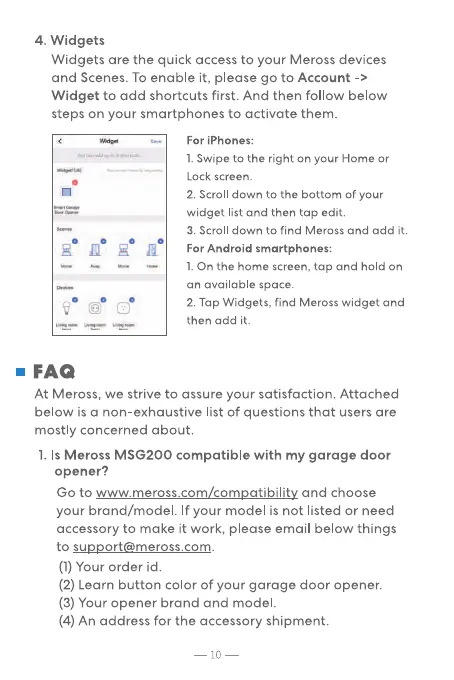
Widgets are the quick access to your Meross devices
and Scenes. TO enable it, please go to Account ->
Widget to add shortcuts first. And then follow below
steps on your smartphones to activate them.
For iPhones:
l. Swipe to the right on your Home or
Lock screen.
2. Scroll down to the bottom Of your
widget list and then tap edit.
3. Scroll down to find Meross and add it.
For Android smartphones:
l. On the home screen, tap and hold on
an available space.
2. Tap Widgets, find Meross widget and
then add it.
• FAQ
At Meross, we strive to assure your satisfaction. Attached
below is a non-exhaustive list of questions that users are
mostly concerned about.
1. Is Meross MSG200 compatible with my garage door
opener?
Go to www.meross.com/compatibility and choose
your brand/model. If your model is not listed or need
accessory to make it work, please email below things
to support@meross.com.
(1) Your order id.
(2) Learn button color of your garage door opener.
(3) Your opener brand and model.
(4) An address for the accessory shipment.
10


 To Next Page