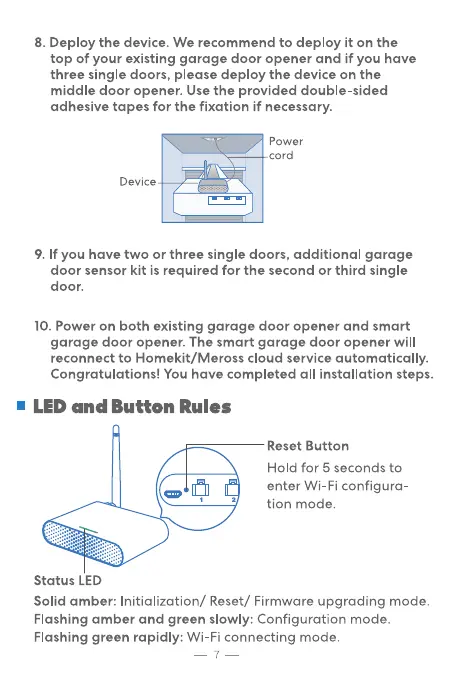
8. Deploy the device. We recommend to deploy it on the
top of your existing garage door opener and if you have
three single doors, please deploy the device on the
middle door opener. Use the provided double-sided
adhesive tapes for the fixation if necessary.
Power
cord
Device
9. If you have two or three single doors, additional garage
door sensor kit is required for the second or third single
door.
10. Power on both existing garage door opener and smart
garage door opener. The smart garage door opener will
reconnect to Homekit/Meross cloud service automatically.
Congratulations! You have completed all installation steps.
• LED and Button Rules
Status LED
Reset Button
Hold for 5 seconds to
enter Wi-Fi configura-
tion mode.
Solid amber: Initialization/ Reset/ Firmware upgrading mode.
Flashing ar•nber and green slowly: Configuration mode.
Flashing green rapidly: Wi-Fi connecting mode.


 To Next Page