
 Need help?
Do you have a question about the Mesa Safe MFS Series and is the answer not in the manual?
Default code sequence for initial safe opening.
Behavior and duration when incorrect codes are entered repeatedly.
Explanation of codes and symbols used in the safe's event log.
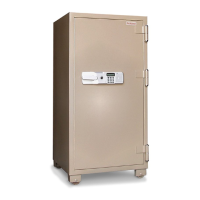
The device is an electronic safe lock, part of the MFS-Series, designed for securing valuables. It features a keypad for entering codes, a display screen for visual feedback, and a handle for opening the safe door. The lock is powered by four AA batteries, which are installed in a dedicated compartment on the right side of the lock face.
The primary function of this device is to provide secure access control to a safe. It allows users to open the safe using a numerical code, and offers various programming options to enhance security and usability.
Opening the Safe: To open the safe for the first time, users must input a specific sequence: the Start Button (*), followed by the default code, and then the End Button (#). If the code is entered correctly, the display will show "MATCH!", a slight 'Click' will be heard, and the user will have approximately 3 seconds to pull the handle downward to open the door. Incorrect code entry will result in "ERROR" on the display and two beeps. Three consecutive incorrect entries will trigger a 3-minute "Lock-Out Mode," displaying "WAIT" and beeping every couple of seconds. During Lock-Out Mode, no codes can be entered, and removing/reinserting batteries will reset the lock-out timer.
Changing the Master Code: This is a crucial security feature. Users are strongly advised to change the factory-set master code immediately to a unique personal code (1-8 digits long). This operation must be performed with the safe door open. To change the master code, press the Reset button located inside the door panel. The display will show "NEW_PW" and emit a beep. The user then has about 10 seconds to enter their new personal code, followed by the End Button (#). The display will again show "NEW_PW" and beep three times. It is recommended to test the new code at least three times with the door open before closing the safe.
Adding & Changing Additional User Codes: The system supports multiple user codes (User 2, User 3, User 4, User 5) in addition to the Master Code. To add or change a user code, the Master Code is required. The sequence involves inputting the Start Button (*), then the End Button (#), followed by the Master Code and End Button (#). The display will show "MASTER_PW" and then "0_EXIT". Next, input '1' to access the code setting menu, which will display "C-NO:". The user then selects the User Number (2-5) they wish to set or change. The display will show "NEW_PW:", prompting for a new 1-8 digit code for that specific user. Finally, pressing the End Button (#) will confirm the change, displaying "SUCCESS!" if successful. If any errors occur, the process must be restarted from Step 1.
Deleting User Codes: Similar to adding codes, deleting user codes also requires the Master Code. The process starts with the Start Button (*), then the End Button (#), followed by the Master Code and End Button (#), leading to "MASTER_PW" and "0_EXIT". Then, input '2' to access the delete menu, which will display "D-NO:". The user selects the User Number (2-5) to be deleted. The display will ask "1=YES OR 0=NO". Inputting '1' will confirm deletion and show "SUCCESS!". If the user changes their mind, pressing '0' will cancel the deletion.
Changing the Display Mode: The lock offers a display mode where entered digits appear as asterisks () instead of numbers, enhancing privacy. This feature also requires the Master Code. The sequence is Start Button (), End Button (#), Master Code, End Button (#), and then '7'. The display will show "MASTER_PW", "0_EXIT", and then "DISPLAY MODE". If successful, all future code entries will be masked with asterisks. To revert to showing digits, the same steps are repeated.
Viewing the Log: The safe maintains a log of operations, which can be viewed using the Master Code. The sequence is Start Button (*), End Button (#), Master Code, End Button (#), and then '8'. The display will show "MASTER_PW", "0_EXIT", and then several digits representing the log entries. Pressing '#' allows scrolling through different pages of the log. The log entries use specific codes: 1-5 for successful openings by User 1-5, A-E for User Password changes (A=Master Code, B=User 2, etc.), B-E for User 2-5 deletions, 0 for openings with the Factory Code, and X for Lock-Out Mode due to three wrong codes. The display also shows the number of entries before those currently displayed.
Deleting the Log: The log can be cleared, again requiring the Master Code. The steps are Start Button (*), End Button (#), Master Code, End Button (#), and then '9'. The display will show "MASTER_PW", "0_EXIT", and then "1=YES OR 0=NO". Inputting '1' will delete the log and display "SUCCESS!". Pressing '0' will cancel the deletion.
Battery Installation/Replacement: The safe requires four AA batteries. These are installed by sliding off the battery cover on the right side of the lock face and inserting the batteries into the compartment. A 'Beep' confirms correct installation. Regular battery checks are important for uninterrupted operation.
Fire Safe Content Storage: Fire safes contain insulation material that can cause humidity. It is recommended to open the safe regularly to air it out and to store moisture-sensitive contents in sealed containers (e.g., zip lock bags).
General Safe Usage Guidelines:
Ordering Replacement Keys: In case of lost or damaged keys, replacements can be ordered by contacting Mesa Safe Customer Care. Proof of purchase (receipt/invoice) is required. If proof of purchase is unavailable, a notarized document stating ownership of the safe, including the owner's name, safe number, key number (stamped on the key lock), and mailing address, must be provided. Original notarized documents are required; copies will not be accepted.
Warranty Information: The safe comes with a 1-year limited warranty from the original purchase date, covering manufacturer defects only. This warranty is non-transferable and applies only to the original owner with proof of purchase from an authorized dealer. Mesa Safe Company's liability is limited to repair or replacement of defective products or a refund, not exceeding the original product's price. The company is not liable for contents stored inside the safe.
 General
| Model | MFS Series |
|---|---|
| Interior Dimensions | Varies by model |
| Exterior Dimensions | Varies by model |
| Weight | Varies by model |
| Body Material | Steel |
| Lock Type | Electronic Lock, Key Lock |
| Warranty | Limited warranty |
| Wall Thickness | Varies by model |

 To Next Page