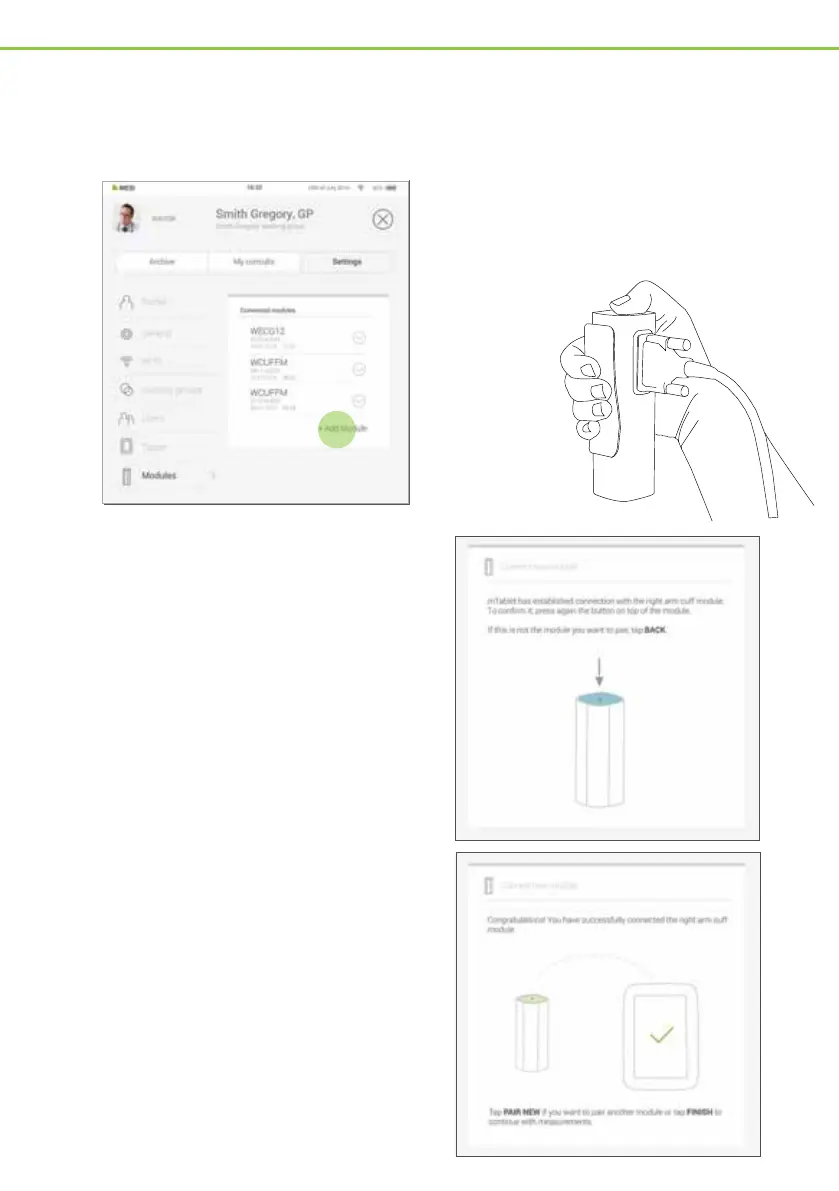
Go to User profile > Settings >
Modules > +Add module
1
2
Before any recordings can be performed, the appropriate module needs to be paired to your MESI
mTABLET. Please take the MESI mTABLET and open the user tab.
Profile
Circles
General
Modules
Sound
Messages Settings
Archive
Janez Novak, dr. med.
Janez Novak working group
DOCTOR
Connectivity
Messages Settings
Archive
Janez Novak, dr. med.
Janez Novak working group
DOCTOR
Connected modules
WECG12
ME02V03-0515000004
22.07.2015 12:05
WCUFFM
ME02V03-0515000004
22.07.2015 12:05
WCUFFM
ME02V03-0515000004
22.07.2015 12:05
+ Add Modul
e
PAIRING DIAGNOSTIC MODULE
Step 1
Press the
button on top
of the
appropriate
module.
Step 2
When the MESI mTABLET establishes a
connection with the module, the light on
top of the module will change. Confirm the
pairing process by pressing the button on
top of the module again.
Step 3
The final screen indicates successful
connection between the MESI mTABLET
and the wireless module. You can access all
technical information about the connected
modules in User profile > Settings >
Modules.
Step 4
MTABSYS - 3/4


 To Next Page