FIRST USE
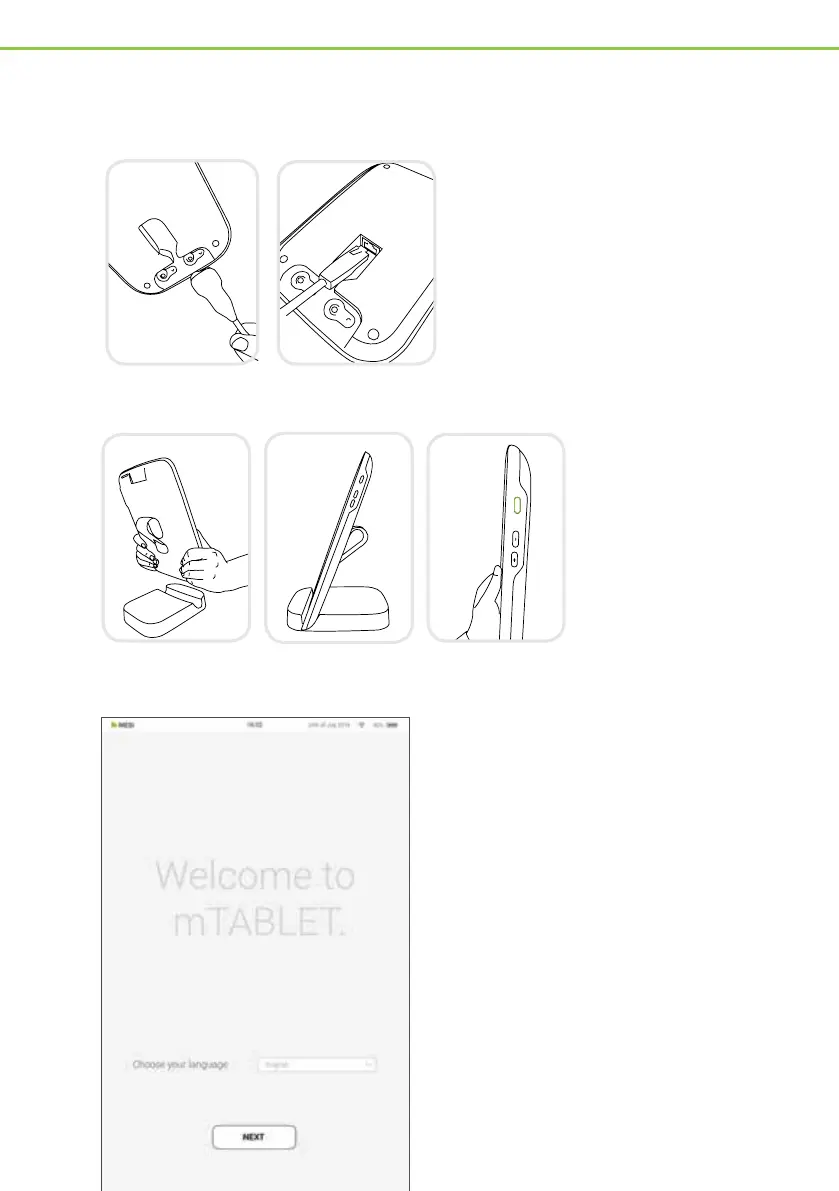
Connect your charging station
to the mains and to the local
area network with the provided
network cable and power
adapter.
1. Connecting the dock
2. MESI mTABLET set up
Before first use, set MESI
mTABLET on the charging
dock to fully charge it.
When MESI mTABLET is
charged, press the ON/
OFF button on the right
side of the tablet to turn on
the device.
3. First boot
Since the MESI mTABLET oers several
languages, select the language you wish to
use from the drop-down menu. This setting
can be changed later in the user settings.
The charging dock for the MESI mTABLET
comes with a built-in Wi-Fi access point
to which the MESI mTABLET will connect
automatically on first use.
If another wireless network is desired, please
select it from the list and enter the security
information.
Wi-Fi is not required for the essential
functions of the MESI mTABLET, but it is
necessary for measurements to be synced to
the MESI mRECORDS web application.
MTABSYS - 2/4


 To Next Page