

EasyManua.ls Logo

Mesqool CR1009Pro - User Manual

Mesqool CR1009Pro
2 pages
Print Icon
To Next Page IconTo Next Page
Loading...
- 02 -- 01 -
Chapter 1 LOCATION OF CONTROLS
27 28
29 30 31 32
1
4
5
6
7
8
171819202122
2
12
13
25
26
3
9
1415
1011
2316
24
Green
Red
Li-ion Battery Indicator
Battery Charging
Button Lock Indicator
Headphone Indicator
Weather Alert Indicator
Working/Fully Charged
Emergency Alert Radio
with AM/FM/SW/NOAA weather/Solar/Hand Crank
CR1009Pro meets the NWS evaluation criteria for NWR All Hazards logo use
CR1009
Pro
Version 1.6
Mad e in China
Red
Flash
Low Battery Power
AAA Battery Indicator
1. USB Output Charging Port
4. Carry Strap Holder
7. SOS Control Button
10. Battery Indicator
13. Lock Indicator
16. Power Indicator
19.WX Alert/Set Time Button
22.Tune+ / Previous Button
25. Red Alert Light
28. Battery Compartment
31. AAA Battery Compartment
2. 3.5mm headphone jack
5. Flashlight Button
8. Telescopic Antenna
11.Time Display
14. Headphone Indicator
17. Power/Lock Button
20. Vol+/Backlight
23. Tune- / Next Button
26. Flashlight
29. Solar Panel
32. Crank Handle
3. Micro USB Input charging Port
6. Reading Lamp Button
9. Band Indicator
12. Weather Alert Indicator
15. Frequency Indicator
18. Band button
21. Vol- Button
24. Speaker
27. Rechargeable Battery
30. Reading Lamp
http://www.mesqool.com
Amazon.ca: help@mesqool.com
Amazon.com: support@mesqool.com
Contact our Expert:
Chapter 2 POWER SUPPLY MODE
5 ways to power the radio:
1. Hand Crank Power
(1) Unfold the crank handle from the backside and rotate it in either any direction.
(2) Rotate the crank handle, It will generate 300-350mA electricity to charge
build-in Li-ion rechargeable battery.
Note: Rotate the crank handle at the speed of 2 laps per second.
It will generate 300-350mA electricity.
2. Solar Power
(1) Expose the solar panel to sunlight, don’t charge indoors.
(2) It will generate 30-50mA electricity to charge build-in Li-ion rechargeable
battery.
Note: Solar panel will generate 30-50mA electricity when exposed to sunlight.
It is difficult to fully charge the Li-ion rechargeable battery with solar panel,
which is mostly used for maintaining the rechargeable battery.
3. AC Adapter Power Supply
Connect the power plug (5V 2A) with the included micro usb cable,then plug into a
110V-220V standard outlet.
Note: (1)Ensure power plug standard is 5V,or it will damage this radio.
(2)Power plug is not included in the package.
4. Li-ion Rechargeable Battery
The radio contains a 5000mAh Li-ion rechargeable battery.
5. AAA Batteries
(1) Open the battery compartment on the back of the unit and insert 3 AAA
batteries making sure the polarity is correct.
(2) When Li-ion Rechargeable Battery power is low, the power source will be
switched to AAA batteries power mode automatically.
1
2
3
5
4
Question and Answer IconNeed help?

Do you have a question about the Mesqool CR1009Pro and is the answer not in the manual?

Summary

Mesquite CR1009 Pro Location of Controls

Device Controls and Indicators

Identifies all buttons, ports, indicators, and physical features of the device for user reference.

Mesquite CR1009 Pro Power Supply Modes

Charging Methods

Details how to charge the device using hand crank, solar power, and AC adapter.

Battery Management

Information on the internal Li-ion and AAA battery systems and their roles.

Mesquite CR1009 Pro Power Switch Functionality

Automatic Power Switching

Explains how the device automatically switches between internal battery sources.

Mesquite CR1009 Pro Charging External Devices

USB Output Charging

Instructions for charging external devices like phones using the radio's USB port.

Mesquite CR1009 Pro Reading Lamp Operation

Reading Lamp Usage

How to use the reading lamp and adjust its brightness levels.

Mesquite CR1009 Pro Flashlight Operation

Flashlight Usage

Instructions for turning on the flashlight and adjusting brightness.

Mesquite CR1009 Pro SOS Alert Functionality

Activating SOS Alert

How to activate and deactivate the emergency SOS alert feature.

Mesquite CR1009 Pro Time Setting

Time Setting Procedure

Steps to set the current time on the device's display.

Mesquite CR1009 Pro LCD Backlight Settings

LCD Backlight Adjustment

How to set or disable the LCD screen backlight.

Mesquite CR1009 Pro Button Lock Function

Button Lock Functionality

How to enable and disable the button lock feature to prevent accidental presses.

Mesquite CR1009 Pro Radio Operation

Basic Radio Functions

Turning the radio on/off, selecting bands, and controlling volume.

Tuning and Scanning Channels

Manual tuning and auto-scanning for radio channels.

Weather Band and Alert Operation

Using the weather band and configuring the weather alert function.

Overview

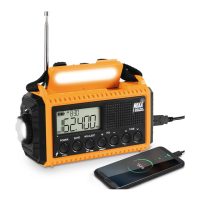
The Mesqool CR1009Pro is an All Hazards NOAA Weather Radio designed for emergency alerts and versatile communication, featuring multiple power supply modes and a range of functionalities. It meets the NWS evaluation criteria for the NWR All Hazards logo use.

Function Description:

The CR1009Pro serves as an emergency alert radio with AM/FM/SW/NOAA weather bands. It is equipped to receive all 7 NOAA weather bands, broadcasting in all 50 states, Puerto Rico, and the U.S. Virgin Islands. The radio features a weather alert function that, when enabled, displays WX and ALERT icons on the LCD, flashes a red alert light, and sounds an audible siren upon receiving a weather alert. Users can manually set the weather alert time for durations such as 4H, 6H, 8H, 12H, 16H, 20H, 24H, or ON (always effective). In standby mode, the radio can still receive weather alerts, activating the siren, red alert light, WX and ALERT icons, and backlight.

Beyond weather alerts, the device offers standard radio functionalities including AM (520KHz-1710KHz), FM (87.00MHz-108MHz), and Shortwave (2.3MHz-23MHz) bands. Users can manually tune channels using TUNE+ and TUNE- buttons, with FM frequency tuning by 0.1 per press. An auto-scanning feature allows the radio to automatically stop once an available channel is found. Volume control is managed via VOL+ and VOL- buttons.

Additional features include a flashlight with two brightness levels, a reading lamp with two brightness levels, and an SOS alert function that activates an alert light and sound in emergencies. The device also has a time setting function, allowing users to adjust hour and minute settings, and an LCD backlight setting with default (15 seconds active) and OFF options. A lock button function prevents accidental button presses during travel.

The CR1009Pro can also charge external devices via its USB output port, making it a useful power bank in emergencies.
Important Technical Specifications:

  • Battery: 5000mAh Li-ion rechargeable battery.
  • Charging Input: Micro USB (5V 2A recommended).
  • USB Output: For charging phones or portable digital devices.
  • Radio Bands:
    • NOAA Weather Band: 162.400/162.425/162.450/162.475/162.50/162.525/162.55MHz
    • AM Band: 520KHz-1710KHz
    • FM Band: 87.00MHz-108MHz
    • SW Band: 2.3MHz-23MHz
  • Battery Life (approximate, under various working conditions with 5000mAh Li-ion battery):
    • POWER OFF: 6500 hours
    • Standby: 100 hours
    • WX Alert: 65 hours
    • FM/AM/SW/WB: 30 hours
    • LAMP: 40 hours
    • FLASHLIGHT: 12 hours
  • Charging Times (5000mAh Li-ion battery):
    • Hand Crank Power: 5 hours (30%), 8.5 hours (50%), 14 hours (80%), 17 hours (100%)
    • Solar Power: 36 hours (30%), 60 hours (50%), 96 hours (80%), 120 hours (100%)
    • Adapter Power Supply: 1.8 hours (30%), 3 hours (50%), 5 hours (80%), 6 hours (100%)

Usage Features:

  • Multiple Power Supply Modes:
    1. Hand Crank Power: Unfold and rotate the crank handle (2 laps per second recommended) to generate 300-350mA electricity for charging the built-in Li-ion battery.
    2. Solar Power: Expose the solar panel to sunlight (not indoors) to generate 30-50mA electricity. Primarily for maintaining the rechargeable battery.
    3. AC Adapter Power Supply: Connect a 5V 2A power plug (not included) via the micro USB cable to a 110V-220V standard outlet.
    4. Li-ion Rechargeable Battery: Contains a 5000mAh Li-ion battery.
    5. AAA Batteries: Insert 3 AAA batteries (not included) into the compartment. The radio automatically switches to AAA battery power when the Li-ion battery is low.
  • Automatic Power Switch: The radio automatically switches to AAA battery power when the Li-ion battery is low. If AAA battery power is also low, the radio will turn off automatically.
  • Charging Phone/Portable Digital Device: Connect a phone charging cable to the USB output port. For a completely drained CR1009Pro, 8-15 minutes of hand cranking can provide enough power for a phone to start up.
  • Controls:
    • USB Output Charging Port, 3.5mm headphone jack, Micro USB Input charging Port.
    • Carry Strap Holder, Flashlight Button, Reading Lamp Button, SOS Control Button.
    • Telescopic Antenna, Band Indicator, Battery Indicator, Weather Alert Indicator, Time Display, Frequency Indicator.
    • Lock Indicator, Power Indicator, Power/Lock Button, Band button.
    • WX Alert/Set Time Button, Vol+/Backlight, Vol-Button.
    • Tune+/Previous Button, Tune-/Next Button, Speaker.
    • Red Alert Light, Flashlight, Rechargeable Battery, Battery Compartment.
    • Solar Panel, Reading Lamp, Crank Handle, AAA Battery Compartment.
  • Indicators:
    • Green: Working/Fully Charged, Weather Alert Indicator, Li-ion Battery Indicator.
    • Red: Low Battery Power, Battery Charging, Button Lock Indicator, Headphone Indicator, AAA Battery Indicator.
    • Flash: Alert.

Maintenance Features:

  • Battery Management: The device is designed to manage power sources automatically, switching to AAA batteries when the Li-ion battery is low.
  • Charging Flexibility: Multiple charging options (hand crank, solar, AC adapter) ensure the device can be powered in various situations, reducing reliance on a single power source.
  • Durability: The device is built to withstand emergency conditions, providing reliable communication and light.
  • Expert Support: Contact information for expert support is provided (Amazon.ca: help@mesqool.com, Amazon.com: support@mesqool.com).

Mesqool CR1009Pro Specifications

General IconGeneral
BrandMesqool
ModelCR1009Pro
CategoryRadio
LanguageEnglish