The M2 Quick Start Guide
Welcome!
The following pages will describe the operation of the M2
measuring software.
User Interface:
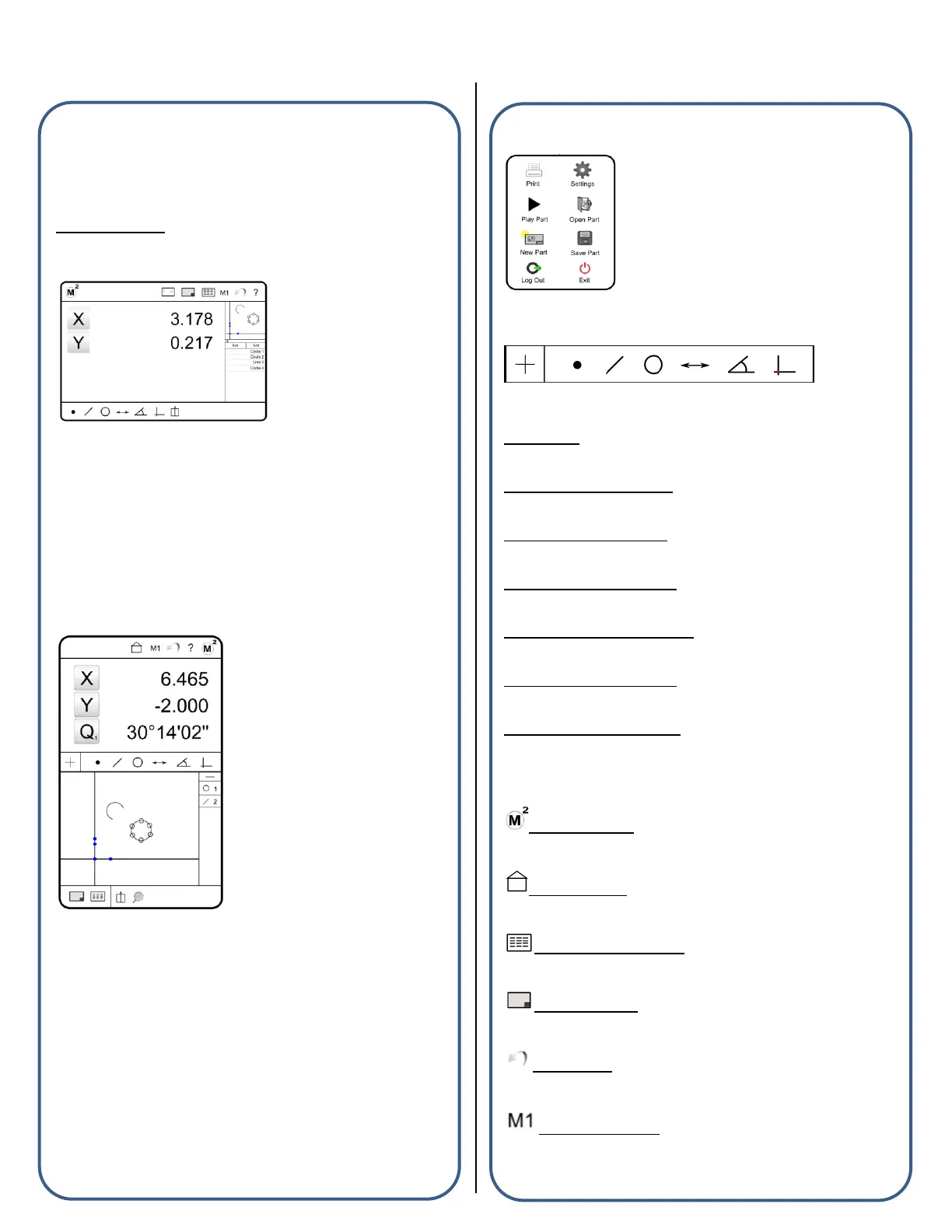
Horizontal Format
The M2 horizontal layout contains three (3) main viewports, one large
viewport on the left side of the screen and two smaller viewports to on
the right side of the screen. The left viewport is the “focus” port and
can provide a large display of the current encoder position, selected
feature detail, or part view. The view selector buttons in the top tool
bars will set the desired view to the “focus” viewport. The viewports
themselves can also be pressed to switch views on the fly. The
location of the small viewports can be changed within the “Desktop”
settings screen.
Vertical Format
The M2 vertical layout contains two (2) main viewports, one on the
upper portion of the screen and one at the bottom. The upper viewport
displays encoder position, feature detail, and active measurement
information. The bottom viewport displays the part view and detailed
report data. The feature and program list are always displayed to the
right of the lower viewport, along the lower right hand side of the
screen.
The M2 System Menu
The Measure Toolbar
Order below is according to the “toolbar” image above (left to right).
Probe Menu: Provides access to the Optical Edge probe buttons.
(For Optical Edge enabled systems only)
Measure Point Menu/Button: Measures Point feature and provides
access to the Point Menu.
Measure Line Menu/Button: Measures Line feature and provides
access to the Line Menu.
Measure Circle Menu/Button: Measures Circle feature and provides
access to the Circle Menu.
Measure Distance Menu/Button: Measures Distance feature and
provides access to the Distance Menu.
Measure Angle Menu/Button: Measures Angle feature and provides
access to the Angle Menu.
Measure Datum Menu/Button: Measures Datum feature and provides
access to the Datum Menu.
The Toolbar Buttons
M2 System Menu: Provides access to the M2 system menu
items.
“Home” Button: Resets the large viewport to the currently
defined “home” view.
Data/Report View Button: Displays the data/report view in the
large viewport.
Part View Button: Displays the part view in the large display
port.
Undo Button: Executes an “Undo” on the last performed
software command.
Magnification Menu: Provides access to the magnification
selection menu.


 To Next Page
 Loading...