EasyManua.ls Logo

Metron Eledyne MP300 - User Manual

Metron Eledyne MP300
24 pages
Print Icon
To Next Page IconTo Next Page
Loading...
Metron, Inc. Date: 09/22/04 Approved: MH DOC#: 605
Revision: B Date: 06/14/06 Approved: MH Page: 1 of 24
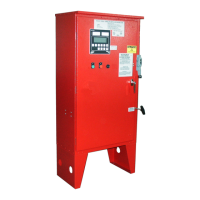
MANUAL FOR MODEL MP300 to MP700
ELECTRIC MOTOR DRIVEN
FIRE PUMP CONTROLLERS
Starting Serial No. "MA"
This manual provides General Information, Installation, Operation, Maintenance and System Set-Up Information for METRON Model
Model MP300 through MP700 Electric Motor Driven Fire Pump Controllers.
TABLE OF CONTENTS
PART I General Information.....................................................................................................................................PAGE 3
PART II Functions......................................................................................................................................................PAGE 3
PART III Operation of the Controller..........................................................................................................................PAGE 4
PART IV Installation & Test Procedure......................................................................................................................PAGE 5
PART V Operator Interface Device (OID) Use and Navigation.......................................................................... PAGE 7
PART VI System Set Point Definitions.....................................................................................................................PAGE 16
PART VII Alarm and Event Log Messages................................................................................................................PAGE 21
APPENDIX 1 Changing Printer Paper and Ribbon Cartridge..........................................................................................PAGE 23
METRON, INC.
1505 West Third Avenue
Denver, Colorado 80223
www.metroninc.com
Telephone: (303) 592-1903 Fax: (303) 534-1947
METRON ELEDYNE LIMITED
18 Autumn Park, Dysart Road, Grantham, LINCS. NG31 7DD. United Kingdom
Telephone: +44 (0) 1476 516120 FAX: +44 (0) 1476 516121 email: info@metroneledyne.co.uk
www.metroneledyne.co.uk
Question and Answer IconNeed help?

Do you have a question about the Metron Eledyne MP300 and is the answer not in the manual?

Summary

Controller Overview and Functions

General Information

Provides general information about the controller's purpose and capabilities.

Controller Functions Overview

Details automatic starting, OID features, alarms, data logging, and manual controls.

Controller Operation

Operating Modes and Testing

Explains automatic, test, and manual operation modes, plus periodic self-testing.

Emergency Manual Operation

Describes the emergency manual operation lever for control circuitry failure.

MP400 Primary Resistance Start

Details the primary resistance starting method for MP400.

Motor Starting Methods

MP420 Part-Winding Start

Explains the part-winding start method for MP420.

MP430 Wye-Delta Open Transition

Describes the Wye-Delta open transition starting for MP430.

MP435 Wye-Delta Closed Transition

Details the Wye-Delta closed transition starting for MP435.

MP450 Autotransformer Start

Explains the autotransformer starting method for MP450.

MP700 Solid State Soft Start

Describes the solid state soft start for MP700.

Installation and Test Procedures

Controller Installation Guidelines

Provides instructions for installing the fire pump controller according to standards.

Post-Installation Test Procedures

Outlines the necessary tests to perform after installation for verification.

Indicator Lights and Status

Explains the meaning of L.E.D. indicators for system status and I/O.

Starting Test Procedures

Details automatic starting tests, weekly tests, and remote start circuits.

AC Power Failure Starting Test

Explains how to test the AC power failure starting feature.

Normal Automatic Operation

Describes normal operation in automatic mode.

Sequential Start Timer for Multiple Pumps

Explains sequential start timers for multi-pump systems.

Pump Room Alarms Monitoring

Describes inputs for various pump room alarms.

Operator Interface Device (OID) Navigation

OID LED Annunciator Guide

Explains the functions of the labeled LEDs on the OID.

Common OID Tasks and Navigation

Details common tasks like silencing alarms, resetting, and mode changes.

OID Screen Map Overview

Provides a visual map of the OID screens and their navigation.

Configuration Settings

Configuration Settings Overview

Details system setpoints, user preferences, tech screens, analog signals, and alarms.

Changing Setpoint Values

Guides on navigating and changing setpoint values using passwords.

Printing Configuration Setpoints

Details options for printing current or all configuration setpoints.

System Set Point Definitions

Pump Start;Stop Pressure and Run Time Settings

Defines pressure thresholds, delay, and minimum run time for the pump.

Ramp Stop and Drain Valve Configuration

Configures ramp down stopping and drain valve for testing.

Automatic Weekly Test Scheduling

Sets the day and time for automatic weekly pump tests.

Alarm and Shutdown Conditions

Covers alarms for power failure, transducer failure, and low intake pressure.

Pressure Switch and Deluge Valve Start

Configures starting the pump via pressure switch or deluge valve.

User Preferences Configuration

System Clock, Date, and Logging Preferences

Sets system clock, date, and preferences for logging pressure drop events.

Pressure Logging and Printing Settings

Configures pressure logging intervals and auto-print settings.

Discharge Pressure Alarms

Sets pressure thresholds and time delays for high and low discharge alarms.

No Load Motor Logging and Display Settings

Configures no load motor logging, LCD backlight, and language.

User Password Management

Sets the password for accessing system configuration screens.

Alarm and Event Log Messages

Phase Failure and Start Failure Alarms

Describes phase failure and pump start failure alarms.

Pressure and Operator Input Events

Describes pressure transducer alarms and operator input events.

System Mode and Low Pressure Events

Logs system mode changes and low pressure events.

Low Intake Shutdown and Other Alarms

Covers low intake shutdown and other alarm conditions.

Auxiliary Alarm Details

Auxiliary Alarm Text Messages

Provides a list of common auxiliary alarm text messages.

Internal Variables for Aux Alarms

Lists internal variables used as inputs for auxiliary alarm user programs.

Printer Operation

Printer Door and Paper Feed

Explains how to open the printer door and use the paper feed button.

Paper Roll and Ribbon Replacement

Guides on replacing the printer paper roll and ribbon cartridge.

Metron Eledyne MP300 Specifications

General IconGeneral
BrandMetron Eledyne
ModelMP300
CategoryController
LanguageEnglish