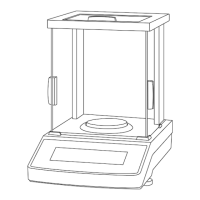
temperature,humidity and other environmental factors,the balance may produce small
error.We can also use the calibration method to eliminate these errors.
Therefore,when using a newly purchased balance for the first time,or moving from one place
to another to use the balance,the balance must be more accurate.
2.Calibration weights
A standard weight for calibration (accuracy 0IMLF
2
or above) should be prepared as
required:
3.Calibration Steps
Preheat the FA series balance scale for 2 hours before calibration.
Take FA2004 as an example,Weighing no-load,press ‘TAR’key,the balance display
0.000g,Then press ‘CAL’key,The’CAL-100’ flash on the display,place the 100g calibration
weight on the plate and wait for seconds until the weight value display changes to
‘100.0000g’.The calibration is over,and you can weigh up.
The internal balance scale has internal calibration weight,it will preheat for 30 minutes after
power on everytime.User can skip it by pressing the ‘TAR’key,and press the ‘CAL’key to
calibrate until value display changes to ‘0.0000’.
If you have another calibration weight,press the ‘CAL’key first,After jumping out of the value
and returning to zero,then press the ‘ON’ and ‘CAL’keys at the same time,After jumping out
the value, put the corresponding weight, remove the weight to return to zero and press the
‘CAL’key,and you can weigh after returning to zero.
4.Mass unit conversion
User presses and hold the ‘FUNC’key in the power-on state,the UNIT-1 displayed is the unit
‘g’;UNIT-2 is the unit ‘CT’;UNIT-3 is the unit ‘OZ’;UNIT-4 is the unit ‘mg’,selected unit release
is the required unit.


 To Next Page
 Loading...