General
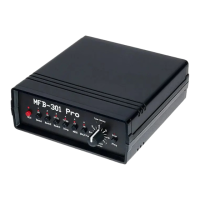
The MFB-301 Pro is a technically advanced reissue of the model MFB-301,
expanded by the claps of model MFB-401. This analog drum computer is
programmable and storable. The patterns can be programmed step by step with
their corresponding parameters. In addition, the unit is fully controllable by MIDI.
To avoid faulty operation, please follow the described key combinations to carry
out specific functions in the exact sequence as described.
Setup
Plug the connector of the supplied power adapter into the mini-USB socket of the
unit. Alternatively, the unit can be supplied with power from a computer or from a
power bank with at least 100 mA current.
Connect the input MIDI In to a keyboard or sequencer.
The unit provides stereo- as well as headphone outputs.
Sounds
Available are eight analogue instruments, being editable in the following
parameters:
BD Bassdrum Pitch, Decay, Tone, Level
SD Snare drum Pitch, Decay, Noise Level, Level
CP Clap Decay, Attack, Level
TT Tom Pitch, Decay, Attack, Level
BO Bongo Pitch, Decay, Attack, Level
CL Claves Pitch, Decay, Attack, Level
CY Cymbal Pitch, Decay, Mix Noise/Metal, Level
HH Hihat Pitch, Decay, Mix Noise/Metal, Level
Sequencer
Push Play to start and stop the sequencer. Use the Value control to adjust the
sequencer tempo, given that the LEDs (Tune/Decay) above are not
lit. Apart from
that the Value control serves to adjust values for the sound parameters.
Loading, saving and deleting patterns
The MFB-301 Pro offers three banks with 36 patterns each. A pattern is loaded by
pressing Bank 1/2/3 (LED above lit). Release the button and subsequently press
two buttons 1-6 to select the memory location (11-66). Saving patterns follows
the same scheme: Here, press and additionally hold REC after pressing Bank first.
Now release both buttons and select the memory location by a combination of 1-
6. A pattern is deleted by pressing and subsequently releasing the buttons REC
and Play.


 To Next Page
 Loading...