MFJ-434B Instruction Manual Voice Keyer
7
IMPORTANT WARNING: Do not inadvertently change the jumper on HD1. This jumper is
set on pins 7-8 and should not be moved.
Other Internal Adjustments
Please note two other important internal settings while the cover is off and the pc board visible:
1. Dual Gain Control, R29: This trimpot, located next to the audio isolation transformer,
sets the overall adjustment range of the Output Level Control located on the rear panel.
If you find the back panel gain control must be adjusted to an extreme setting (high or
low) to provide the correct levels to your radio, you may reset R29 to bring the Output
Level Control back into its center range.
2. PTT Automatic Override, JMP1: This jumper plug enables the Automatic Override
feature that stops outgoing messages whenever the PTT switch is pressed. When the plug
is removed, the automatic override function is disabled.
Audio Lines
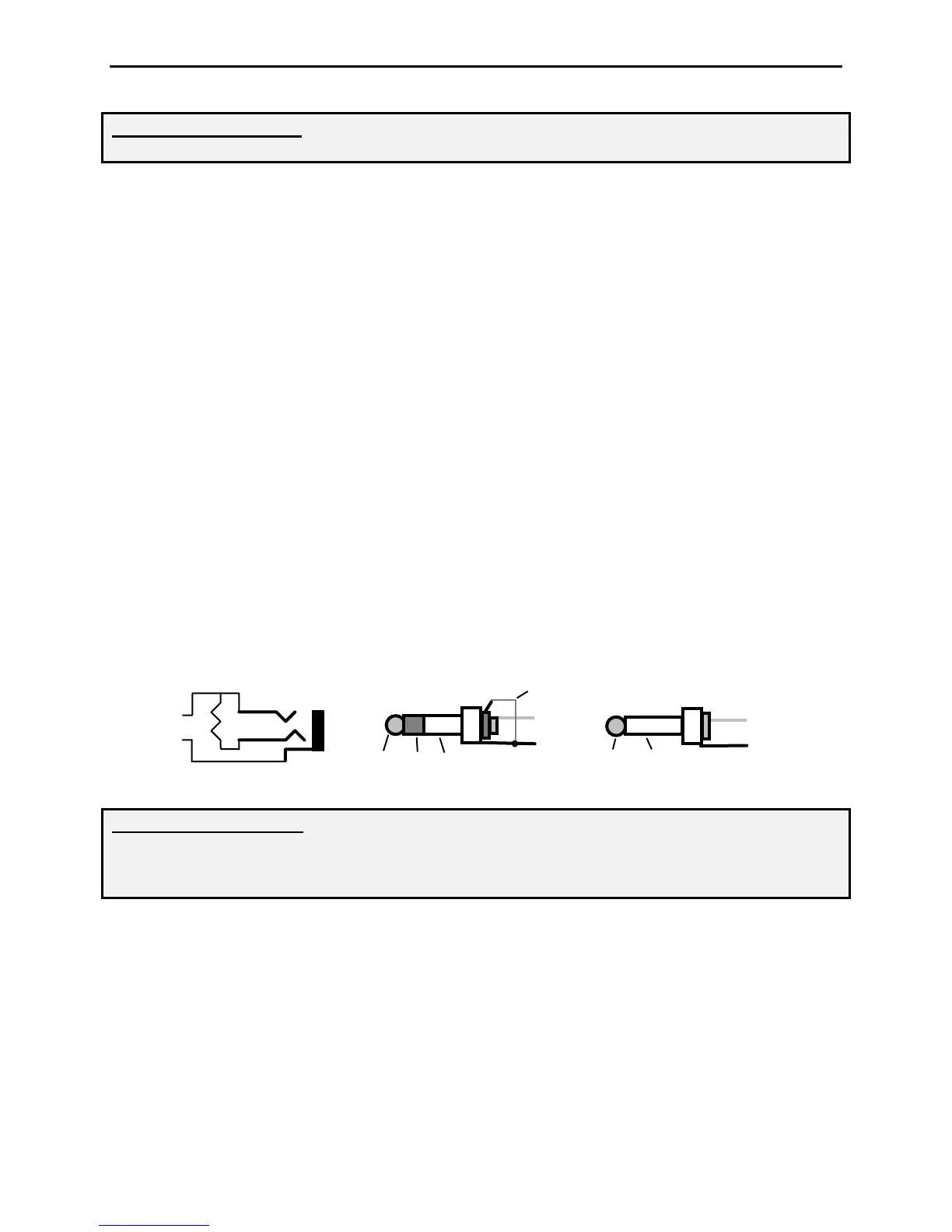
Audio In: This 3.5mm jack accepts audio signals from a receiver or other low impedance
monaural source for recording. Maximum input level is 0 dBm at 600 Ohms (2 Vpp), and the
minimum usable level is –23 dBm into 600 Ohms (0.15 Vpp). Inserting a plug automatically
disconnects the keyer's internal electret mic. Both jack terminals float with respect to ground to
permit connecting balanced or unbalanced sources. If you experience station microphone hum
with an external audio source plugged in, install a 600 Ohm 1:1 audio isolation transformer in
the external audio line (RadioShack RS273-1374). All audio lines, balanced or unbalanced,
should be grounded at one end only.
Stereo Plug
Mono Plug
Audio
Audio
Tip
Sleeve
Tip
Sleeve
Ring
Audio
680
Omit for Hi-Z source
IMPORTANT WARNING: Never exceed 3 Vdc or 3 Vpp input on the “Audio In” jack. If
recorded audio is distorted, either reduce the external audio level control or add external
attenuation to reduce level. When using stereo plugs, connect the ring terminal to the
sleeve for 600-Ohm lines, or leave open for hi-Z audio sources.
Audio Out: This 3.5mm jack provides a low impedance monaural output signal from the
keyer's monitor amplifier, disconnecting the internal speaker when a plug is inserted. Output is
unbalanced, and the monitor amplifier delivers a maximum undistorted signal level of
approximately 4Vpp into 4 ohms (or about 500 mW RMS). The jack's tip lead is "hot" and the
sleeve is connected to both signal and chassis ground. When using stereo plugs, do not wire to
the ring terminal (see input jack diagram above). Note that stereo headphones will not function
properly when plugged into this jack.
Remote Port Connections


 To Next Page
 Loading...