Function instruction
Function instruction
Refrigerant filling and pressure inspection
A. Turn off the blue valve and red valve.
B. Power on the instrument. Then make sure if the LCD displays pressure
test status as below picture. If not, press the Function button to switch it.
C. If the temperature probe accessories have been connected to the
instrument, the real-time temperature will be displayed. If not, no display
of it.
D. Press R+/ R- buttons , Unit button and °C/°F button to select tested
refrigerant and reading display respectively.
E. When the instrument is turned on, there may be 10 digits in the
high and low pressure display area. At this
time, press the zero button long until it returns to zero.
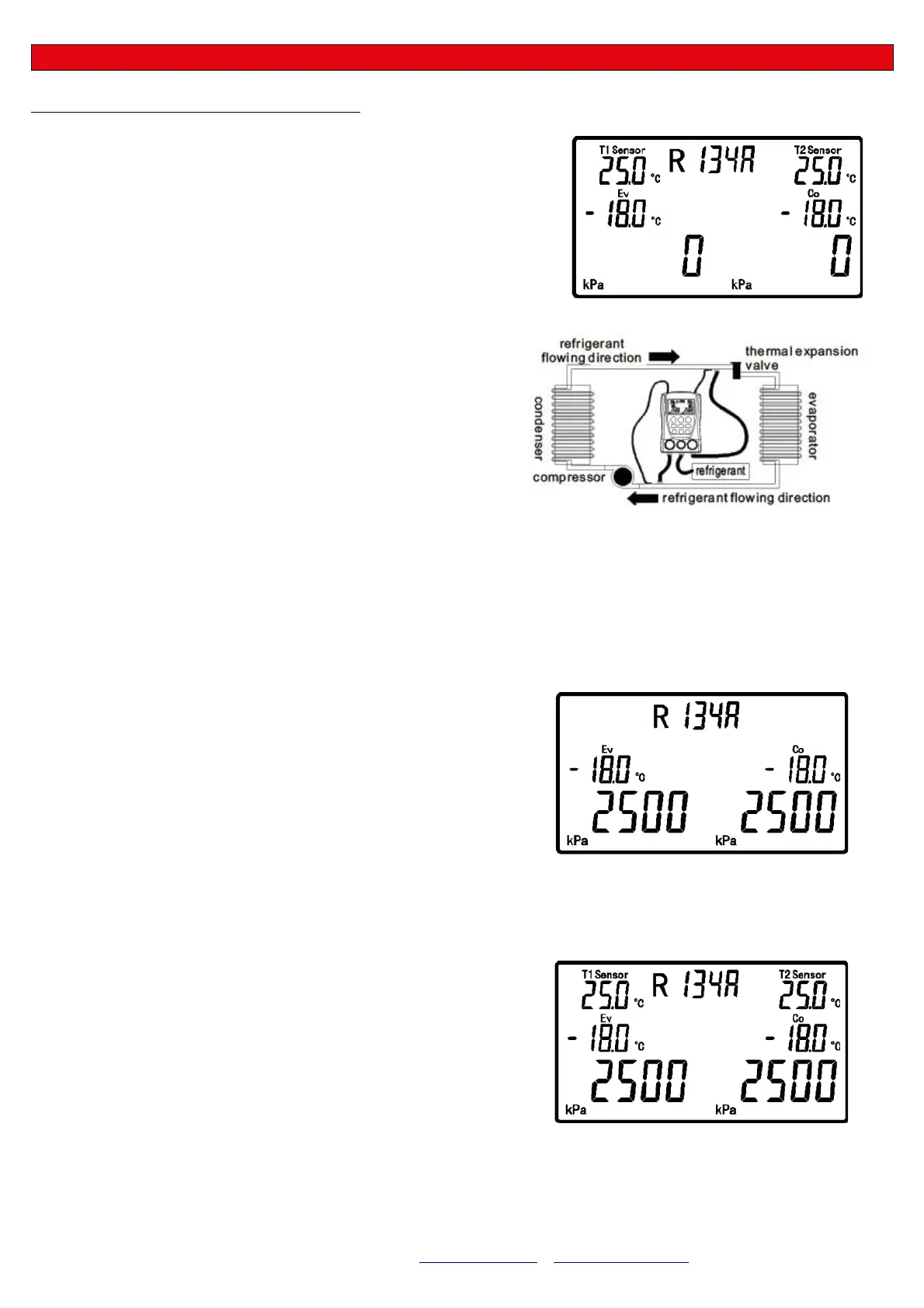
F. Connect the instrument to the refrigeration system according to
the chart below. (pay attention to the direction of the refrigerant
flowing!)
G. Turn on the refrigerant valve and gently press the pressure
release valve to vent the air in the connecting
hose.
H. When the refrigeration system stops, turn on the high pressure valve (red valve) and fill with a certain amount of
refrigerant and then shut the valve quickly.
I. Run the refrigeration system, turn on the low pressure valve (blue valve), and fill with the refrigerant into
the refrigeration system. Vacuum operation is required if it is filled initially or in full with refrigerant. Refer to the section on
vacuum operation.
J. After the filling is completed, shut the low pressure valve (blue valve)
and refrigerant valve. Let the refrigeration system running.
K. Shut down the refrigeration system, make sure all valves are turned off
, then disconnect the instrument between refrigeration system and
source. Do not remove the high pressure valve connection until the
pressure drops to the safe point. Then turn off the instrument.
Note: The filling operation of different equipment or refrigerants may
vary. Please read carefully the relevant specific operation requirements for
filling operation, so as to avoid damage to user or equipment caused by
improper operation!
- The instrument can display the corresponding Evaporation
Temperature (EV) and Condensation Temperature (CO) during the
refrigerant pressure test, as shown below:
- If the clamp-on temperature probes are connected to the instrument,
LCD will display the real-time temperature in the spot T1 Sensor and T2
Sensor, as shown below. Please make sure clamp-on temperature
probes are connected as step F and contacted fully to the refrigeration
pipes.
5
MGF
MGF srl –– Via Chico Mendes, 8 – 43058 Sorbolo Mezzani (PR) Italy – Tel. +39 0521-818301 Fax: +39 0521-818202
e-mail: info@mgftools.com – www.mgftools.com – www.nebulizzare.com


 To Next Page
 Loading...