EasyManua.ls Logo

MHZ TX NewCloner - User Manual

MHZ TX NewCloner
11 pages
Print Icon
To Next Page IconTo Next Page
Loading...
www.mhz.pt
TX NewCloner (MultiCloner)
Frequency below 433 MHZ is forbidden in Europe, They are just allowed in countries where they are authorized, any
handling and used of these is buyer responsibility.
Las frecuencias por debajo de 433 MHZ están prohibidas en Europa, solo se permiten en los países donde están
autorizados, cualquier uso o manejo de estas frecuencias es responsabilidad del comprador.
With compliance with DIRECTIVE 1999/05/CE
MANUFACTURED BY /FAB: ESB06450563
TECHNICAL FEATURES
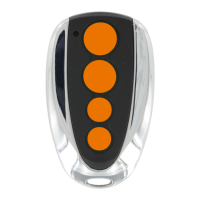
Model TX NEWCLONER
Open
Batt.
1 BATTERY 2032
FREQUENCIES 433,92 TO 900
4 Channels
SPECIAL CHIP
SOFTWARE NEW CLONER PATENTED
ATENCIÓN: ESTE MANDO TRABAJA DE DOS FORMAS DIFERENTES:
1.
2.
ENTRA DIRECTAMENTE EN EL RECEPTOR
CLONA
ATTENTION: THIS REMOTE WORKS IN TWO DIFFERENT WAYS:
1.
2.
ENTERING DIRECTLY IN THE RECEIVER
CLONING
CETTE TÉLÉCOMMANDE TRAVAILLE DE DEUX FAÇONS DIFFÉRENTES:
1.
2.
ELLE ENTRE DIRECTEMENT SUR LE RECEPTEUR
ELLE FAIT UN CLON
English Programming Instructions
1. Locate the selector switch in the back of the remote. Use a paper clip or small object to pry up the rubber cover
to expose the selector switch.
2. Set your selector switch for the desired manufacture. See Chart Below
3. The remote is ready to be used, please refer to your receiver’s user manual.
Note: To programming BFT, MUTANCODE and ERREKA- Hidden button (beside the switches) will be necessary.
Español Instrucciones de programación.
1. Localice los DIP switches en la parte trasera del mando. Use un clip o un objeto pequeño para retirar la goma
protectora que da acceso a los DIP switches.
2. Seleccione la combinación correspondiente de DIP switches de acuerdo a la marca deseada. Véase la tabla a
continuación.
3. El mando está listo para usarse. Por favor, diríjase al manual de usuario de su receptor.
Question and Answer IconNeed help?

Do you have a question about the MHZ TX NewCloner and is the answer not in the manual?

Summary

TX NewCloner (MultiCloner) Overview and Features

Technical Features

Key technical specifications of the TX NewCloner device, including frequency and channels.

General Programming Instructions

Instructions for setting up the remote for direct receiver entry, including DIP switch usage.

Direct Receiver Programming: DIP Switch Configurations

DIP Switch Settings for BFT, NICE, BENINCA

DIP switch configurations for BFT, NICE, and BENINCA compatible devices.

DIP Switch Settings for DEA, ERREKA, GIBIDI

DIP switch configurations for DEA, ERREKA, and GIBIDI compatible devices.

DIP Switch Settings for FAAC, MUTAN, DOORHAN

DIP switch configurations for FAAC, MUTAN, and DOORHAN compatible devices.

DIP Switch Settings for PROTECO, DITEC, KINGATE

DIP switch configurations for PROTECO, DITEC, and KINGATE compatible devices.

DIP Switch Settings for KEY, ROGER, TELCOMA

DIP switch settings for KEY, ROGER, and TELCOMA compatible devices.

DIP Switch Settings for V2, SOMMER, CARDIN

DIP switch settings for V2, SOMMER, and CARDIN compatible devices.

Cloning Mode Operation and Settings

Cloning Procedure

Step-by-step instructions for cloning a transmitter using the TX NewCloner.

DIP Switch Settings for Cloning

DIP switch configurations specific to the cloning function for various brands.

Summary

TX NewCloner (MultiCloner) Overview and Features

Technical Features

Key technical specifications of the TX NewCloner device, including frequency and channels.

General Programming Instructions

Instructions for setting up the remote for direct receiver entry, including DIP switch usage.

Direct Receiver Programming: DIP Switch Configurations

DIP Switch Settings for BFT, NICE, BENINCA

DIP switch configurations for BFT, NICE, and BENINCA compatible devices.

DIP Switch Settings for DEA, ERREKA, GIBIDI

DIP switch configurations for DEA, ERREKA, and GIBIDI compatible devices.

DIP Switch Settings for FAAC, MUTAN, DOORHAN

DIP switch configurations for FAAC, MUTAN, and DOORHAN compatible devices.

DIP Switch Settings for PROTECO, DITEC, KINGATE

DIP switch configurations for PROTECO, DITEC, and KINGATE compatible devices.

DIP Switch Settings for KEY, ROGER, TELCOMA

DIP switch settings for KEY, ROGER, and TELCOMA compatible devices.

DIP Switch Settings for V2, SOMMER, CARDIN

DIP switch settings for V2, SOMMER, and CARDIN compatible devices.

Cloning Mode Operation and Settings

Cloning Procedure

Step-by-step instructions for cloning a transmitter using the TX NewCloner.

DIP Switch Settings for Cloning

DIP switch configurations specific to the cloning function for various brands.

MHZ TX NewCloner Specifications

General IconGeneral
BrandMHZ
ModelTX NewCloner
CategoryRemote Control
LanguageEnglish