Remote Control Button Introduction
FUT089 Button Introduction
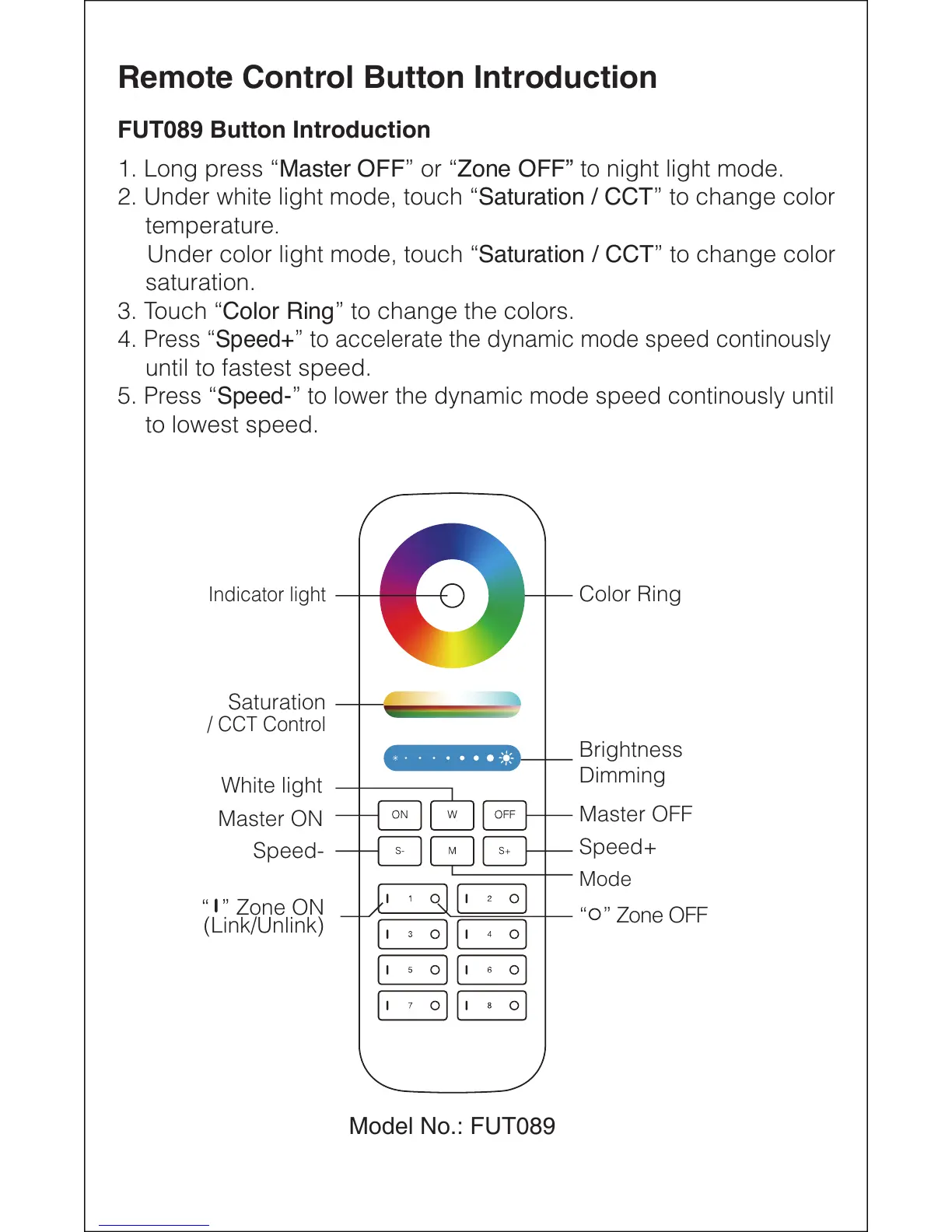
1. Long press “Master OFF” or “Zone OFF” to night light mode.
2. Under white light mode, touch “Saturation / CCT” to change color
temperature.
Under color light mode, touch “Saturation / CCT” to change color
saturation.
3. Touch “Color Ring” to change the colors.
4.
Press “Speed+” to accelerate the dynamic mode speed continously
until to fastest speed.
5.
Press “Speed-” to lower the dynamic mode speed continously until
to lowest speed.
Color Ring
Speed+
Mode
Speed-
White light
Saturation
Indicator light
Master OFF
Master ON
/ CCT Control
Brightness
Dimming
“ ” Zone OFF
“ ” Zone ON
(Link/Unlink)
Model No.: FUT089


 To Next Page