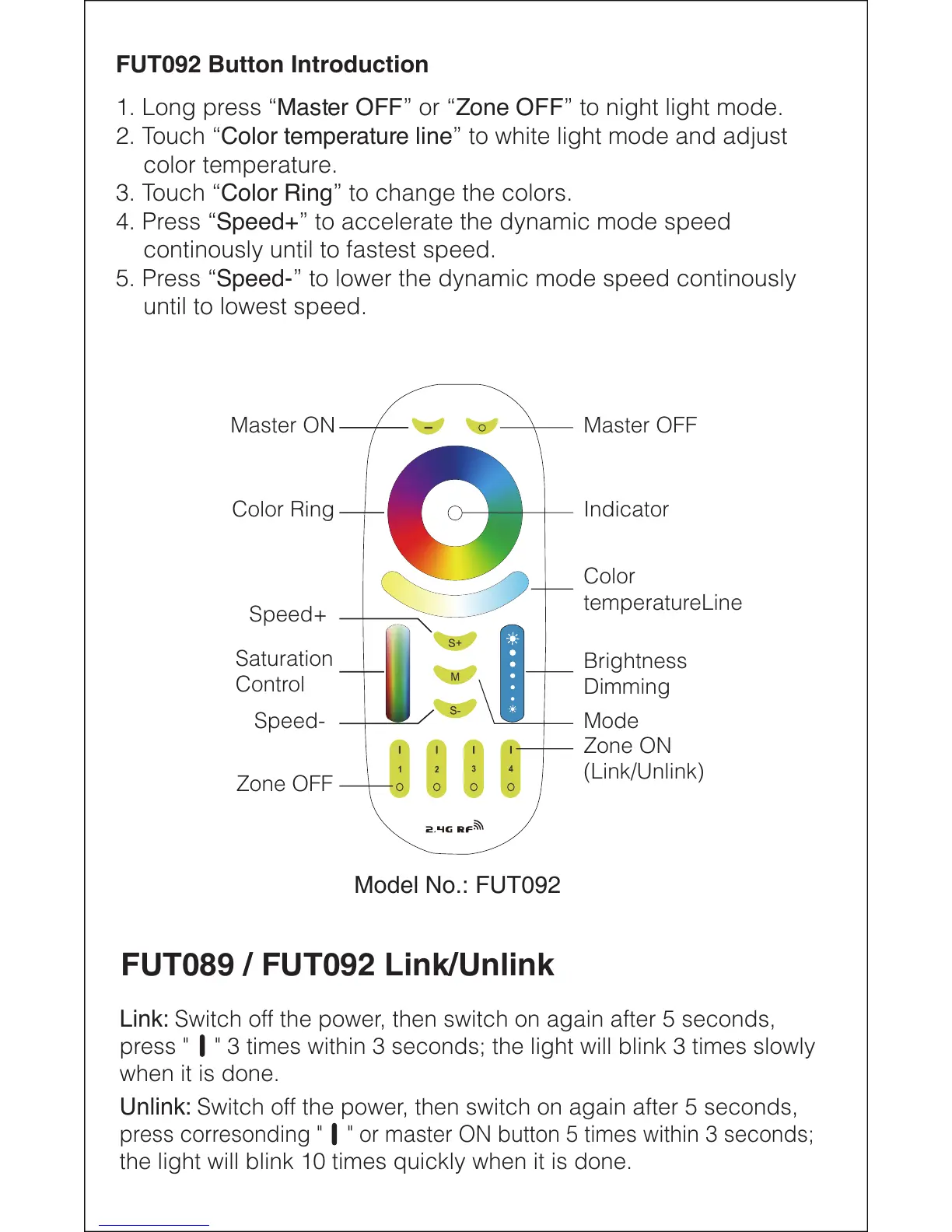
FUT092 Button Introduction
1. Long press “Master OFF” or “Zone OFF” to night light mode.
2. Touch “Color temperature line” to white light mode and adjust
color temperature.
3. Touch “Color Ring” to change the colors.
4. Press “Speed+” to accelerate the dynamic mode speed
continously until to fastest speed.
5. Press “Speed-” to lower the dynamic mode speed continously
until to lowest speed.
FUT089 / FUT092 Link/Unlink
Link: Switch off the power, then switch on again after 5 seconds,
press " " 3 times within 3 seconds; the light will blink 3 times slowly
when it is done.
Unlink: Switch off the power, then switch on again after 5 seconds,
press corresonding " " or master ON button 5 times within 3 seconds;
the light will blink 10 times quickly when it is done.
Master ON
Color Ring
Speed+
Speed-
Saturation
Control
Master OFF
Indicator
Color
temperatureLine
Brightness
Dimming
Mode
Zone ON
(Link/Unlink)
Zone OFF
Model No.: FUT092


 To Next Page
 Loading...