7
©2021 Micro-Air Corp August 2, 2021, revision 1.4
Operating the thermostat
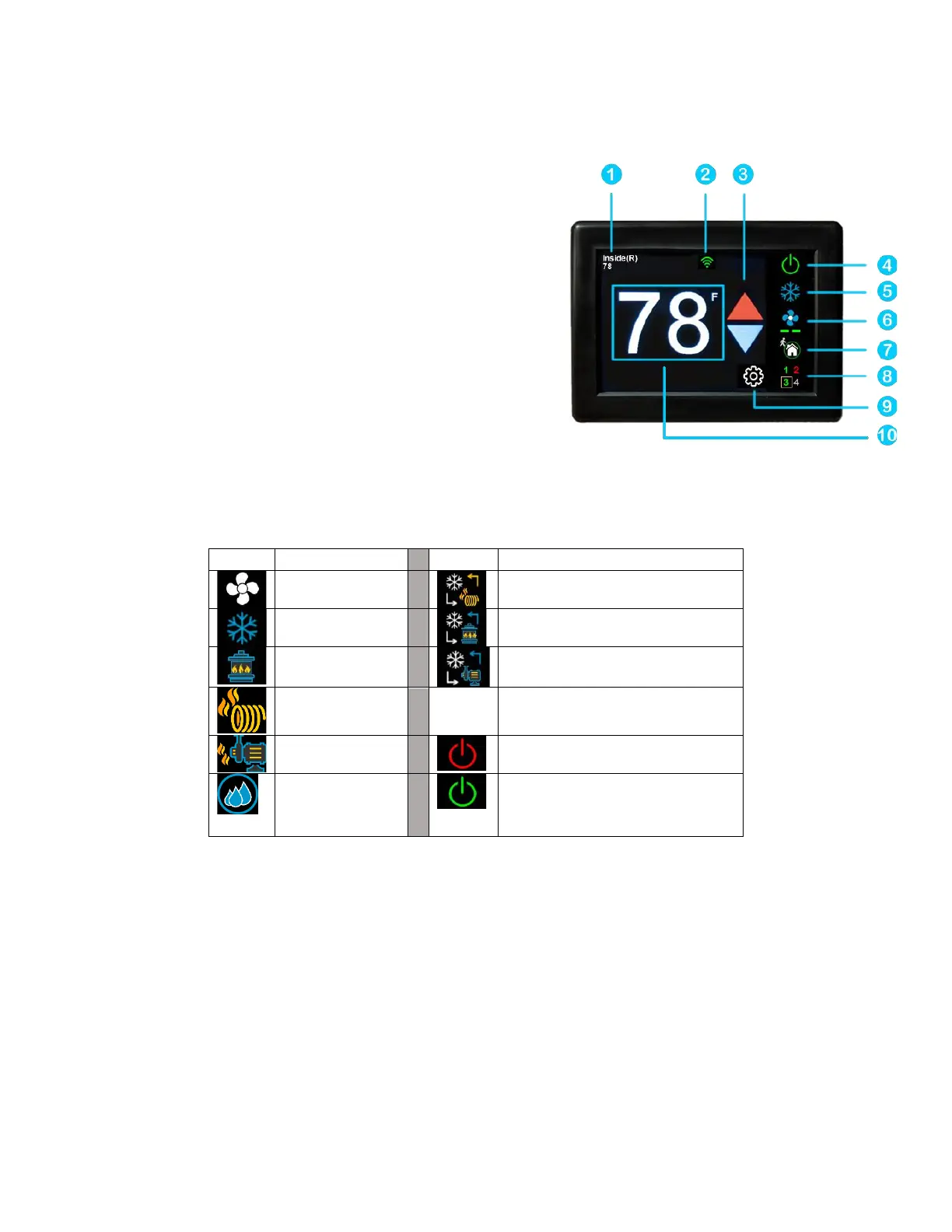
Main screen
1. Inside temperature shows the ambient temperature of
the room.
2. WIFI indicator shows the state of the WIFI connection.
Green indicates WIFI is connected properly, Red
indicates connection to router only, bars indicate signal
strength, and no symbol indicates no connection.
3. Raise and lower the temperature set point using the
red and blue arrows.
4. Use the power button to turn the system on or off.
Button is red for off and green for on.
5. Pressing the mode icon changes from cooling or
heating modes depending on what is available in your system. See table 2 for a list of all possible
modes.
Table 2
6. Pressing the fan icon selects between manual (always on) fan speeds and automatic fan speeds.
Automatic will turn the fan off after the heating or cooling cycle is completed. See table 3 for
available fan speeds.



 To Next Page