ENEN
20
Notes :
1. Press and hold the power button for 3 seconds to turn the Scooter ON/OFF.
2. Automatic shutdown time of the whole Scooter: 10 minutes.
3. Cruise control: keep the current speed for 5 seconds to enter the cruise mode.
Exit the cruise mode when pressing accelerator again or brake.
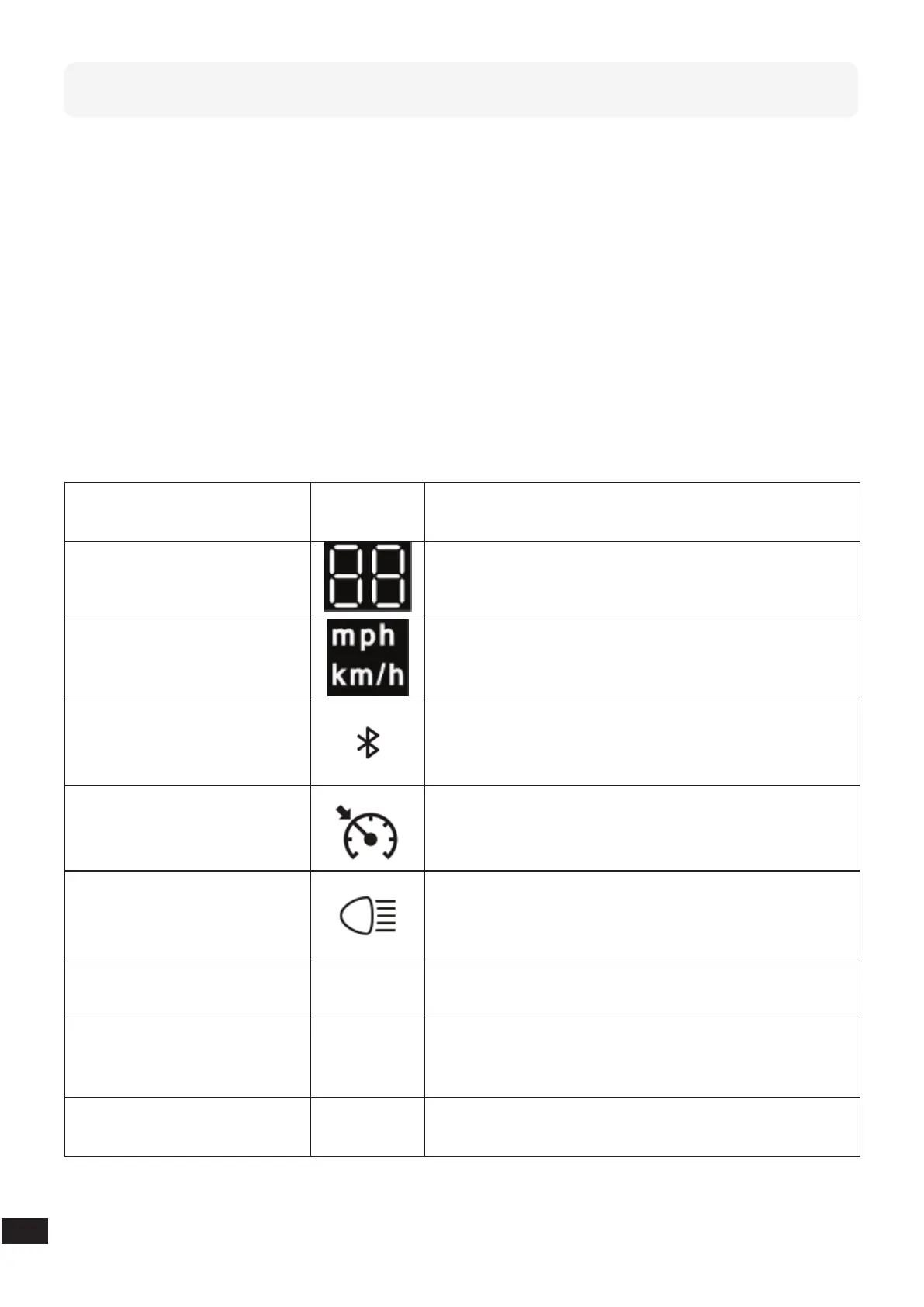
Instructions of Buttons
ON/OFF
Press and hold the power button for 3 seconds to
turn the Scooter ON/OFF.
Speed
This gure shows your current speed in km/h or mph.
Speed Unit
Press the power button 3 times to change between
mph and km/h.
Bluetooth
Once you are switching on the Bluetooth on your
phone the Bluetooth Icon will show up on the display.
Cruise Control
Keep the speed for 5 seconds: The cruise control icon
will appear on the screen and the buzzer rings once.
Front and Rear-Light
Press the power button 2 times to switch on the front
and rear light.
Riding Modes
Press shortly the power button to change between
the dierent riding modes.
Fault
In case of a product fault an error code will appear
on the display, and you will hear a continuous alarm
sound.
Battery
Five cells show the remaining battery capacity. One
cell stands for 20%.


 To Next Page