The Microbeau Flux Mini is a wireless pen-style machine designed for permanent makeup (PMU) applications, featuring a detachable battery and a direct drive 2.5 mm stroke. It is a Class III appliance, meaning it is designed to be supplied from a separated/safety extra-low voltage (SELV) power source, ensuring user safety by minimizing the risk of electrical shock. The device is built with extra safety features that exceed Class I and Class II appliances, making it suitable for medical devices and compliant with Class III regulations.
Important Technical Specifications:
- Operating Voltage: 5 - 10 V DC
- Current: 0.5 A
- Stitch Frequency: 25 - 160 Hz
- Stroke: 2.5 mm
- Connection: USB-C
- Drive: 2.12 watt motor
- Operating Mode: Continuous operation
- Ambient Temperature: +10 to +35 °C
- Relative Humidity: 30 to 75%
- Dimensions (Ø X L): 35 x 125 mm
- Weight: Approx. 170 g
- Fast Charging Speed: Up to 1.0 A
Usage Features:
The Flux Mini is powered by a USB-C Li-ion battery, which includes a charge and voltage LED indicator. The device features a proprietary motor design with a Direct Drive 2.5 mm stroke, ensuring consistent performance. It also incorporates a ratcheted, adjustable needle depth system for precise control during procedures.
The Grip:
The Flux Mini grip allows artists to control needle depth through a ratcheting mechanism. The standard grip has a diameter of 28mm, with other grip options available. The grip is crafted from a solid rod of 6061 T6 aircraft-grade aluminum. This polished and anodized grip is safe to be sterilized under steam, in an autoclave, or sprayed with cold sanitation solutions. It is an autoclavable ergonomic grip design and is compatible with most membrane needle cartridges on the market.
The Body:
The body of the machine is the core of the device, constructed from a solid rod of 6061 T6 aircraft-grade aluminum. This module should be sanitized by wiping it with cold sterilization solutions only. It is crucial to avoid getting fluids into the housing. The body includes a ratcheted disk system and friction stabilizing O-rings.
The PowerBolt (Battery Housing):
The PowerBolt is the detachable battery housing. The LED indicator on the PowerBolt provides visual feedback on the battery status and voltage.
- LED Indicator Color:
- Solid green = Whole Value
- Blinking green = Half Increment
- Ex: Solid green indicates 10V
- Flashing green indicates 10.5V
- Battery Level Check: Press and hold the power button until white. A blinking colored light indicates remaining charge.
- Green: 100 - 98%
- Yellow: 97 - 60%
- Orange: 59 - 40%
- Red: 39 - 15%
- Red (blinking): 14 - 0%
- Note: LED flashes while battery charges. Once < 15% is reached, red light will blink alternately with voltage.
- Activating Modes: Press and hold the power button to cycle through modes, releasing when LED color flashes.
- White: Indicates battery charge level.
- Green: Set voltage reduction from 0.1 to 0.5 voltage steps.
- Orange: Automatic LED Brightness dimming (enable/disable).
- Light Blue: Manual LED brightness control (use "up" and "down" to control).
- Red (Travel Safe Mode): Press and hold the power button until the LED flashes red. This mode is for when you want to avoid unnecessary discharge and/or comply with travel laws. To reactivate, connect/disconnect to a USB-C port.
- Reset (Factory Settings): Should you experience abnormal behavior, hold the power button and the voltage down button at the same time, then quickly release.
Detaching the PowerBolt:
To detach the battery, ensure you have a firm grip on the Body and Grip. Turn the battery counter-clockwise and pull out. To attach the battery, push in while twisting clockwise. Ensure that the locking mechanism moves freely. The battery must sit correctly to ensure that the power leads align. Avoid contact with the battery leads while recharging or servicing.
USB-C Connection and Charging:
The Flux Mini uses a USB-C connection for charging. The connecting terminal is compatible with most USB-C cables on the market. It is recommended to use the included cable for recharging the battery. To charge, plug the USB-C cord into the battery connector. The battery can be recharged whether or not it is connected to the Flux Mini.
Adjusting Needle Depth:
To adjust needle depth, hold the machine body and battery while turning the Grip. A counter-clockwise turn decreases depth, while a clockwise turn increases depth (also known as needle hang). Each time you turn the grip, you can feel the feedback of the ratcheting mechanism. Each "click" displaces your needle 0.2mm, allowing you to set your needle precisely without involuntarily turning.
Voltage Parameters:
The machine has been tested to operate at a minimum voltage of 5 Volts and a maximum voltage of 10 Volts. Depending on the type of needle configuration and brand you use, feel free to adjust the voltage to obtain the desired performance.
Accepted Needles:
Only cartridge needles with an internal membrane should be used. This will avoid accidental contamination inside your machine. Fluids such as ink, water, or oil will void the warranty of the device and may require replacement of internal parts.
Maintenance Features:
- Flux Mini is sold pre-lubricated from the factory and does not need internal lubrication.
- Prevent any type of external elements from entering inside the machine as they will disrupt the motion of the component and contaminate lubrication.
- The grip of the machine is autoclavable. Use only steam autoclaves at temperatures no higher than 270° Fahrenheit or 132.222° Celsius. Add a hint of ointment or PTFE grease around the internal opening of the grip or on stabilizing friction O-rings for optimal functionality after autoclaving.
- Machine Body and Battery can be sanitized from the outside with cold sterilization products.
- Never spray the surface directly to prevent fluids from entering the machine. Always use pads or disposable paper towels to apply sterilization products.
- DO NOT DISASSEMBLE MACHINE.
Warranty:
- All the housing components (Grip, Machine Body, and Battery) are covered by a lifetime warranty.
- Internal parts are subject to wear and the motor itself will be covered by a 1-year warranty from the date of purchase.
- Motor warranty is void if the motor shows signs of being dropped, of internal fluids entering the motor, and/or if the motor shows signs of being tampered with in any way.
Handy Tips:
- Always secure your machine. Dropping the machine can cause damage to the magnets, bearings, and brushes of the motor.
- Use only cartridges with membranes to avoid contamination.
- Rinse your needle frequently to avoid pigment drying up and slowing down your cartridges. When rinsing your needle, ensure to dip only the tip of the cartridge to avoid backflow of fluids.
- Inspect your needles prior to use.
- Avoid scratching the surface of the embodiments.
- Use only FDA-approved cold sterilization solutions for disinfection.
- Do not lubricate the machine unless instructed otherwise.
- Store your machine in a secure place.
- Before first use, charge the battery for a minimum of 3 hours.
Troubleshooting:
- Machine manufacturer: Microbeau Int.: 1771 NW 79th Avenue, Doral, Florida 33126
- Servicing your machine: Just like any mechanical device subject to use, Microbeau strongly suggests that you service your product at least once a year to ensure that a proper diagnosis of all working parts is conducted. This ensures the optimal condition of all working parts, including internal machine clean-up and fresh lubrication. Routine servicing will ensure that your machine remains functioning like the very first day. Service is subject to fees.
- Warning: Disconnect the machine from any power before making any adjustments.
For service inquiries, please contact service@microbeau.com. For additional tips and tutorials, please visit Microbeau's YouTube channel.

 Need help?
 General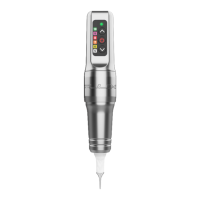

 To Next Page
