AC IN
FUSE
T800mAL250V
AUX
INPUT
5.1
INPUT
L
R
FRONT
L
FRONT
R
CENTER
BASS
REAR
L
REAR
R
AUDIO OUTPUT
R
L
R
L
FRONT BASS REAR
CENTER
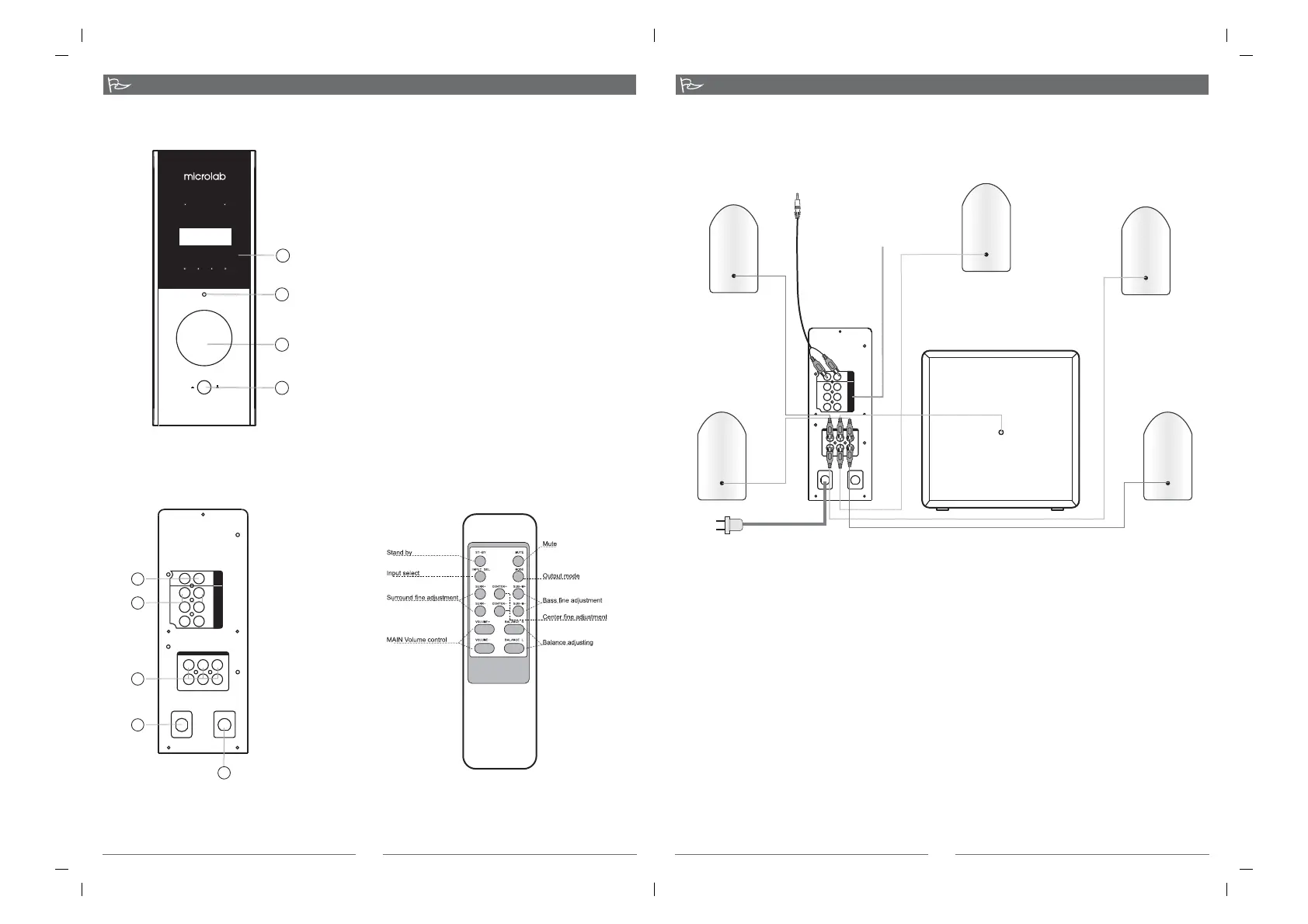
*Front View of the Amplifier
*Back View of the Amplifier
Function Instruction
1
2
3
5
1.DIGITAL DISPLAY
2.INPUT SELECT
Push input select button to select aux input or 5.1 input
audio input
3.VOLUME CONTROL
Adjust the speaker system's volume, turn the volume
control anti-clockwise to minimum, adjusting the
volume control to your demanding level
4.POWER
Press this key down to switch the system ON,
Press this key up to place the system OFF
4
1
2
3
POWE R MUTE
5.1C H AUX 5. 1CH 2.1 CH
INPUT OUTPUT
IN PUT S EL
MASTER VOLUME
POWER
ON OF F
MULTIMEDIA AUDIO AMPLIFIER
1.AUX INPUT
RCA input jack
2.5.1 INPUT
RCA input jack
3.AUDIO OUTPUT
RCA output jack
4.POWER CORD
5.FUSE
3
1. Connect the woofer, front left/right, center, rear left/right speaker cables to the appropriate audio
output sockets on the back of the amplifier.
2. While connecting to VCD/DVD, etc, please use the double RCA ends audio cables. Connect one
end of the audio cable to the sockets of the
the other end to the
3. While connecting to , please use the 3.5mm-2RCA audio cable.
Connect the 3.5mm end of the audio cable to the audio output sockets on the
, then other end to the aux Input sockets on the back of amplifier.
4. Check the connection and make sure every cable is correctly connected, then connect power plug
to the right AC outlet.
appropriate 5.1 input front left/right, center, rear
left/right channel on the back of the amplifier., appropriate audio output
sockets on the VCD/DVD.
sound card(CD MP3,etc)
sound card (Cd
MP3,etc)
The shape of the plug and power outlet depends on the country of use.
、
、
System Connection
4
4
AC IN
FUSE
T800mAL250V
AUX
INPUT
5.1
INPUT
L
R
FRONT
L
FRONT
R
CENTER
BASS
REAR
L
REAR
R
AUDIO OUTPUT
R
L
R
L
FRONT BASS REAR
CENTER
Amplifier
Subwoofer
FRONT R
CENTER
REAR L
FRONT L
REAR R
PC sound card or other
stereo audio source
DVD player or computer 5.1
channer sound card
*Front View of Remote control
80-fc365-97-0001-03 20070213 20070801


 To Previous Page