EasyManua.ls Logo

Micronta 22-025 - Page 5

Default Icon
8 pages
Print Icon
To Next Page IconTo Next Page
To Previous Page IconTo Previous Page
Loading...
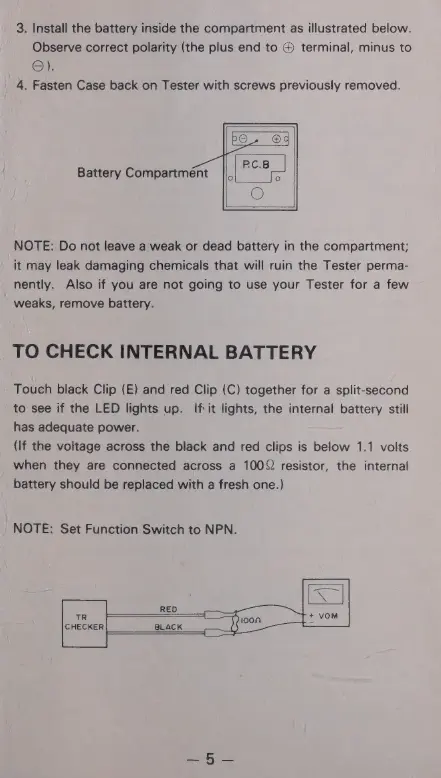
3.
Install
the
battery
inside
the
compartment
as
illustrated
below.
Observe
correct
polarity
(the
plus
end
to
®
terminal,
minus
to
ӨЛ
4.
Fasten
Case
back
on
Tester
with
screws
previously
removed.
Battery
Compartment
NOTE:
Do
not
leave
a
weak
or
dead
battery
in
the
compartment;
it
may
leak
damaging
chemicals
that
will
ruin
the
Tester
perma-
nently.
Also
if
you
are
not
going
to
use
your
Tester
for
a
few
weaks,
remove
battery.
TO
CHECK
INTERNAL
BATTERY
Touch
black
Clip
(E)
and
red
Clip
(C)
together
for
a
split-second
to
see
if
the
LED
lights
up.
If
it
lights,
the
internal
battery
still
has
adequate
power.
(If
the
voltage
across
the
black
and
red
clips
is
below
1.1
volts
when
they
are
connected
across
a
1002
resistor,
the
internal
battery
should
be
replaced
with
a
fresh
one.)
NOTE:
Set
Function
Switch
to
NPN.