ENGLISH
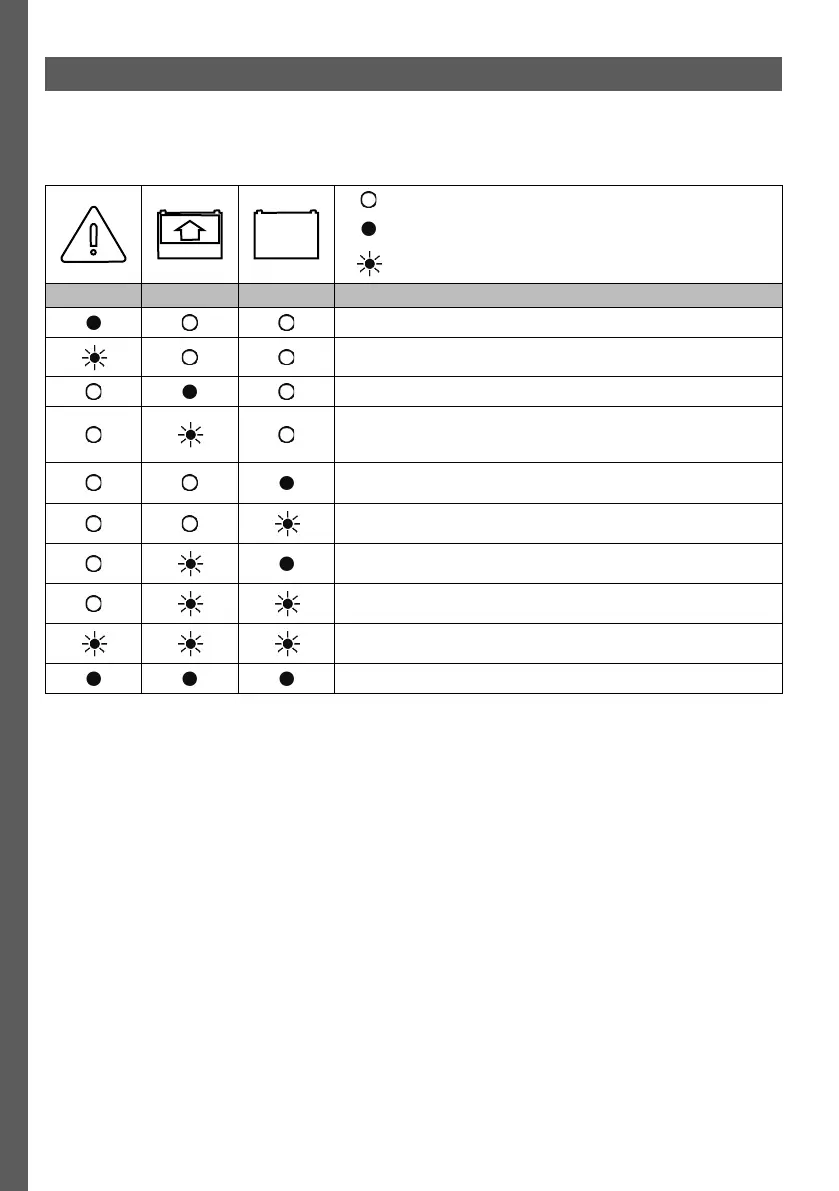
Indicators status on the Control panel
Table 1
Off
On
Flashing
Red Yellow Green Information
An alarm is active.
Software malfunction
A battery is connected to the charger and a charging is in progress.
A battery is connected to the charger but charging is restricted. The
restriction can be due to settings in the Time restriction, Remote in
function or during a BMU initialization.
A battery is connected to the charger and the charging process is
completed.
The charging process has been manually stopped. Press ESC to
resume charging.
Equalize charging in process.
Watering in progress. Watering can be active without this indication.
An indication request has been sent from Access™ Service tool.
Charger is in bootloader mode. Wait until charger automatically restarts.
8


 To Next Page