To connect your console to a
wireless network:
1 Turn on your console and any
wireless networking devices (such
as access points or routers).
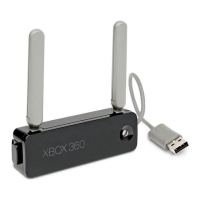
2 Attach the wireless networking
adapter to the back of your
console (see “Attach the Adapter
toYourConsole”)orsetitupaway
from your console (see “Set Up
the Adapter Away from Your
Console”).
3 Theconsolewillrecognizethe
adapter and lead you through
networkconguration.Youwillbe
asked to enter your wireless
network settings.
Once you’ve completed network
conguration,theconsoleshouldbe
connected to your wireless network.
Your Network Settings
Use this section to record your
network settings. If you are using
boththe2.4-GHzand5-GHzbands,
you must have different network
names (SSIDs) for each band. All
computers and devices accessing a
network with a wireless connection
must use the same wireless network
settings.
Workgroup name (if used):
5-GHz (802.11a/n) Network
Wireless network name (SSID):
Wireless security setting:
2.4-GHz (802.11b/g) Network
Wireless network name (SSID):
Wireless security setting:


 To Next Page