EasyManua.ls Logo

Microsound TS631 - User Manual

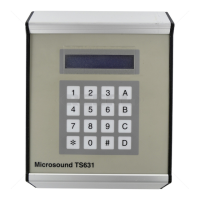
Microsound TS631
4 pages
Print Icon
To Next Page IconTo Next Page
Loading...
TS631
Reworded 13 November 2013 Page 1 of 4
MICROSOUND
AC/DC Modified TS631 Manual
Step-by-Step Directions for programming TS631 Time Switch
Power On - Time Switch goes into time mode displaying Microsound TS631, the current day and time.
WHEN PROGRAMMING IS FINISHED, THE TIME SWITCH MUST BE IN THIS MODE.
To ring the bell manually, press B while in this mode
D Changes to the next mode
#
Changes back to the last mode
Please Note that it is normal for the unit to loose +/- 60seconds over a month or two. To adjust the current time,
please go to step No. J below. <<TIP: Use Telkoms time line Tel: 1026 to get exact time>>
A. ENTER NEW ALARM (To set the alarm time i.e. when the bell/siren must be triggered)
1. Press D once to go into
Enter new alarm
mode.
2. Press
*
once to start programming the alarm times
3. Press: 1 for Monday / 2 for Tuesday / 3 for Wednesday /
4 for Thursday / 5 for Friday / 6 for Saturday / 7 for Sunday,
the cursor will then jump over to the zeros.
4. Enter time in 24 hour format hours 00: minutes :00: seconds :00
Note: Seconds must always be 00
E.g. 0 7 :4 5 :0 0 or 1 2 :0 0 :0 0 .
5. Press A to accept your new alarm. To clear an alarm time, press C .
6. Display will again show: Mon 00:00:00
7. Continue entering your alarms. When finished press D or # .
B. VIEW ALARMS (To check the alarms that have been programmed)
1. Press
*
to view the times that have been programmed.
2. Press B
to move forward to the next time. This can be done until the display shows
No more
Alarms
”. To move b
ack through alarms press A .
3. To delete only a selected alarm, press C while the alarm is shown on the display. The display will
show the next alarm.
4. Press # to go back to the time mode or D to go to the next mode
Question and Answer IconNeed help?

Do you have a question about the Microsound TS631 and is the answer not in the manual?

Summary

TS631 Time Switch Programming Guide

Enter New Alarm

Set specific alarm times for triggering the bell or siren.

View Programmed Alarms

Check previously set alarm times and navigate through them.

Copy Alarms

Copy alarm settings from one day to another.

Clear All Alarms

Delete all programmed alarms from the time switch.

Set Alarm Duration

Configure the duration in seconds for the alarm to sound.

Select Alarm Mode

Choose between 'Pulsed' or 'Latching' modes for alarm activation.

Configure System Beep

Enable or disable the audible beep for button presses.

Arm;Disarm Alarms

Activate or deactivate all programmed alarms.

Select Alarm Table

Toggle between two distinct sets of alarm schedules.

Set Current Time

Adjust the device's internal clock to the correct current time.

Installation and Wiring

Overview

The Microsound AC/DC Modified TS631 is a time switch designed for controlling bells, sirens, and intercom systems based on programmed schedules. It offers a range of features for setting, managing, and maintaining alarm schedules, as well as basic configuration options.

Function Description:

The primary function of the TS631 is to trigger an alarm (bell or siren) or control an intercom system at specific, user-defined times. It operates as a programmable time switch, allowing users to set multiple daily alarms. The device can also switch between two independent sets of alarm schedules, useful for distinguishing between permanent everyday alarms and special event alarms. It supports both "Pulsed" and "Latching" alarm modes, with "Pulsed" being the recommended mode for triggering bells, sirens, or specific intercom models like the SLS180 / M20. The device includes a manual bell ring function and the ability to enable or disable all programmed alarms.

Important Technical Specifications:

  • Power: The time switch is powered by an AC/DC adapter.
  • Relay Contacts: The TS631 features relay contacts for connecting to external devices. These contacts include Normally Closed, Normally Open, and Common terminals, suitable for various wiring configurations for bells, sirens, and intercom systems.
  • Input Voltage (for Bell/Siren):
    • For 12/24V Siren: Requires a 12/24V PSU (Power Supply Unit) connected to the siren and the TS631 relay contacts.
    • For 220V Bell: Connects directly to a 220V AC source and the TS631 relay contacts.
  • Intercom Wiring (SLS180 or M20): Specific wiring diagrams are provided for connecting to SLS180 (Krone Strip 0) and M20 (PCB inside PSU box) intercom systems, utilizing the TS631 relay contacts for control.
  • Time Accuracy: The unit may experience a drift of +/- 60 seconds over a month or two, requiring occasional time adjustments.

Usage Features:

  • Programming Alarms (ENTER NEW ALARM):
    • Users can program new alarm times in a 24-hour format (HH:MM:SS), with seconds always set to 00.
    • Alarms can be set for specific days of the week (1=Monday to 7=Sunday).
    • A cursor guides the user through the input process.
    • Alarms are accepted by pressing 'A' and cleared by pressing '*'.
    • Multiple alarms can be entered sequentially.
  • Viewing Alarms (VIEW ALARMS):
    • Programmed alarm times can be reviewed.
    • Users can navigate forward through alarms using 'B' and backward using 'A'.
    • The display indicates "No more Alarms" when all have been viewed.
  • Copying Alarms (COPY ALARMS):
    • Allows copying alarm schedules from one day to another, one day at a time. This is useful for days with identical schedules.
  • Clearing Alarms (CLEAR ALARMS):
    • Provides options to delete all alarms at once or to delete only a selected alarm while viewing.
  • Alarm Duration (ALARM DURATION):
    • Users can set the duration (in seconds) for which the alarm will sound when in "Pulsed" mode. This setting has no effect in "Latching" mode.
  • Alarm Mode (ALARM MODE):
    • Toggles between "Pulsed" and "Latching" modes.
    • "Pulsed" mode is recommended for triggering bells, sirens, or SLS180/M20 intercoms.
    • "Latching" mode causes the alarm to ring continuously.
  • Configuration Mode (CONFIG MODE):
    • Enables or disables a beep sound when any button is pressed.
  • Arming Alarms (ARM ALARM):
    • Allows users to switch all programmed alarms "on" or "off," effectively enabling or disabling the entire alarm system without deleting schedules.
  • Table Function (TABLE):
    • Enables switching between two independent sets of programmed alarms (Table 1 and Table 2). This is useful for managing different schedules, such as permanent everyday alarms versus special event alarms. Only one table can be active at a time.
  • Adjusting Current Time (ENTER NEW TIME):
    • Users can adjust the current day and time (in 24-hour format) displayed by the device.
    • Telkom's time line (Tel: 1026) is suggested for obtaining exact time.
  • Navigation:
    • 'D' button: Changes to the next mode.
    • '#' button: Changes back to the last mode or returns to time mode.
    • '*' button: Used to start programming or enter specific modes.
    • 'A' button: Used to accept choices, move backward through alarms, or toggle settings.
    • 'B' button: Used to ring the bell manually or move forward through alarms.

Maintenance Features:

  • Time Adjustment: Due to potential time drift, periodic adjustment of the current time is necessary.
  • Alarm Management: The ability to view, copy, clear, and arm/disarm alarms simplifies the ongoing management of schedules.
  • Dual Alarm Tables: The "TABLE" function provides a structured way to manage different alarm scenarios without constant reprogramming, reducing maintenance effort for recurring special events.

Microsound TS631 Specifications

General IconGeneral
BrandMicrosound
ModelTS631
CategoryTimer
LanguageEnglish