EasyManua.ls Logo

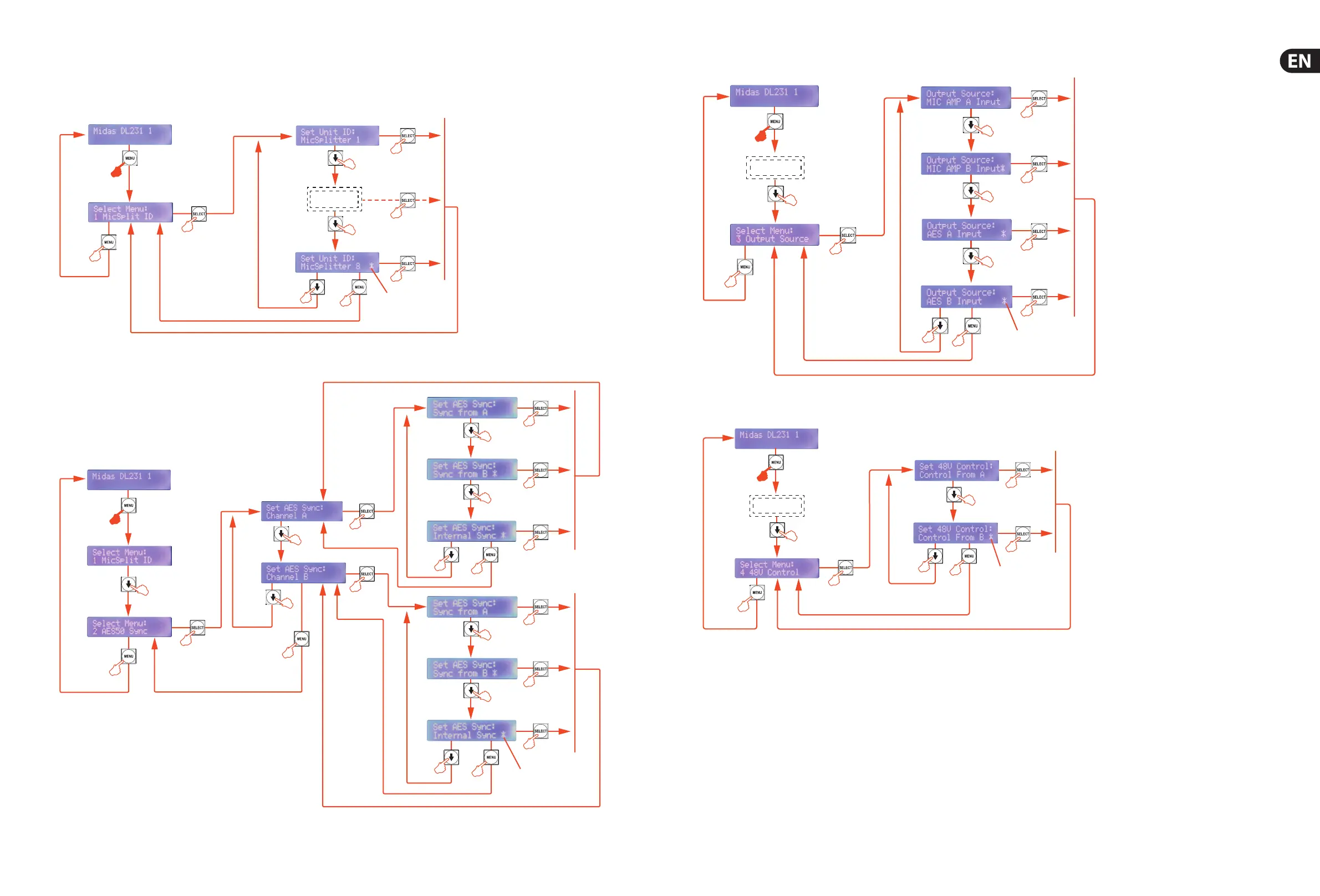
Midas DL231 - Menu Flowchart: MicSplit ID Configuration; Menu Flowchart: AES50 Synchronization; Menu Flowchart: Output Signal Routing; Menu Flowchart: 48 V Phantom Power Control

Midas DL231
14 pages
Print Icon
To Next Page IconTo Next Page
To Previous Page IconTo Previous Page
Loading...
16 17MIDAS DL231 Quick Start Guide
Menu Flowchart
Menu 1: MicSplit ID
Menu 2: AES50 Sync
Press and
hold down
for about
two seconds
Menu 1
Default screen
Asterisk
indicates
parameter is
available for
selection.
ID range is from
1 to 8
Default screen
Channel A
and
Channel B
have matching
submenus
Menu 2
Asterisk
indicates
parameter
is available
for selection
Menu 1
Press and
hold down
for about
two seconds
Menu 3: Output Source
Menu 4: 48 V Control
Press and
hold down
for about
two seconds
Default screen
Asterisk
indicates
parameter
is available
for selection
Navigate through
2 menus
Menu 3
Press and
hold down
for about
two seconds
Navigate through
3 menus
Default screen
Menu 4
Asterisk
indicates
parameter
is available
for selection