EasyManua.ls Logo

MIDDLE RABBIT S-W4 - User Manual

MIDDLE RABBIT S-W4
2 pages
Print Icon
To Next Page IconTo Next Page
Loading...
Product Parameters
Guide for using earphone without dongle ChargingEarphone basic operation
QUICK START GUIDE
When receiving a call,
Single click on either MFB for answering
Double click on either MFB for rejecting
When ending a call,
Single click on either MFB for ending
* All specifications above are based on lab testing data.
Earphones Charging case
1. Open charging case lid, both earphones will get paired with each other
(when one icy-blue indicator light flashes slowly and the other goes out,
successful pairing is done).
Music control
Calling control
Modes-switch control
Power On / Off
Method 1: Open charging case lid, earphones will be powered on and get connected
automatically;Put earphones back into charging case and close case lid,
earphones will be powered off and get charged automatically.
Pairing the headset with the Type-C Dongle (Please make
sure Bluetooth is disconnected before using Type-C dongle,
or the earphones will pair automatically with Bluetooth
device you last used.)
1. Open the lid of the charging box, press and the reset button for 3 seconds, the charging
box light flashes twice, and the headset disconnect the previous pairing. Or, you can directly
turn off your Bluetooth on your last pairing device.
2. Insert the Type-C Dongle (directly or through the USB adapter), the indicator light flashes
slowly, and the light is always on after successful pairing.
3. When using the Type-C Dongle again, the headset can be automatically connected when
the earphones are turned on.
Method 2: Press both earphones MFB (touch button which is pointed out in the picture)
for about 3 seconds to power on
Press both earphones MFB for about 5 seconds under on-state for power-off.
When charging case is under low-battery state, there will be low battery warning tone every 2 minutes
Type-C charging cable Silicon earbuds
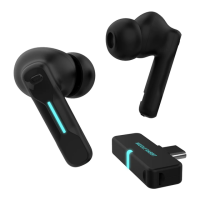
Type-C dongle
Warranty Card
BT Version : Bluetooth V5.1
Driver: Ф10mm
Impedance: 16 Ω
Sensitivity: 105 dB
Frequency Response: 20 Hz-20K Hz
Microphone Sensitivity:42 dB
Audio codecs support: SBC、AAC
2. For the first time use, search for “S-W4”
in the Bluetooth function of the
mobile phone, and click “S-W4”
to pair mobile phone with the earphones.
Earphones will
get connected with the device
automatically for the second use after
opening charging case lid.
Available device
S-W4
Icy-blue lights
flash during
charging
Icy-blue lights
will be off after
full charging
When playing music
Single click on either MFB for Play / Pause
Press left MFB for 2 seconds for previous track
Press right MFB for 2 seconds for next track
Double click on the left to decrease the volume
Double click on the right to increase the volume
Automatic pairing
3S On
5S Off
Touch control area(MFB)
Music
mode
Gaming
mode
Voice Assistant control
Earphones Reset
Method 2:
Under power-off state, long press both MFB for
7 seconds to enter pairing mode (icy-blue
indicator light flashes slowly), click 6 times on both MFB
(icy-blue indicator light flashes 3 times) to clear all
pairing info, put earphones back into charging
case for new pairing operation.
Method 1:
Place earphones in charging case,
long press reset button for 3 seconds,
charging case indicator light flashes
twice, all pairing info is deleted
automatically.
THD: ≤ 5%
Bluetooth range :10m
Battery capacity :(Earphone)70 mAh x 2
(Charging case )470 mAh
Play Music : 8 H
Call time : 12-16 H
charging time(Charging case )2.5 H
IPX level: IPX5
Step1Power-off state Step2
Reset button
What’s in package
Certificate
The following situations will not be repaired free of charge
1. No warranty card or warranty card is damaged
2. Device damage caused by self disassembly
3
. Damage caused by water, dropping or man made mechanical destruction
4
. Damage or fault caused by force majeure
Warranty content ( Fill in this card truthfully for warranty )
Product Name
Product Model
Purchase Date
Purchase Seller
Users Name
Users Address
Contact Detail
Fault Description
Inspector
Inspection Date
Manufacture Date
When using dongle mode, you can click either side
three times to mute or unmute your mic. (dongle
mode only, not for Bluetooth mode)
MODEL:S-W4
If you encounter any problems when using the earphones,
feel free to contact us: amz@fediker-vip.com
Click 4 times on either
side MFB to switch mode
USB adapter
Question and Answer IconNeed help?

Do you have a question about the MIDDLE RABBIT S-W4 and is the answer not in the manual?

Summary

Whats in Package

Power On; Off

Automatic Power Management

Earphones power on/off and charge automatically when opening/closing the charging case lid.

Manual Power Control

Press and hold the MFB touch button for 3 seconds to power on, and 5 seconds to power off.

Pairing with Type-C Dongle

Prepare for Pairing

Clear previous pairings by pressing reset button or disabling Bluetooth on the last used device.

Dongle Connection

Insert Type-C Dongle; indicator light flashes slowly, then remains solid after successful pairing.

Dongle Auto-Reconnect

Headset automatically connects to the Dongle when turned on.

Earphone Basic Operation

Music and Call Controls

Control music playback (play/pause, next/previous, volume) and calls (answer/reject/end) via MFB touch.

Mode Switching

Switch between Music and Gaming modes by clicking the MFB four times.

Voice Assistant & Dongle Mute

Activate voice assistant by clicking MFB three times; mute/unmute mic in dongle mode by clicking three times.

Earphone Reset

Reset earphones to clear all pairing information by pressing the reset button or MFB multiple times.

Charging

Charging Process

Icy-blue lights flash during charging and turn off when fully charged. Low battery warning tone sounds every 2 mins.

Product Parameters

Warranty Card Information

Overview

The Middle Rabbit S-W4 is a pair of wireless earphones designed for versatile use, offering both Bluetooth connectivity and a Type-C dongle option for seamless audio experiences. This quick start guide provides comprehensive instructions for setup, operation, and maintenance.

Function Description:

The S-W4 earphones are primarily designed for audio playback and hands-free calling. They feature touch controls for music management (play/pause, next/previous track, volume adjustment), call handling (answer/reject/end calls), and mode switching (music/gaming mode). A key feature is the dual connectivity option: users can connect via Bluetooth 5.1 to mobile devices or utilize the included Type-C dongle for a direct, low-latency connection, particularly useful for gaming or devices without Bluetooth. The earphones come with a charging case that not only protects them but also recharges them automatically when stored. The case itself is rechargeable via a Type-C charging cable.

Important Technical Specifications:

  • Bluetooth Version: V5.1
  • Driver: Φ10mm
  • Impedance: 16 Ω
  • Sensitivity: 105 dB
  • Frequency Response: 20 Hz-20K Hz
  • Microphone Sensitivity: 42 dB
  • Audio Codecs Support: SBC, AAC
  • THD: ≤ 5%
  • Bluetooth Range: 10m
  • Battery Capacity:
    • Earphone: 70 mAh x 2
    • Charging Case: 470 mAh
  • Play Music Time: 8 H
  • Call Time: 12-16 H
  • Charging Time (Charging Case): 2.5 H
  • IPX Level: IPX5

Usage Features:

Power On/Off:

  • Method 1 (Automatic): Open the charging case lid to automatically power on the earphones and connect. Place them back in the case and close the lid to power off and begin charging.
  • Method 2 (Manual): Press both Multi-Function Buttons (MFB) for approximately 3 seconds to power on. Press both MFBs for about 5 seconds while on to power off.

Pairing:

  • Bluetooth Pairing (First Time Use): Open the charging case lid. Search for "S-W4" in your mobile phone's Bluetooth settings and select it to pair. The earphones will automatically connect for subsequent uses when the lid is opened.
  • Automatic Pairing (Earphones to each other): When the charging case lid is opened, the earphones will automatically pair with each other. A successful pairing is indicated by one icy-blue indicator light flashing slowly and the other going out.

Pairing with Type-C Dongle:

  1. Disconnect Previous Bluetooth: Open the charging case lid, press the reset button for 3 seconds (charging box light flashes twice) to disconnect previous pairings. Alternatively, turn off Bluetooth on your last paired device.
  2. Insert Dongle: Insert the Type-C Dongle (directly or via USB adapter). The indicator light will flash slowly and then remain solid upon successful pairing.
  3. Automatic Connection: For subsequent uses, the headset will automatically connect when the earphones and dongle are on.

Touch Controls (MFB):

  • Music Control:
    • Play/Pause: Single click on either MFB.
    • Previous Track: Press left MFB for 2 seconds.
    • Next Track: Press right MFB for 2 seconds.
    • Volume Down: Double click on the left MFB.
    • Volume Up: Double click on the right MFB.
  • Calling Control:
    • Answer Call: Single click on either MFB.
    • Reject Call: Double click on either MFB.
    • End Call: Single click on either MFB.
  • Modes-Switch Control:
    • Switch Music/Gaming Mode: Click 4 times on either MFB.
  • Voice Assistant Control:
    • Activate Voice Assistant: Click 3 times on either MFB (Bluetooth mode only).
    • Mute/Unmute Mic: Click 3 times on either MFB (Dongle mode only).

Charging:

  • Earphones: Automatically charge when placed in the charging case.
  • Charging Case: Connect the Type-C charging cable. Icy-blue lights will flash during charging and turn off when fully charged. A low-battery warning tone will sound every 2 minutes when the case is low on power.

Maintenance Features:

Earphones Reset:

  • Method 1 (Via Charging Case): Place earphones in the charging case. Long press the reset button for 3 seconds. The charging case indicator light will flash twice, indicating all pairing information is deleted.
  • Method 2 (Manual): While in the power-off state, long press both MFBs for 7 seconds to enter pairing mode (icy-blue indicator light flashes slowly). Then, click 6 times on both MFBs (icy-blue indicator light flashes 3 times) to clear all pairing information. Afterwards, put the earphones back into the charging case for new pairing operation.

Warranty Information:

The product comes with a warranty, which requires the warranty card to be filled out truthfully. The warranty does not cover:

  1. Missing or damaged warranty card.
  2. Device damage caused by self-disassembly.
  3. Damage caused by water, dropping, or other man-made mechanical destruction.
  4. Damage or fault caused by force majeure.

FCC Compliance:

The device complies with Part 15 of the FCC Rules, ensuring it does not cause harmful interference and accepts any interference received. Users are advised to avoid unauthorized modifications to the equipment. If interference occurs, measures like reorienting the receiving antenna, increasing separation between equipment, connecting to a different circuit, or consulting a dealer/technician are recommended. The device is evaluated for general RF exposure and can be used in portable exposure conditions without restriction.

MIDDLE RABBIT S-W4 Specifications

General IconGeneral
BrandMIDDLE RABBIT
ModelS-W4
CategoryHeadphone
LanguageEnglish