3 OPERATION
26
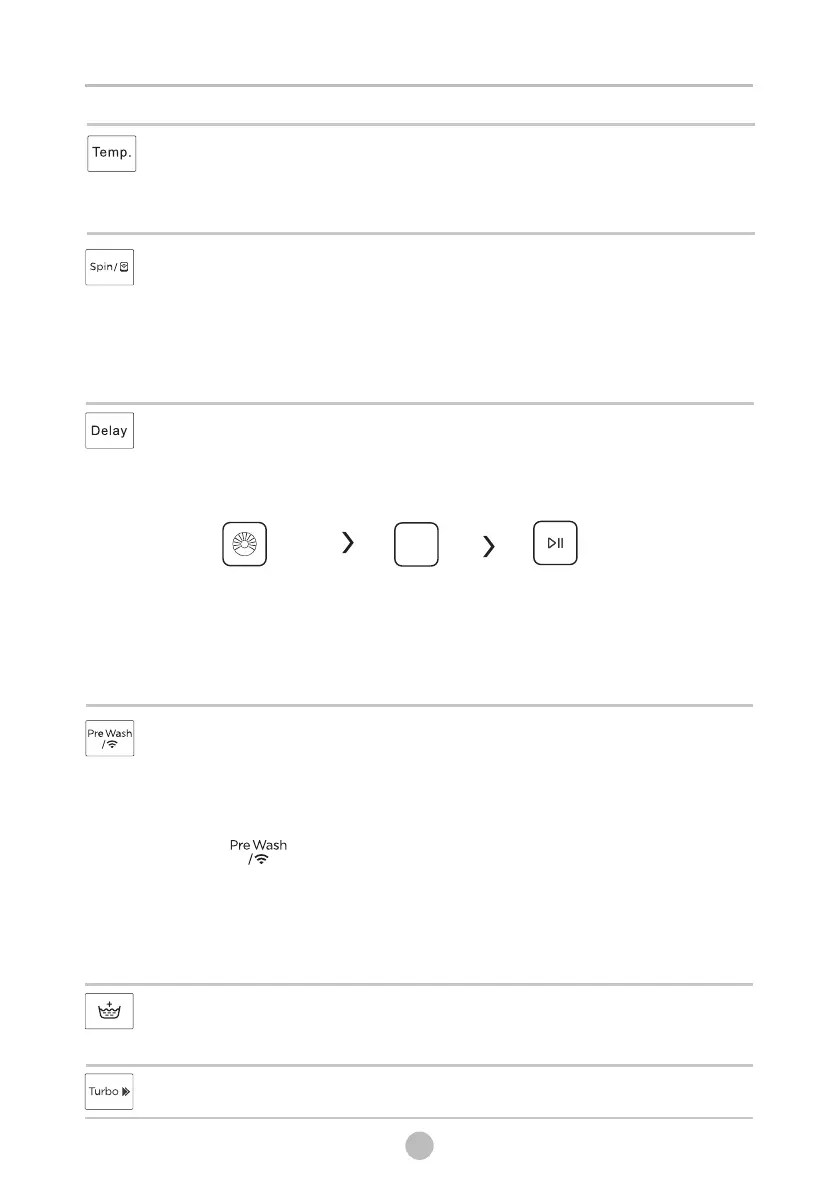
Delay
2.Press the Delay button to choose the delaying time 0-24h
3.Press [Start/Pause] to start the delay operation
1. Select a programme
Delay
To cancel the Delay function, press the “Delay” button before
starting the program until the display shows 0 h. If the program
has already started, switch the appliance off and afterwards on
and select a new programme.
Pre Wash
Extra washing function before the main washing cycle starts to
increase the washing performance.
Note: Detergent needs to be added to the compartment I.
Remote Control
The detail of Remote Control , pls check “ SMART FUNCTION ” .
WiFi
Press[ ]3 seconds ,the washing machine will be
connected to the internet on your smartphone, you can go to
the settings and turn on the wireless connection and select an
AP (Access Point).
Choose programme Setting time
Start
Temp.
When needed, the washing temperature can be adjusted
by pressing the temperature button in the following
steps: Cold - 20°C - 30°C - 40°C - 60°C - 90°C.
Turbo
The function can decrease the washing time.
Extra Rinse
The laundry will undergo an extra rinse after selecting this
function.
NOTE:The detail of connect wireless network , pls check
“ SMART FUNCTION ” .
Spin
When needed, the spinning speed can be adjusted pressing the
Speed button in the following steps:
1400:0-400-600-800-1000-1200-1400.



 To Next Page