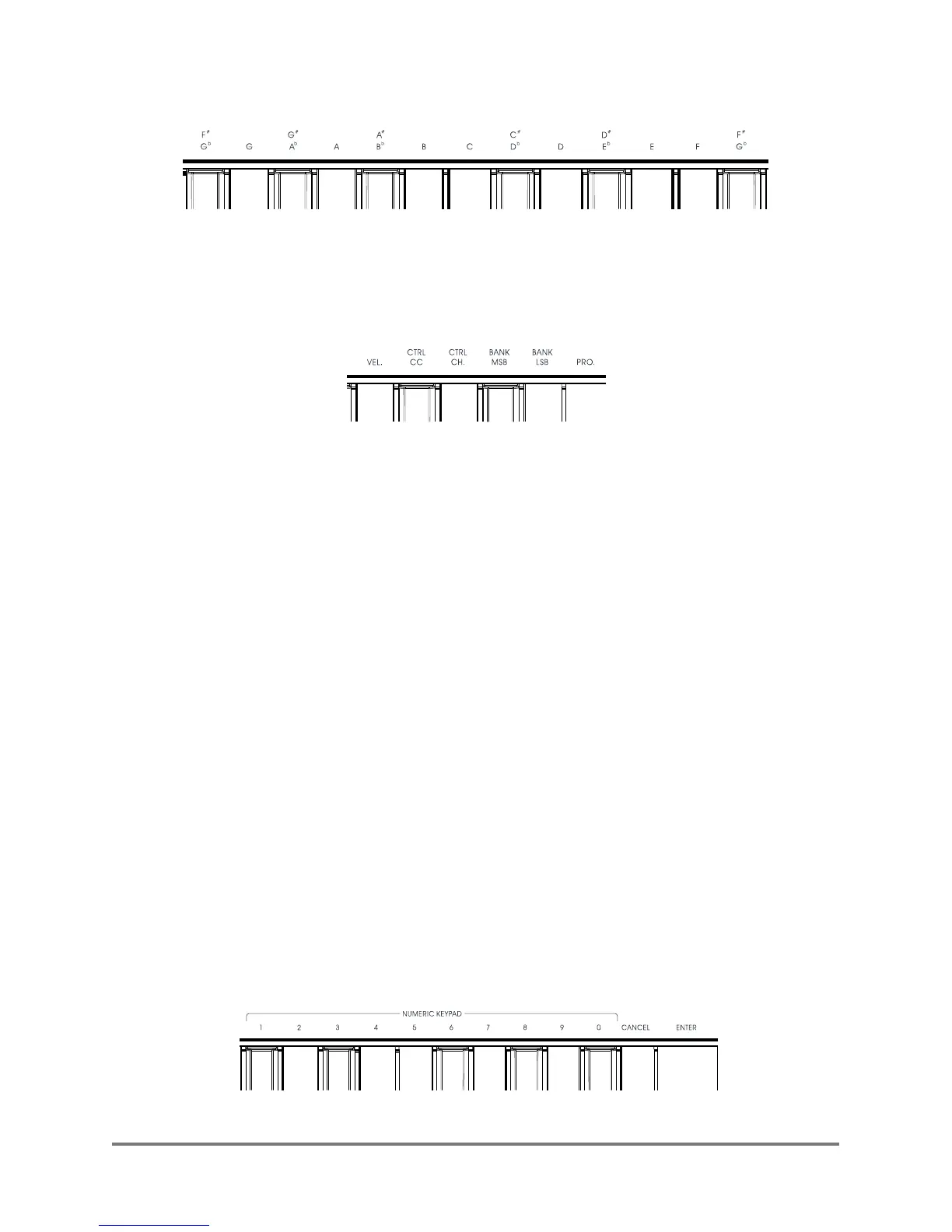
4.2.2 Transmission selection
For changing tonality of the keys.
(Please refer to Operation example 2 for details.)
4.2.3. Sub-functions for other keys:
(1) VEL: The selection for velocity sense curve of the key. ( range: 1~8).
(Please refer to Operation example 3 for details.)
(2) CTRL CC: CC function selection (range:0~138).
(Please refer to Operation example 4)
(3) CTRL CHL: Channel setting(range:0~16).
(Please refer to Operations example 5)
(4) BANK MSB: Sound librar y high byte adjustment.(range:0~127)
(5) BANK MSB: Sound librar y low byte adjustment.(range:0~127)
(6) PRO:Sound setting. (range:0~127).
(Please refer to Operations example 6 for details)
Notes:The selection of CC function Please read
<<Appendix 2:Controller CC schedule>>;when CTRL CHL(controller
channel) is set to zero, the controller is set to be full channel, the controller
channel will follow the keyboard channel automatically.
4.2.4. NUMERIC KEYPAD、CANCAL and ENTER:
For numeric input, cancel and enter when setting other sub-functions.
XSeries--UserManual
04


 To Next Page
 Loading...