Midland ER300 | 11
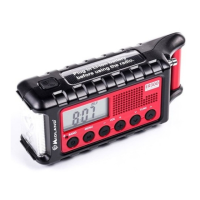
1. Flashlight /SOS/Dog whistle button
2. LCD Display
3. Solar panel
4. Antenna
5. Speaker
6. TUNE - Tuning adjust buttons
7. VOL - Volume adjust buttons
8. MENU button
9. Power / Band button
10. Charge indicator
11. Led flashlight
12. Ultrasonic dog whistle
13. Headphone jack
14. USB Output port
15. USB Input port
16. Battery type selector (AA / Li)
17. Dynamo crank
Powering Your ER300
USB Charge Cable
Before the ER300 is used, the internal Li-Ion rechargeable
battery pack should be charged with the USB charge cable until
the battery indicator icon indicates a full charge. To charge the
ER300 with the USB cable insert the USB charge cable into a
USB power source and plug the micro USB connector into the


 To Next Page