Midland ER300 | 15
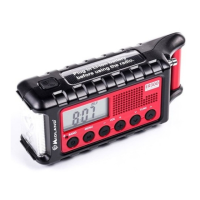
The ER300 has 2 flashlight brightness settings:
• Dim: The first press of the flashlight button
will enable the
dim setting.
• Bright: The second press of the flashlight button
will enable
the bright setting.
SOS Morse Code Flashlight Beacon
To enable the SOS feature, press the flashlight button 3 times.
The SOS Morse Code is: 3 short flashes, 3 long flashes, and 3
short flashes.
To turn o the SOS feature, press the flashlight button .
Ultrasonic Dog Whistle
The ultrasonic dog whistle may assist search and rescue teams to
locate individuals during an emergency situation.
To enable the ultrasonic dog whistle, press and hold the button
for 2 seconds. The icon will be lit in the upper right corner of
the LCD screen.
To turn o the ultrasonic dog whistle, press any button on the de-
vice.
Using the Headphone Jack
Plug in a set of optional headphones (also headphones for smar-
tphones) that have a 3,5mm stereo plug.


 To Next Page