English - 7
© 2016 Midmark Corp. | 60 Vista Drive Versailles, OH 45380 USA | 1-800-643-6275 | 1-937-526-3662 |
003-2426-99
TP201 20-42-FO-00013 Rev A1 C2169
Step 25:
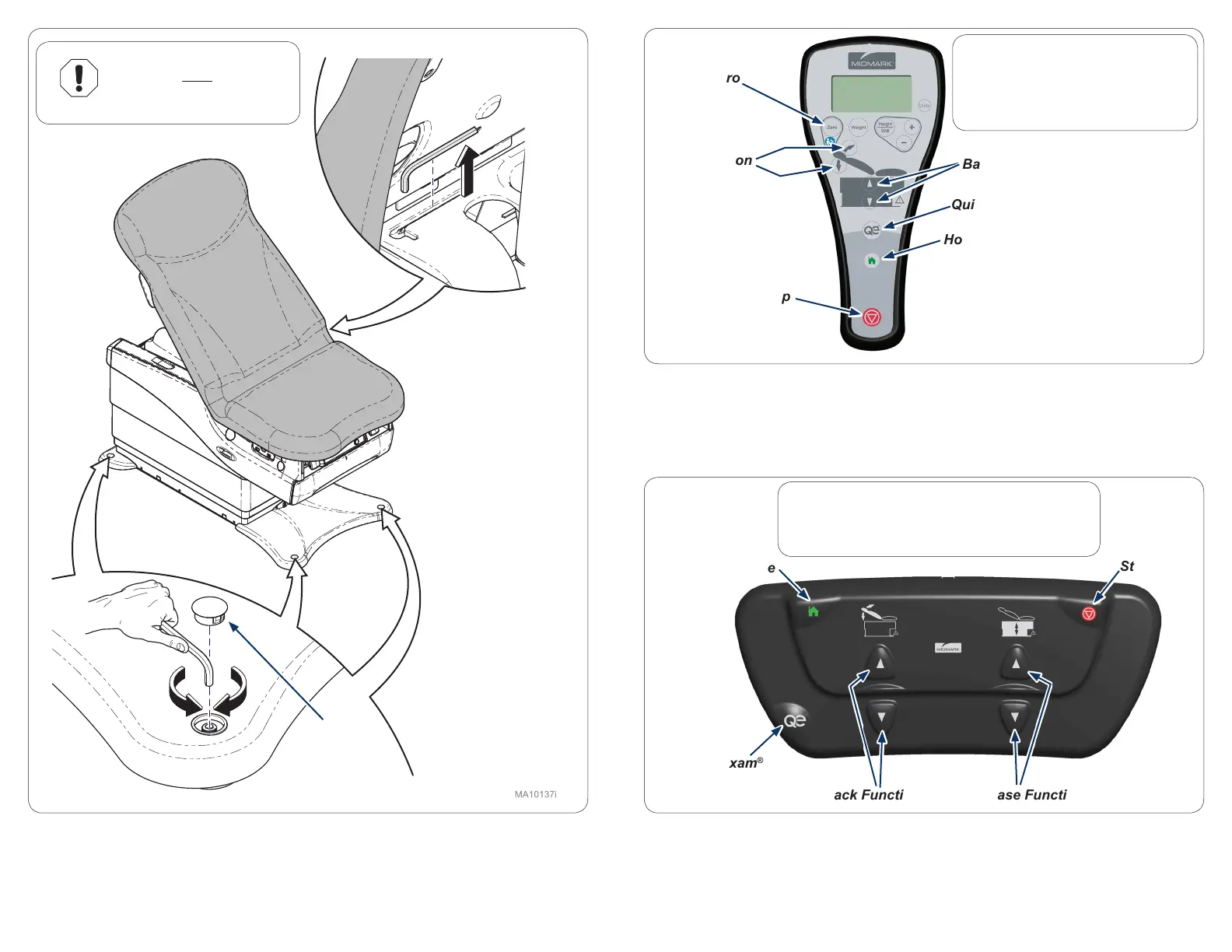
Verify proper operation of hand control. Press the buttons for Base Up/Down, Back Up/
Down, Quick Exam® and Home. Press home button, while table is moving press Stop.
(All movement should stop)
Step 26:
Verify proper operation of foot control. Press the buttons for Base Up/Down, Back Up/
Down, Quick Exam® and Home. Press home button, while table is moving press Stop.
(All movement should stop)
Step 24:
Find Allen wrench under table back. Remove hole plug to
level or balance table.
Back Function
Base Function
Quick Exam
®
Home
Stop
Zero
Back Function Base Function
Quick Exam
®
Home
Stop
Equipment Alert
The table must be leveled
or stable to ensure proper
operation.
Hole Plug
Note
If a malfunction is detected contact
Midmark Technical Service by
calling: 1-800-MIDMARK.
Note
If a malfunction is detected contact Midmark
Technical Service by calling: 1-800-MIDMARK.
625-004 shown


 To Next Page
 Loading...
